About dbt Wizard in dbt platform Preview
dbt Wizard is dbt's AI agent in dbt platform, helping teams investigate, change, validate, and ship trusted dbt work with warehouse-aware grounding.
dbt Wizard is more than a general coding agent with access to dbt. Built for governed data development in dbt, it understands lineage, documentation, tests, and semantic definitions, and accounts for dev builds, compute, run time, and post-build inspection. Its suggestions are grounded in your project's actual data and context. Be warned, the wizard has been known to
.AI features are being enabled by default. They're already on for new accounts and are rolling out soon to existing accounts. If your organization opted out, they'll remain off. Admins can turn AI off or back on and configure providers anytime.
From September 1st, 2026, dbt Wizard usage is metered per token against your account's usage credits. All credit amounts are per account, not per user. Enterprise and Enterprise+ accounts get monthly credits. Developer and Starter plans start with a 30-day trial and $100 in credits, as do CLI users via a free dbt account.
Refer to Trial and billing for what each plan gets, spend limits, and paid access.
Where you can use dbt Wizard
- Wizard home tab: Ask questions about your project, generate changes, review the diff, and run validations — all in one place.
- Studio IDE: Work with dbt Wizard alongside the code editor, console, and file explorer.
- Terminal (CLI): Use the same agent from your terminal, with or without a dbt platform account.
- Wizard Desktop: A native app for building and validating data, with rich data visualizations, data diffs, and lineage rendered alongside the chat.
You can teach dbt Wizard your team's conventions with skills, hand off bigger jobs to subagents, or connect your project to other AI tools with the dbt platform MCP server.
What you can do
- Ask project-aware questions and get answers grounded in your project's context
- Generate documentation, semantic models, tests, and metrics
- Build or refactor models from plain-language prompts
- Review file changes as diffs before you save them
- Run end-to-end tasks in agent mode, either approving each file change or letting dbt Wizard edit automatically
- Ask questions of production data in Explore mode, including read-only users with no development access
- Follow along in the wayfinder bar, which shows your current project and branch and guides you through Git tasks like committing files or creating a branch
- Get consistent output from dbt Agent Skills, which encode dbt best practices out of the box
For more examples, visit Use cases and examples.
Most of the workflows in How to use dbt Wizard in your dbt project apply here too — the prompts work the same in Studio IDE and the dbt Wizard home tab.
Supported AI providers
dbt Wizard supports managed models (billed by dbt Labs, no key to manage) and bring-your-own-key (BYOK) models (billed directly by your provider).
Here are the following AI providers supported depending on where you work. Refer to Model Provider Rate table for the full list of available models.
- dbt platform
- Locally (CLI)
| Provider | Access |
|---|---|
| OpenAI (default) | dbt managed or BYOK |
| Anthropic† | dbt managed or BYOK |
| Open weight models (like DeepSeek, Kimi, and so on). | dbt managed |
| Azure AI Foundry / Azure OpenAI | BYOK |
| Provider | Access |
|---|---|
| OpenAI | dbt managed or BYOK |
| Anthropic† | dbt managed or BYOK |
| Open weight models (like DeepSeek, Kimi, and so on). | dbt managed |
| Azure AI Foundry / Azure OpenAI | BYOK |
| AWS Bedrock | BYOK |
| Google Gemini | BYOK |
| Snowflake Cortex | BYOK |
| Databricks Unity AI Gateway | BYOK |
You can also connect a personal OpenAI ChatGPT subscription instead of a key.
†Anthropic enterprise and subscription licenses (such as Claude Enterprise) aren't supported per Anthropic's terms of service.
Open dbt Wizard
- Sign in to dbt platform.
- Select the dbt Wizard icon in the navigation menu, or open it in the Studio IDE.
- Enter a prompt. Try one of these to get a feel for it:
summarize what this project doeswhich models in this project have no tests?add not_null and unique tests to the primary key of stg_customers
- ..and that's it 🎉!
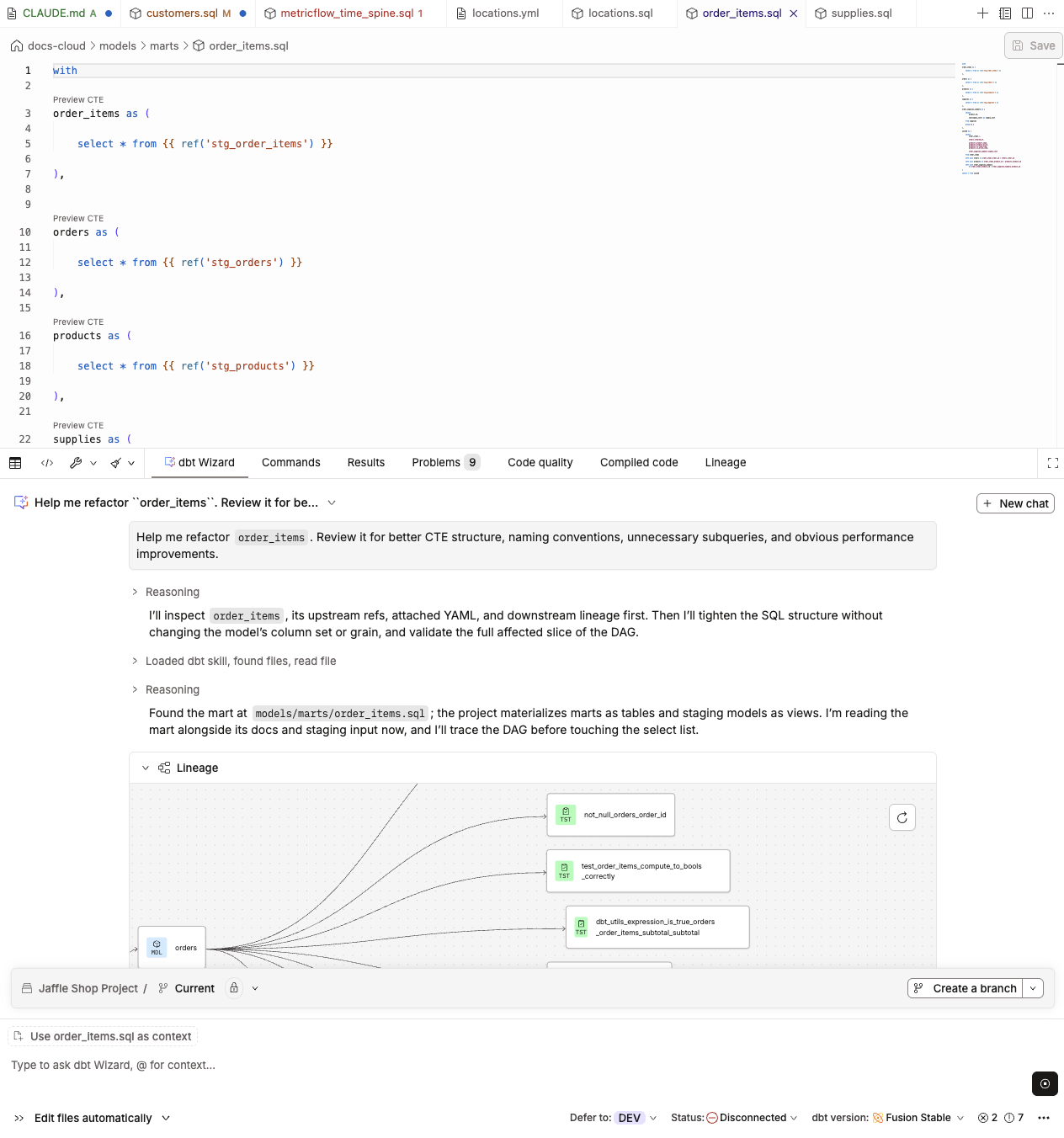 dbt Wizard in the Studio IDE refactoring a model and displaying the lineage inside the chat interface.
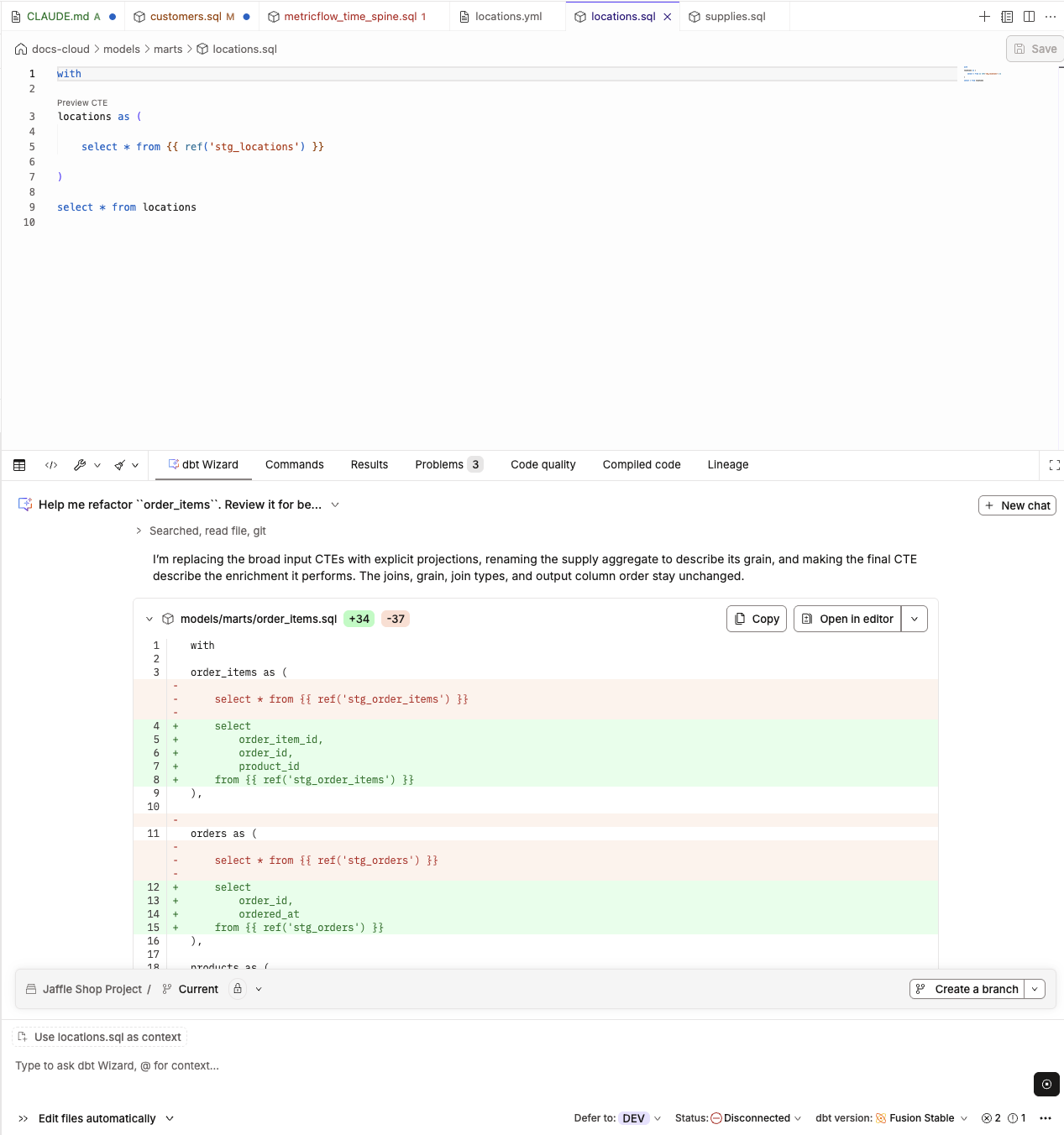 Wizard's final refactor result displayed as a diff in the Studio IDE
For more prompt ideas, refer to the prompt cookbook.
If dbt Wizard isn't available, confirm that your plan is eligible and that an admin has enabled account access to AI features.
Check out the free dbt Wizard video course on dbt Learn!
Trial and usage credits
Every prompt you send to dbt Wizard uses AI model tokens. What you pay for those tokens depends on your plan and whether you use a dbt Labs-managed model or your own key. If you bring your own key, your AI provider bills you directly and your usage doesn't draw from your consumption pool.
Legacy team plans don't have access to dbt Wizard. You can move to a Starter, Enterprise, or Enterprise+ plan to use it.
For steps on how to start your trial and manage your spend, refer to Start your trial and Manage your spend limit.
To choose a provider or bring your own key, refer to Manage AI features.
Other AI features in dbt platform
dbt platform also has AI features that work separately from dbt Wizard:
- dbt Copilot generates SQL, documentation, tests, and semantic models in one click in Studio IDE, Canvas, and Insights.
- The dbt Support Assistant answers product questions and helps you open a ticket. Contact the dbt Support team for more info.
Related docs
- dbt Wizard home tab
- dbt Wizard in Studio IDE
- How dbt Wizard works — architecture and data flow in the dbt platform
- Manage AI features in dbt platform — admin setup for AI access and providers
- Configure BYOK in dbt platform
- Models and pricing
- Data & Privacy in dbt platform
Was this page helpful?
This site is protected by reCAPTCHA and the Google Privacy Policy and Terms of Service apply.
