Set up Databricks OAuth
dbt platform accounts on Enterprise and Enterprise+ plans support developer OAuth (OAuth for partner solutions) with Databricks. When you enable Databricks OAuth for a dbt project, all developers must authenticate with Databricks in order to use the Studio IDE.
Development and deployment authentication
Databricks OAuth uses user-to-machine (U2M) authentication for interactive development in the Studio IDE. It applies to development credentials only.
Deployment environments use separate credentials configured at the environment level. They do not use developer OAuth. For deployment and batch jobs, configure token-based credentials in a deployment connection profile. A service principal token is recommended for production and non-production jobs.
For setup steps, refer to Defining your dbt deployment environment. For more information on deployment environments, refer to Deploy environments.
Configure Databricks OAuth (Databricks admin)
To get started, add dbt as a custom OAuth application in Databricks.
The following steps use the Databricks UI. Alternatively, use the Databricks CLI. Use the redirect URLs for your region for either method.
-
Log in to the account console and click the Settings icon in the sidebar.
-
On the App connections tab, click Add connection.
-
Enter the following details:
- A name for your connection.
- The redirect URLs for your OAuth connection. Use both URLs listed for your account region.
- For Access scopes, the APIs the application should have access to:
- For BI applications, the SQL scope is required to allow the connected app to access Databricks SQL APIs (this is required for SQL models).
- For applications that need to access Databricks APIs for purposes other than querying, the ALL APIs scope is required (this is required if running Python models).
- The access token time-to-live (TTL) in minutes. Default: 60.
- The refresh token time-to-live (TTL) in minutes. Default: 10080.
-
Select Generate a client secret. Copy and securely store the client secret. The client secret will not be available later.
Redirect URLs by region
Use the redirect URLs that correspond to your dbt account region when configuring Databricks OAuth.
As part of the account-specific URL migration, some customers should update OAuth redirect URLs and other integration settings. Existing getdbt.com region URLs continue to support integrations until November 1st, 2026, unless otherwise specified. For more migration timing and account-specific URL guidance, refer to the account URL migration documentation.
Configure the Connection in dbt (dbt project admin)
Now that you have an OAuth app set up in Databricks, you'll need to add the client ID and secret to dbt. To do so:
- From dbt, click on your account name in the left side menu and select Account settings.
- Select Projects from the menu.
- Choose your project from the list.
- Click Connections and select the Databricks connection.
- Click Edit.
- Under the Optional settings section, add the OAuth Client ID and OAuth Client Secret from the Databricks OAuth app.
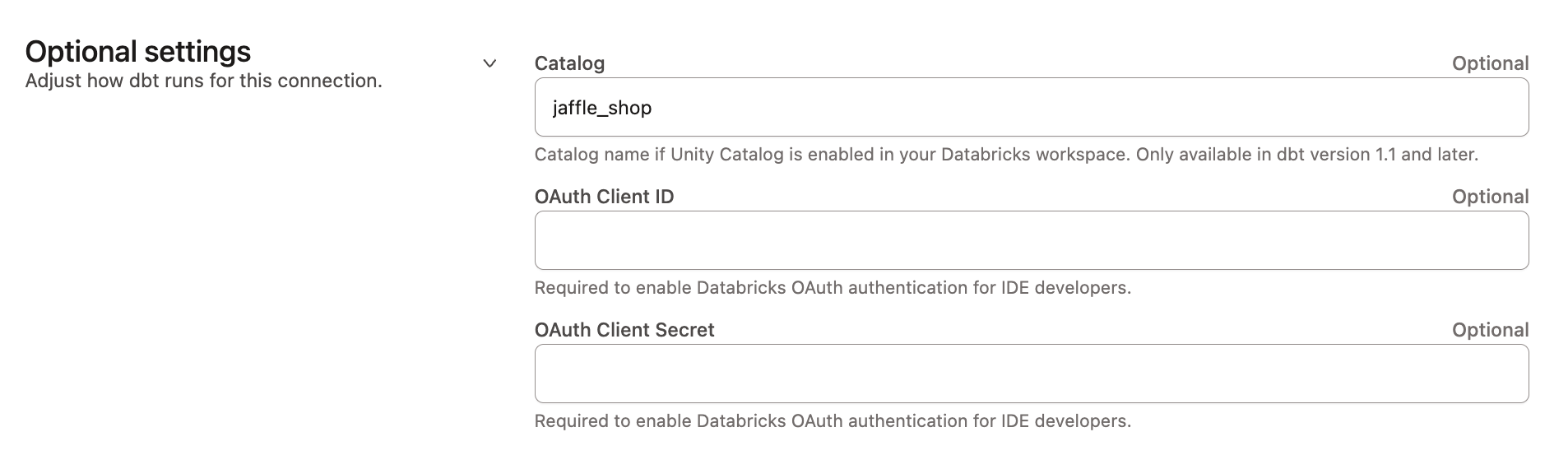 Add Databricks OAuth credentials to the connection
Authenticating to Databricks (Studio IDE developer)
Once the Databricks OAuth connection is set up for a dbt project, each dbt user will need to authenticate with Databricks in order to use the Studio IDE. To do so:
- From dbt, click on your account name in the left side menu and select Account settings.
- Under Your profile, select Credentials.
- Choose your project from the list and click Edit.
- Select OAuth as the authentication method, and click Save.
- Finalize by clicking the Connect Databricks Account button.
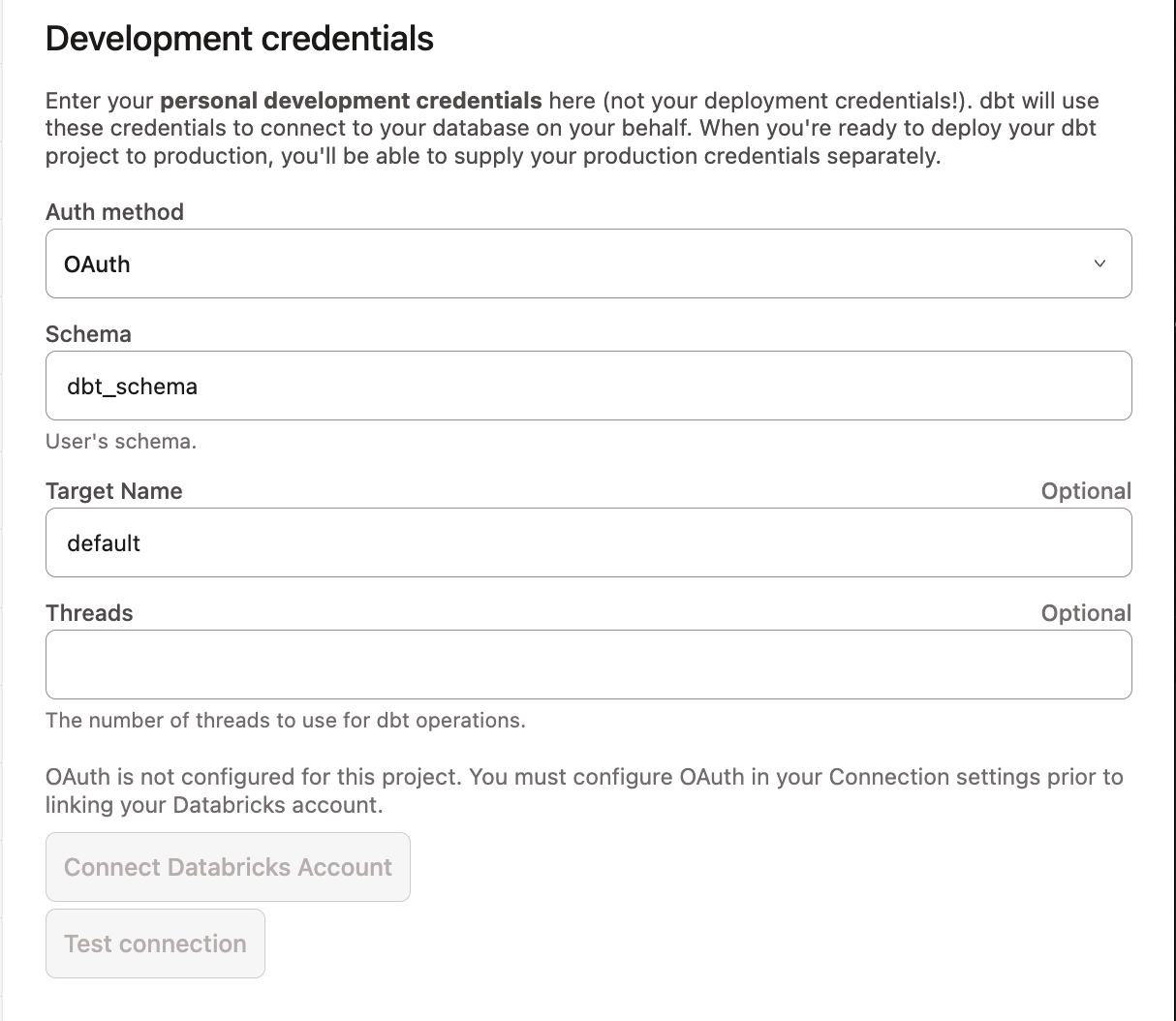 Connect your Databricks account from development credentials
You will then be redirected to Databricks and asked to approve the connection. This redirects you back to dbt. You should now be an authenticated Databricks user, ready to use the Studio IDE.
Studio OAuth flow
Once a user has authorized dbt with Databricks, Databricks returns a refresh token to the dbt application.
At the start of each Studio IDE session, dbt exchanges the refresh token for an access token, which it uses to connect to Databricks and execute queries on the user's behalf. dbt does not fetch new access tokens during an active session. When the access token expires (default: 60 minutes), the user must restart the Studio IDE to continue development.
The refresh token lifetime is set when you configure the OAuth app in Databricks (default refresh token TTL: 10080 minutes). When a user's refresh token expires, they must click Connect Databricks Account again to re-authenticate.
Was this page helpful?
This site is protected by reCAPTCHA and the Google Privacy Policy and Terms of Service apply.
