Cross-platform Mesh using Iceberg catalogs Beta
If a model is configured with catalog_name, dbt uses the current project's catalog definition (in catalogs.yml), for the current active adapter, to resolve the top-level namespace of that model.
This means that you can materialize a dbt model in your databricks_project to an Iceberg table in Unity catalog, and select from it in another model in your snowflake_project. You can even materialize that model back to Unity catalog, and then use it for other models in databricks_project.
The requirement is an automated service for linking or syncing metadata across your Iceberg catalog and connected data platforms. These include Snowflake catalog-linked databases, Databricks catalog federation, AWS Glue catalog federation, and GCP Lakehouse runtime catalog.
Supported cross-platform combinations include:
- Snowflake ↔ Databricks using Unity catalog (Snowflake docs, tutorial)
- Snowflake ↔ Athena using Glue catalog (Snowflake docs)
- Snowflake ↔ BigQuery using BigLake catalog (Snowflake docs)
- Snowflake ↔ DuckDB using Horizon catalog (example)
- Databricks ↔ DuckDB using Unity catalog (example)
Example: Snowflake ↔ Databricks using Unity catalog
Let's imagine two "mesh" projects, jaffle_finance and jaffle_marketing, with a cross-project dependency jaffle_finance -> jaffle_marketing.
So long as the jaffle_finance project writes its public models to an Iceberg catalog that the jaffle_marketing project can read from, and both projects configure that Iceberg catalog in catalogs.yml by the same name — these projects can now run on different data platforms.
# jaffle_finance/dbt_project.yml
flags:
  use_catalogs_v2: true

models:
  jaffle_finance:
    marts:
      access: public
      catalog_name: finance_db
# jaffle_finance/catalogs.yml
catalogs:
  - name: finance_db
    type: unity
    config:
      databricks:
        # where jaffle_finance project will write its public models to
        catalog_database: finance_db
# jaffle_marketing/dbt_project.yml
flags:
  use_catalogs_v2: true
# jaffle_marketing/catalogs.yml
catalogs:
  - name: finance_db
    type: unity
    config:
      snowflake:
        # catalog-linked database pointing to same Unity catalog
        # where jaffle_marketing project will read jaffle_finance public models from
        catalog_database: snowflake_cld__finance_db
If you create the Snowflake catalog-linked database with CATALOG_CASE_SENSITIVITY = CASE_INSENSITIVE, then you don't need to quote all column and identifier names that Snowflake is reading from or writing to Unity.
What's going on here?
- The
jaffle_financeproject, running on Databricks, materializes "mart" models into thefinance_dbdatabase in Unity catalog. - This is actually an Iceberg catalog, which we've made accessible to Snowflake through a catalog-linked database. In Snowflake, the catalog-linked database is named
snowflake_cld__finance_db. - When running the
jaffle_marketingproject, dbt sees a cross-project reference to a public model in thejaffle_financeproject:
-- marketing/models/marts/roi_by_channel.sql
with monthly_revenue as (

    select * from {{ ref('jaffle_finance', 'monthly_revenue') }}

),

...
This works for both ways of resolving cross-project references:
packagedependencies (supported in dbt v1 + dbt platform)projectdependencies (dbt platform Enterprise; refer to the advantages of this approach)
For package dependencies:
# dependencies.yml
packages:
  - git: https://github.com/dbt-labs/jaffle-shop-mesh-finance
The upstream package model jaffle_finance.monthly_revenue is configured with catalog_name: finance_db. dbt uses the currently running (root) project's catalogs.yml to resolve its three-part relation name. In this project (jaffle_marketing) + this platform (Snowflake), that catalog is configured with database: snowflake_cld__finance_db. Therefore, dbt resolves the reference to:
For project dependencies:
# dependencies.yml
projects:
  - name: jaffle_finance
Previously, if we only used the upstream model's database config, then dbt would resolve this to finance_db.jaffle_finance.monthly_revenue — which doesn't exist in Snowflake.
Instead, dbt now matches up the catalog_name for the referenced model with the entries in catalogs.yml for the currently running (root) project. dbt sees that jaffle_finance.monthly_revenue has catalog_name: finance_db, which for this project (jaffle_marketing) + this platform (Snowflake) is configured with database: snowflake_cld__finance_db. Therefore, dbt resolves the reference to:
-- marketing/target/compiled/models/marts/roi_by_channel.sql
with monthly_revenue as (

    select * from snowflake_cld__finance_db."jaffle_finance"."monthly_revenue"

),

...
And it just works!
Behind the scenes, Snowflake is syncing Databricks' finance_db ↔ Snowflake's snowflake_cld__finance_db, with eventual consistency. This means that finance_db.jaffle_finance.monthly_revenue in Databricks and snowflake_cld__finance_db."jaffle_finance"."monthly_revenue" in Snowflake are pointers to the exact same Iceberg table in the Databricks-managed Unity catalog.
Alternative approach: catalog federation
Writes to external Iceberg catalogs are generally slower than writes to managed Iceberg tables, and they can also run into reliability issues at scale. (See our blog and benchmark.)
Instead of having Snowflake write directly to Unity catalog through a catalog-linked database, you can have Snowflake write to its (managed) Horizon catalog, and use Databricks catalog federation to synchronize the Iceberg metadata for subsequent reads.
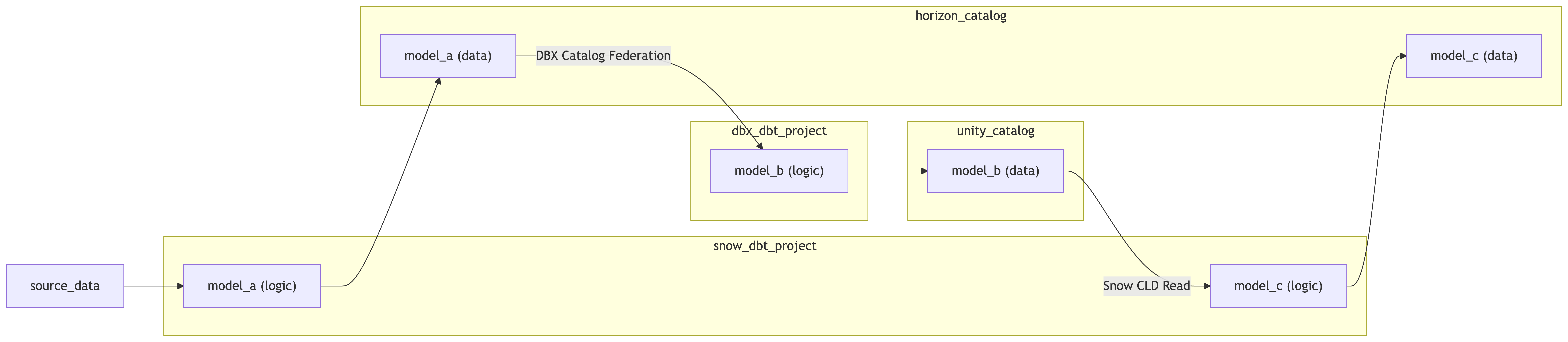 Multi-catalog pattern for Databricks + Snowflake cross-platform Mesh
catalogs:
- name: finance_unity
type: unity
config:
databricks:
# catalog where jaffle_finance project will write its public models to
catalog_database: finance_db
snowflake:
# name of catalog-linked database
# where jaffle_marketing will read jaffle_finance's public models
catalog_database: snowflake_cld__finance_db
- name: marketing_horizon
type: horizon
config:
snowflake:
# database where jaffle_marketing will write its public models to
catalog_database: horizon_db
databricks:
# name of federated catalog in Unity
# where jaffle_finance will read jaffle_marketing's public models
catalog_database: dbx_federation__horizon_db
Was this page helpful?
This site is protected by reCAPTCHA and the Google Privacy Policy and Terms of Service apply.
