Example usage for dbt State
These examples use the Jaffle Shop project to show side-by-side comparisons of CLI output with and without dbt State enabled. To enable dbt State, follow the steps in Setting up dbt State.
The following examples use this Jaffle Shop project DAG as a reference. You can refer to it to understand the model lineage for each scenario.
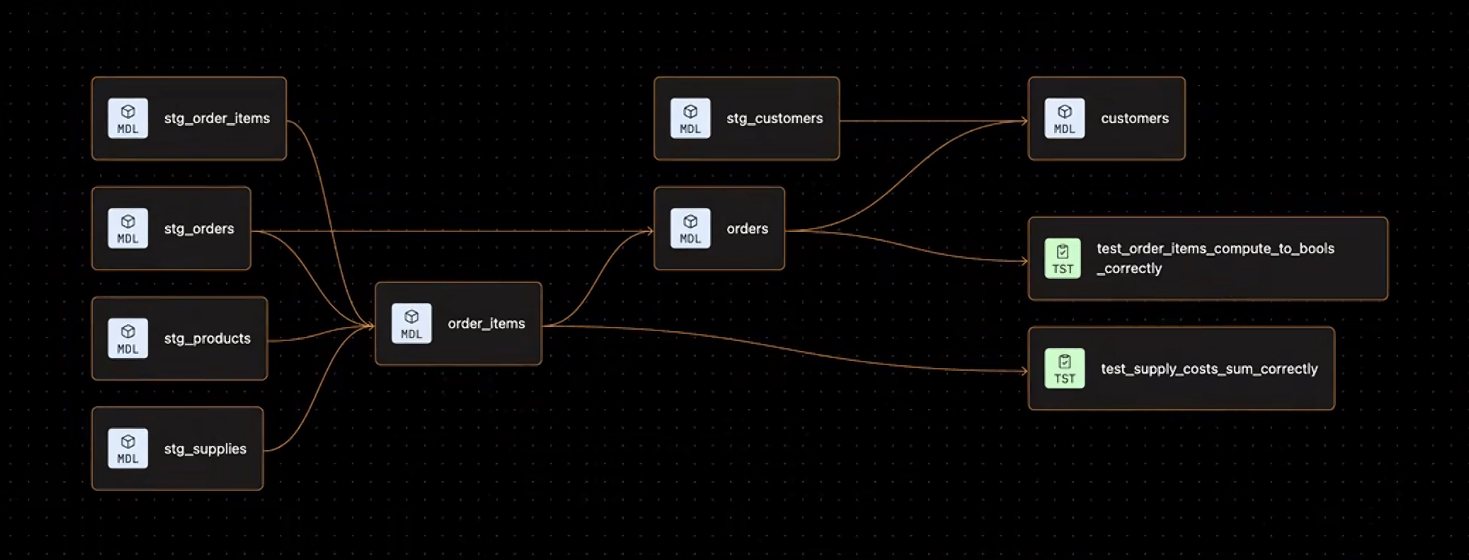 The Jaffle Shop DAG
Each of the following scenarios shows how a run differs between dbt alone and dbt with dbt State, using the same command and project.
| Scenario | Command | What dbt State changes |
|---|---|---|
| Initial run in empty schema | dbt run --target prod | Same result |
| Second run | dbt run --target prod | Reuses unchanged table models and most views; may rebuild views with select * directly on a ref() or source() |
| Selecting a model in a fresh dev environment after changing the customers model | dbt run --target dev --select "customers" | Defers to prod for upstream models |
| Selecting a model in a new dev schema with no model changes | dbt run --target dev --select "customers" | Defers and clones unchanged models |
Every skipped model is a model you didn't pay to rebuild. dbt State tracks what's changed and skips the rest — reducing run time and warehouse costs.
Initial run in empty schema
dbt run --target prod
With no prior state to compare against, dbt builds every model from scratch. dbt State captures metadata from this run for future comparisons.
- Without dbt State
- With dbt State
Running with dbt=1.12.0-b2
Registered adapter: snowflake=1.11.5
Found 12 models, 6 seeds, 27 data tests, 6 sources, 644 macros, 3 unit tests

Concurrency: 1 threads (target='prod')

1 of 12 START sql view model jaffle_analytics.stg_customers .................... [RUN]
1 of 12 OK created sql view model jaffle_analytics.stg_customers ............... [SUCCESS 1 in 0.54s]
2 of 12 START sql view model jaffle_analytics.stg_locations .................... [RUN]
2 of 12 OK created sql view model jaffle_analytics.stg_locations ............... [SUCCESS 1 in 0.48s]
3 of 12 START sql view model jaffle_analytics.stg_order_items .................. [RUN]
3 of 12 OK created sql view model jaffle_analytics.stg_order_items ............. [SUCCESS 1 in 0.51s]
4 of 12 START sql view model jaffle_analytics.stg_orders ....................... [RUN]
4 of 12 OK created sql view model jaffle_analytics.stg_orders .................. [SUCCESS 1 in 0.77s]
5 of 12 START sql view model jaffle_analytics.stg_products ..................... [RUN]
5 of 12 OK created sql view model jaffle_analytics.stg_products ................ [SUCCESS 1 in 0.58s]
6 of 12 START sql view model jaffle_analytics.stg_supplies ..................... [RUN]
6 of 12 OK created sql view model jaffle_analytics.stg_supplies ................ [SUCCESS 1 in 0.63s]
7 of 12 START sql table model jaffle_analytics.locations ....................... [RUN]
7 of 12 OK created sql table model jaffle_analytics.locations .................. [SUCCESS 1 in 1.81s]
8 of 12 START sql table model jaffle_analytics.products ........................ [RUN]
8 of 12 OK created sql table model jaffle_analytics.products ................... [SUCCESS 1 in 1.33s]
9 of 12 START sql table model jaffle_analytics.order_items ..................... [RUN]
9 of 12 OK created sql table model jaffle_analytics.order_items ................ [SUCCESS 1 in 2.09s]
10 of 12 START sql table model jaffle_analytics.supplies ....................... [RUN]
10 of 12 OK created sql table model jaffle_analytics.supplies .................. [SUCCESS 1 in 1.26s]
11 of 12 START sql table model jaffle_analytics.orders ......................... [RUN]
11 of 12 OK created sql table model jaffle_analytics.orders .................... [SUCCESS 1 in 1.70s]
12 of 12 START sql table model jaffle_analytics.customers ...................... [RUN]
12 of 12 OK created sql table model jaffle_analytics.customers ................. [SUCCESS 1 in 1.77s]

Finished running 6 table models, 6 view models in 0 hours 0 minutes and 17.77 seconds (17.77s).

Completed successfully

Done. PASS=12 WARN=0 ERROR=0 SKIP=0 NO-OP=0 TOTAL=12
Running with dbt=1.12.0-b2
State adapter: dbt-state v2.43.1 is enabled
Registered adapter: snowflake=1.11.5
Found 12 models, 6 seeds, 27 data tests, 6 sources, 644 macros, 3 unit tests

Concurrency: 1 threads (target='prod')

1 of 12 START sql view model jaffle_analytics.stg_customers .................... [RUN]
State adapter: Fetching freshness metadata
1 of 12 OK created sql view model jaffle_analytics.stg_customers ............... [SUCCESS 1 in 0.54s]
2 of 12 START sql view model jaffle_analytics.stg_locations .................... [RUN]
2 of 12 OK created sql view model jaffle_analytics.stg_locations ............... [SUCCESS 1 in 0.48s]
3 of 12 START sql view model jaffle_analytics.stg_order_items .................. [RUN]
3 of 12 OK created sql view model jaffle_analytics.stg_order_items ............. [SUCCESS 1 in 0.51s]
4 of 12 START sql view model jaffle_analytics.stg_orders ....................... [RUN]
4 of 12 OK created sql view model jaffle_analytics.stg_orders .................. [SUCCESS 1 in 0.77s]
5 of 12 START sql view model jaffle_analytics.stg_products ..................... [RUN]
5 of 12 OK created sql view model jaffle_analytics.stg_products ................ [SUCCESS 1 in 0.58s]
6 of 12 START sql view model jaffle_analytics.stg_supplies ..................... [RUN]
6 of 12 OK created sql view model jaffle_analytics.stg_supplies ................ [SUCCESS 1 in 0.63s]
7 of 12 START sql table model jaffle_analytics.locations ....................... [RUN]
7 of 12 OK created sql table model jaffle_analytics.locations .................. [SUCCESS 1 in 1.81s]
8 of 12 START sql table model jaffle_analytics.products ........................ [RUN]
8 of 12 OK created sql table model jaffle_analytics.products ................... [SUCCESS 1 in 1.33s]
9 of 12 START sql table model jaffle_analytics.order_items ..................... [RUN]
9 of 12 OK created sql table model jaffle_analytics.order_items ................ [SUCCESS 1 in 2.09s]
10 of 12 START sql table model jaffle_analytics.supplies ....................... [RUN]
10 of 12 OK created sql table model jaffle_analytics.supplies .................. [SUCCESS 1 in 1.26s]
11 of 12 START sql table model jaffle_analytics.orders ......................... [RUN]
11 of 12 OK created sql table model jaffle_analytics.orders .................... [SUCCESS 1 in 1.70s]
12 of 12 START sql table model jaffle_analytics.customers ...................... [RUN]
12 of 12 OK created sql table model jaffle_analytics.customers ................. [SUCCESS 1 in 1.77s]

Finished running 6 table models, 6 view models in 0 hours 0 minutes and 17.77 seconds (17.77s).

Completed successfully. Total cache hits: 0. Estimated time saved: 0.00s. Freshness tolerance: 45m.

Done. PASS=12 WARN=0 ERROR=0 SKIP=0 NO-OP=0 REUSED=0 TOTAL=12
Second run
dbt run --target prod
For each model, dbt State compares the current logic and upstream data against the previous run. If nothing has changed, dbt State skips the build or clones the result from another environment.
With dbt State enabled, all twelve models are reused — nothing changed, so there's nothing to rebuild.
dbt State reuses views when their SQL logic is unchanged, even if new data has arrived upstream. Because views don't store data, they always read directly from the underlying tables when queried. The staging views shown here use select * on a CTE, which dbt State can reuse. For details on select * patterns that can force a rebuild, refer to Views with select *.
- Without dbt State
- With dbt State
Running with dbt=1.12.0-b2
Registered adapter: snowflake=1.11.5
Found 12 models, 6 seeds, 27 data tests, 6 sources, 644 macros, 3 unit tests

Concurrency: 1 threads (target='prod')

1 of 12 START sql view model jaffle_analytics.stg_customers .................... [RUN]
1 of 12 OK created sql view model jaffle_analytics.stg_customers ............... [SUCCESS 1 in 0.54s]
2 of 12 START sql view model jaffle_analytics.stg_locations .................... [RUN]
2 of 12 OK created sql view model jaffle_analytics.stg_locations ............... [SUCCESS 1 in 0.48s]
3 of 12 START sql view model jaffle_analytics.stg_order_items .................. [RUN]
3 of 12 OK created sql view model jaffle_analytics.stg_order_items ............. [SUCCESS 1 in 0.51s]
4 of 12 START sql view model jaffle_analytics.stg_orders ....................... [RUN]
4 of 12 OK created sql view model jaffle_analytics.stg_orders .................. [SUCCESS 1 in 0.77s]
5 of 12 START sql view model jaffle_analytics.stg_products ..................... [RUN]
5 of 12 OK created sql view model jaffle_analytics.stg_products ................ [SUCCESS 1 in 0.58s]
6 of 12 START sql view model jaffle_analytics.stg_supplies ..................... [RUN]
6 of 12 OK created sql view model jaffle_analytics.stg_supplies ................ [SUCCESS 1 in 0.63s]
7 of 12 START sql table model jaffle_analytics.locations ....................... [RUN]
7 of 12 OK created sql table model jaffle_analytics.locations .................. [SUCCESS 1 in 1.81s]
8 of 12 START sql table model jaffle_analytics.products ........................ [RUN]
8 of 12 OK created sql table model jaffle_analytics.products ................... [SUCCESS 1 in 1.33s]
9 of 12 START sql table model jaffle_analytics.order_items ..................... [RUN]
9 of 12 OK created sql table model jaffle_analytics.order_items ................ [SUCCESS 1 in 2.09s]
10 of 12 START sql table model jaffle_analytics.supplies ....................... [RUN]
10 of 12 OK created sql table model jaffle_analytics.supplies .................. [SUCCESS 1 in 1.26s]
11 of 12 START sql table model jaffle_analytics.orders ......................... [RUN]
11 of 12 OK created sql table model jaffle_analytics.orders .................... [SUCCESS 1 in 1.70s]
12 of 12 START sql table model jaffle_analytics.customers ...................... [RUN]
12 of 12 OK created sql table model jaffle_analytics.customers ................. [SUCCESS 1 in 1.77s]

Finished running 6 table models, 6 view models in 0 hours 0 minutes and 17.77 seconds (17.77s).

Completed successfully

Done. PASS=12 WARN=0 ERROR=0 SKIP=0 NO-OP=0 TOTAL=12
Running with dbt=1.12.0-b2
State adapter: dbt-state v2.43.1 is enabled
Registered adapter: snowflake=1.11.5
Unable to do partial parsing because of a version mismatch
Found 12 models, 6 seeds, 27 data tests, 6 sources, 658 macros, 3 unit tests

Concurrency: 1 threads (target='prod')

1 of 12 START sql view model jaffle_analytics.stg_customers .................... [RUN]
State adapter: Fetching freshness metadata
1 of 12 OK created sql view model jaffle_analytics.stg_customers ............... [No new changes in 2.73s]
2 of 12 START sql view model jaffle_analytics.stg_locations .................... [RUN]
2 of 12 OK created sql view model jaffle_analytics.stg_locations ............... [No new changes in 0.87s]
3 of 12 START sql view model jaffle_analytics.stg_order_items .................. [RUN]
3 of 12 OK created sql view model jaffle_analytics.stg_order_items ............. [No new changes in 1.04s]
4 of 12 START sql view model jaffle_analytics.stg_orders ....................... [RUN]
4 of 12 OK created sql view model jaffle_analytics.stg_orders .................. [No new changes in 0.74s]
5 of 12 START sql view model jaffle_analytics.stg_products ..................... [RUN]
5 of 12 OK created sql view model jaffle_analytics.stg_products ................ [No new changes in 1.47s]
6 of 12 START sql view model jaffle_analytics.stg_supplies ..................... [RUN]
6 of 12 OK created sql view model jaffle_analytics.stg_supplies ................ [No new changes in 0.92s]
7 of 12 START sql table model jaffle_analytics.locations ....................... [RUN]
7 of 12 OK created sql table model jaffle_analytics.locations .................. [No new changes in 1.84s]
8 of 12 START sql table model jaffle_analytics.products ........................ [RUN]
8 of 12 OK created sql table model jaffle_analytics.products ................... [No new changes in 1.99s]
9 of 12 START sql table model jaffle_analytics.order_items ..................... [RUN]
9 of 12 OK created sql table model jaffle_analytics.order_items ................ [No new changes in 2.35s]
10 of 12 START sql table model jaffle_analytics.supplies ....................... [RUN]
10 of 12 OK created sql table model jaffle_analytics.supplies .................. [No new changes in 0.24s]
11 of 12 START sql table model jaffle_analytics.orders ......................... [RUN]
11 of 12 OK created sql table model jaffle_analytics.orders .................... [No new changes in 1.07s]
12 of 12 START sql table model jaffle_analytics.customers ...................... [RUN]
12 of 12 OK created sql table model jaffle_analytics.customers ................. [No new changes in 2.19s]

Finished running 6 table models, 6 view models in 0 hours 0 minutes and 19.79 seconds (19.79s).

Completed successfully. Total cache hits: 12. Estimated time saved: 17.77s. Freshness tolerance: 45m.

Done. PASS=0 WARN=0 ERROR=0 SKIP=0 NO-OP=0 REUSED=12 TOTAL=12
Selecting a model in a fresh dev environment after changing the customers model
dbt run --target dev --select "customers"
Imagine you've made a small change to the customers model and run it in a fresh developer schema. Without dbt State, dbt v1 fails because upstream relations are missing. With dbt State, dbt defers to prod for upstream models and runs only the updated customers model.
- Without dbt State
- With dbt State
Running with dbt=1.12.0-b2
Registered adapter: snowflake=1.11.5
Found 12 models, 6 seeds, 27 data tests, 6 sources, 658 macros, 3 unit tests

Concurrency: 1 threads (target='dev')

1 of 1 START sql table model dbt_schema.customers .............................. [RUN]
1 of 1 ERROR creating sql table model dbt_schema.customers ..................... [ERROR in 0.36s]

Finished running 1 table model in 0 hours 0 minutes and 5.11 seconds (5.11s).

Completed with 1 error, 0 partial successes, and 0 warnings:

[ERROR]: in model customers (models/marts/customers.sql)
  Database Error in model customers (models/marts/customers.sql)
  002003 (42S02): SQL compilation error:
  Object 'ANALYTICS.DBT_SCHEMA.STG_CUSTOMERS' does not exist or not authorized.
  compiled code at target/run/jaffle_shop/models/marts/customers.sql

  compiled code at target/compiled/jaffle_shop/models/marts/customers.sql

Done. PASS=0 WARN=0 ERROR=1 SKIP=0 NO-OP=0 REUSED=0 TOTAL=1
Running with dbt=1.12.0-b2
State adapter: dbt-state v2.43.1 is enabled
Registered adapter: snowflake=1.11.5
Found 12 models, 6 seeds, 27 data tests, 6 sources, 658 macros, 3 unit tests

Concurrency: 1 threads (target='dev')

1 of 1 START sql table model dbt_schema.customers .............................. [RUN]
State adapter: Fetching freshness metadata
1 of 1 OK created sql table model dbt_schema.customers ......................... [SUCCESS 128 in 52.46s]

Finished running 1 table model in 0 hours 0 minutes and 58.06 seconds (58.06s).

Completed successfully

Done. PASS=1 WARN=0 ERROR=0 SKIP=0 NO-OP=0 REUSED=0 TOTAL=1
Selecting a model in a new dev schema with no model changes
dbt run --target dev --select "customers"
Suppose you create a fresh dev schema and run only the customers model. Without dbt State, dbt v1 fails because there is no data in the schema. With dbt State, dbt knows customers just ran in another schema: it defers to prod for upstream models and clones customers because the outcome is unchanged.
- Without dbt State
- With dbt State
Running with dbt=1.12.0-b2
Registered adapter: snowflake=1.11.5
Found 12 models, 6 seeds, 27 data tests, 6 sources, 658 macros, 3 unit tests

Concurrency: 1 threads (target='dev')

1 of 1 START sql table model dbt_schema.customers .............................. [RUN]
1 of 1 ERROR creating sql table model dbt_schema.customers ..................... [ERROR in 0.36s]

Finished running 1 table model in 0 hours 0 minutes and 5.11 seconds (5.11s).

Completed with 1 error, 0 partial successes, and 0 warnings:

[ERROR]: in model customers (models/marts/customers.sql)
  Database Error in model customers (models/marts/customers.sql)
  002003 (42S02): SQL compilation error:
  Object 'ANALYTICS.DBT_SCHEMA.STG_CUSTOMERS' does not exist or not authorized.
  compiled code at target/run/jaffle_shop/models/marts/customers.sql

  compiled code at target/compiled/jaffle_shop/models/marts/customers.sql

Done. PASS=0 WARN=0 ERROR=1 SKIP=0 NO-OP=0 REUSED=0 TOTAL=1
Running with dbt=1.12.0-b2
State adapter: dbt-state v2.43.1 is enabled
Registered adapter: snowflake=1.11.5
Found 12 models, 6 seeds, 27 data tests, 6 sources, 658 macros, 3 unit tests

Concurrency: 1 threads (target='dev')

1 of 1 START sql table model dbt_schema.customers .............................. [RUN]
State adapter: Fetching freshness metadata
1 of 1 OK created sql table model dbt_schema.customers ......................... [Cloned from other environment in 57.19s]

Finished running 1 table model in 0 hours 1 minutes and 3.50 seconds (63.50s).

Completed successfully. Total cache hits: 1. Estimated time saved: 2.20s. Freshness tolerance: 45m.

Done. PASS=0 WARN=0 ERROR=0 SKIP=0 NO-OP=0 REUSED=1 TOTAL=1
Related docs
- About dbt State
- Setting up dbt State
- Set up authentication for non-interactive environments
- Configuring deferral in dbt State
- Monitoring dbt State activity in dbt platform
- Migrating from state-aware orchestration to dbt State
- dbt State configs
Was this page helpful?
This site is protected by reCAPTCHA and the Google Privacy Policy and Terms of Service apply.
