About dbt State
dbt State makes dbt smarter about what to build. Instead of rebuilding every node on every run, dbt reuses nodes by cloning from another location or skipping a rebuild when the logic and data haven't changed.
With dbt State, dbt first compares the logic and data of each node to previous builds across multiple environments on every run — whether orchestrated in the dbt platform, through your own orchestrator, or in development. If the logic is the same and the data is still fresh, dbt reuses an existing object. It will either clone an existing node from elsewhere, or skip executing a model that already exists, rather than building it anew. Additionally, it will automatically defer to production state without the need to manually set the --defer or --state flags.
dbt State can reuse all node types that create relations in the database (such as SQL models, snapshots, seeds) and data tests. Note that the following models are not eligible for reuse:
- Python models: dbt State builds Python models on every run, even if their code and upstream data have not changed.
- Models with custom materializations: dbt State builds these models on every run because custom materializations may have side effects (for example, modifying table properties or writing to other schemas), and dbt State cannot safely determine whether skipping the run would produce the same result.
dbt State works with dbt (v1 and v2) and the dbt platform, across all environments and orchestrators, making it a flexible approach regardless of how you run dbt. It requires authentication through a dbt platform account. For pricing details, refer to dbt State usage and pricing.
Benefits
dbt State reduces warehouse compute costs and simplifies how you develop, orchestrate, and execute dbt:
- Fresher data, lower costs: Nodes only rebuild when the result would be different (new data or code changes), reducing warehouse compute while keeping production data fresh.
- Faster, simpler development: Without dbt State, developing in a fresh schema means you need to build upstream dependencies, maintain development copies, or configure
--deferwith a state manifest. With dbt State, none of that is needed since dbt finds the freshest available state across environments, clones fresh upstream assets, and rebuilds only what changed. - Simpler orchestration: Orchestration decisions typically happen at the job level — which nodes belong in which job, and how often that job should run. dbt State adds node-level decision-making within each run: instead of rebuilding every selected node, dbt evaluates each one individually and decides whether to rebuild, clone, or skip based on its logic and data freshness. Unlike standard deferral, which always builds selected nodes and only defers unselected upstream references, dbt State can skip or clone selected nodes, too.
- Model-level freshness threshold: The
lag_toleranceconfig sets how long dbt State waits before rebuilding a node once its upstream data changes. A node rebuilds only when its last build is older than the tolerance window and its upstream data has changed. It decouples downstream models from high-frequency upstream changes, and prevents costly rebuilds on stagnant data when an upstream dependency misses its freshness Service Level Agreement (SLA).
How dbt State works
When you run a command like dbt build --select +my_model, dbt State evaluates each selected node and applies the most efficient approach it can:
-
Reuse node from same schema (skip) — dbt checks whether the object already exists in the target schema, its logic hasn't changed, and it is not yet due for rebuilding based on its
lag_tolerance(either because the last build is still within the tolerance window, or its upstream data hasn't changed). If all conditions are met, dbt skips the node entirely, as if it was never selected. For data tests, if the nodes being tested haven't changed since the last run, the previous test result is reused without re-executing the test query.For views, if the view's logic is unchanged, dbt State reuses it even if new data has arrived upstream. Because views don't store data, new upstream data is automatically reflected when the view is queried, even without a rebuild. Note that views using
select *on an upstream node may behave differently — refer to Views withselect *for more information. -
Reuse node from different schema (clone) — dbt State looks across all environments and jobs for a matching object with identical logic and fresh data. This includes schemas where a model was built before it ever ran in production. When multiple candidates exist, dbt State clones from the one with the freshest data, regardless of which environment it came from. For example, if a CI schema has fresher data than production and identical logic, dbt State clones from there. The node is marked as Reused at a fraction of the compute cost.
If you want to prevent cloning into a specific target (for example, in regulated environments), set
allow_clones: falseon that target inprofiles.ymlor as an extended attribute in the dbt platform. -
Normal build — If reuse is not possible, dbt builds the node as normal, automatically deferring any unselected upstream nodes.
dbt State fetches table metadata (for example, last-modified timestamps) in the background at the start of each run. Any node ready to skip, clone, or execute proceeds immediately; nodes with an undetermined action wait for the fetch to complete.
Without dbt State, every selected node rebuilds on every run regardless of whether anything has changed.
To see which decision dbt State made for each node after a run and why, you can run the (Applies to dbt v2.0 and later) dbt state explain command. If you use the dbt platform, the same information is available without running a command — go to the Explain tab on the job run details page to see the full decision breakdown for each node.
For the full list of available configs, see dbt State configs.
How dbt State decides whether to rebuild, clone, or reuse
The following decision tree shows how dbt State chooses the most efficient valid action for each node.
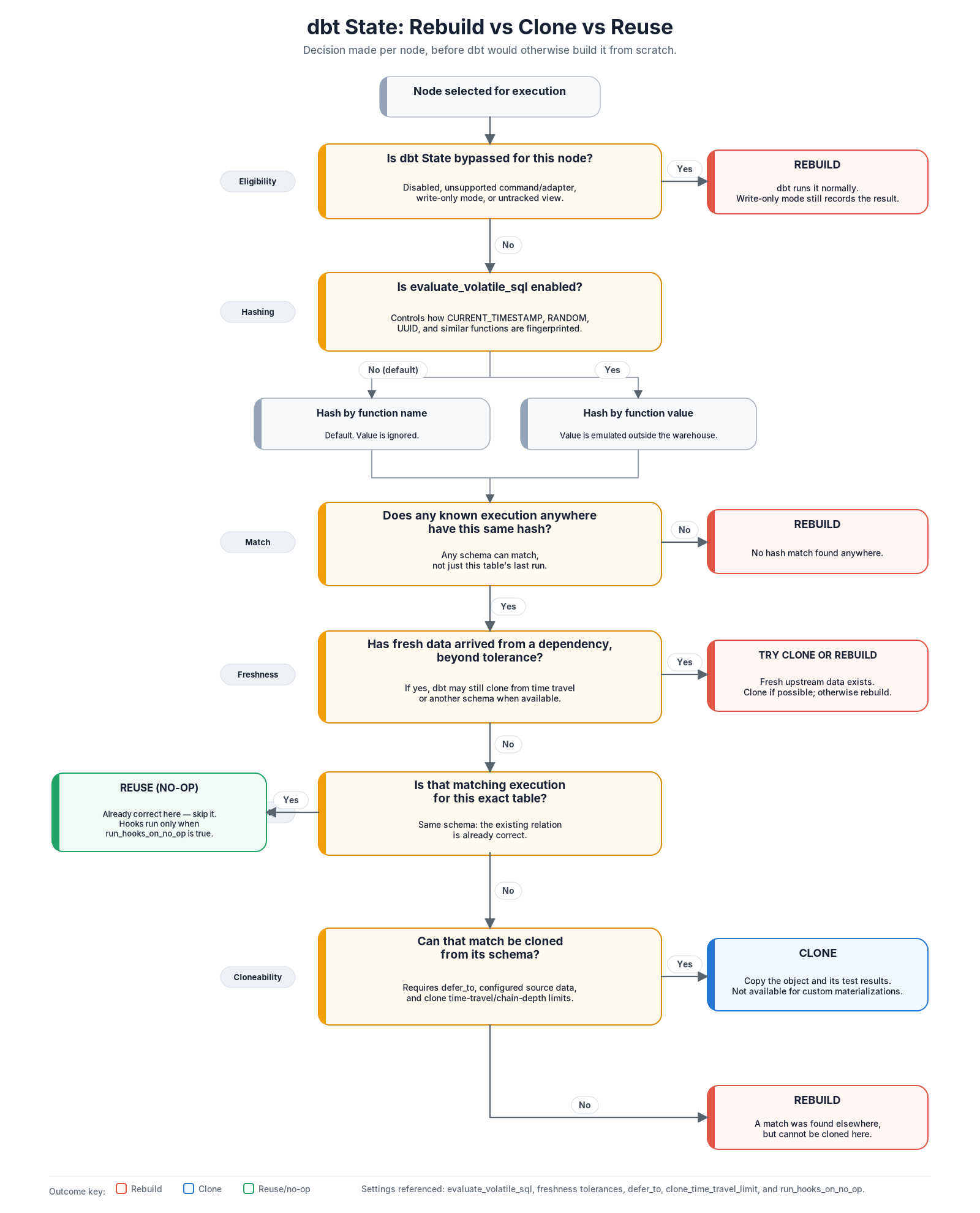 dbt State decision tree for rebuild, clone, and reuse
The key idea is that dbt State only skips work when it can prove the existing object is sufficiently equivalent for the current run. If the SQL logic, relevant config, schema, or upstream freshness means the result might be different, dbt rebuilds instead.
Use dbt State with state:* selectors Beta
In self-managed deployments, you can also use dbt State with state:* selectors. Instead of comparing against a single manifest.json, these selectors use dbt State as the comparison source, with state tracked for each individual node. Refer to dbt State-powered state:* selectors for more information.
Signing up for dbt State
dbt State requires a dbt platform account for authentication, even if you run dbt locally or in a non-interactive environment.
- Existing dbt platform users: Your dbt State credentials are the same as your platform credentials, and dbt State has access to your platform environments and jobs.
- New to dbt platform: Create an account from the dbt platform sign-up page. For dbt v2 and v1 users, you can start the account creation workflow from the CLI by running
dbt login(v1.13/v2) ordbt run/dbt build(dbt v1.7–1.12), which opens the sign-up page where you can create a free account.
For setup steps, refer to Set up dbt State.
The standalone dbt State app (app.state.dbt.com) is no longer accepting new users. If you have an existing dbt State app account, create a free dbt platform account to continue using dbt State — your free trial will be extended upon account creation.
FAQs
Related docs
- Set up dbt State
- Monitor dbt State activity
- Set up authentication for non-interactive environments
- dbt State configs
- Migrate from state-aware orchestration
- dbt State trial and billing
- dbt State usage and pricing
Was this page helpful?
This site is protected by reCAPTCHA and the Google Privacy Policy and Terms of Service apply.
