Models and pricing
Learn how dbt Wizard usage is metered and how model access works across the dbt platform and local CLI.
This page covers which AI models dbt Wizard can use and how usage is priced. To start a trial, add a credit card, or set a spend limit, refer to Trial and billing.
Get started with free dbt-managed usage credits. Every credit balance is per account, not per user, which means everyone on your account shares the same pool. Enterprise and Enterprise+ accounts get monthly usage credits, and all other plans get a 30-day free trial with $100 in credits.
There are two ways to pay for AI usage: let dbt Labs handle the models and the billing, or bring your own provider key. Here's how they compare:
| Choose it when | You want to start now, with no AI provider account of your own | You already have provider credits, or your company requires a specific vendor |
| Who bills you | dbt Labs, through your dbt account | Your AI provider, directly |
| Spend controls | Consumption pool and spend limits in Billing & Usage | Managed with your provider |
| Setup | Nothing to configure | Configure a provider key |
Both options are metered per token. For dbt managed rates, refer to the Model Provider Rate Table. With BYOK, you pay whatever your provider charges.
Most users start with the dbt managed model and only reach for BYOK or a specific managed frontier provider when they need it.
Key terms
These four terms come up on every dbt Wizard billing page:
| Term | What it means |
|---|---|
| Token | The unit of AI model usage. How many tokens you use, and the rate you pay for them, depends on the model, the context window, the length and complexity of your prompt, and the size of the response |
| Usage credits | The free balance included with your plan, shared by everyone on the account, whether that's trial credits on Developer and Starter, or monthly credits on Enterprise and Enterprise+. Scoped to dbt Wizard only |
| Consumption pool | Your overall dbt managed usage balance, including any pool you purchase once your credits run out. A purchased pool covers both dbt Wizard and dbt State. Shown as Consumption pool in Billing & Usage |
| Spend limit | The maximum dbt managed usage your account can consume in a billing period |
Usage draws down from your credits first, then your consumption pool, and stops at your spend limit. Usage costs are passed through directly from the AI provider.
dbt managed providers
In the dbt platform, dbt Wizard offers a managed OpenAI model by default. dbt Labs also offers managed access to Anthropic and to open weight models.
You'll see two kinds of models across these pages:
- Frontier models are the flagship models hosted by providers like OpenAI and Anthropic. They're the most capable and the most expensive per token.
- Open weight models, such as DeepSeek and Kimi, are openly published models available through dbt Labs. They offer a strong balance of capability and cost compared to frontier models.
Refer to the Model Provider Rate Table and Supported AI providers for the full list of what's available where.
Bring your own key (BYOK)
With BYOK, you supply your own credentials for a provider — OpenAI, Anthropic, Azure AI Foundry, AWS Bedrock, Google Gemini, Snowflake Cortex, or Databricks.
BYOK in dbt platform is available on Starter, Enterprise, and Enterprise+ plans.
To set up BYOK, refer to Configure BYOK for dbt platform or Configure BYOK for the CLI.
Supported AI providers
dbt Wizard supports managed models (billed by dbt Labs, no key to manage) and bring-your-own-key (BYOK) models (billed directly by your provider).
Here are the following AI providers supported depending on where you work. Refer to Model Provider Rate table for the full list of available models.
- dbt platform
- Locally (CLI)
| Provider | Access |
|---|---|
| OpenAI (default) | dbt managed or BYOK |
| Anthropic† | dbt managed or BYOK |
| Open weight models (like DeepSeek, Kimi, and so on). | dbt managed |
| Azure AI Foundry / Azure OpenAI | BYOK |
| Provider | Access |
|---|---|
| OpenAI | dbt managed or BYOK |
| Anthropic† | dbt managed or BYOK |
| Open weight models (like DeepSeek, Kimi, and so on). | dbt managed |
| Azure AI Foundry / Azure OpenAI | BYOK |
| AWS Bedrock | BYOK |
| Google Gemini | BYOK |
| Snowflake Cortex | BYOK |
| Databricks Unity AI Gateway | BYOK |
You can also connect a personal OpenAI ChatGPT subscription instead of a key.
†Anthropic enterprise and subscription licenses (such as Claude Enterprise) aren't supported per Anthropic's terms of service.
Choose a model
With dbt managed inference, you can switch between the supported managed models at any using the model picker dropdown next to the Agent mode control (where you choose Ask for approval or Edit files automatically).
- In Studio IDE and the dbt Wizard home tab, open the model picker dropdown next to the Agent mode control in the dbt Wizard panel, then select a model.
- The picker lists the managed models available to you. Refer to the Model Provider Rate table for the available models and their token rates.
- If you bring your own key (BYOK), dbt Wizard uses the provider and model you configured with your key rather than the managed model picker.
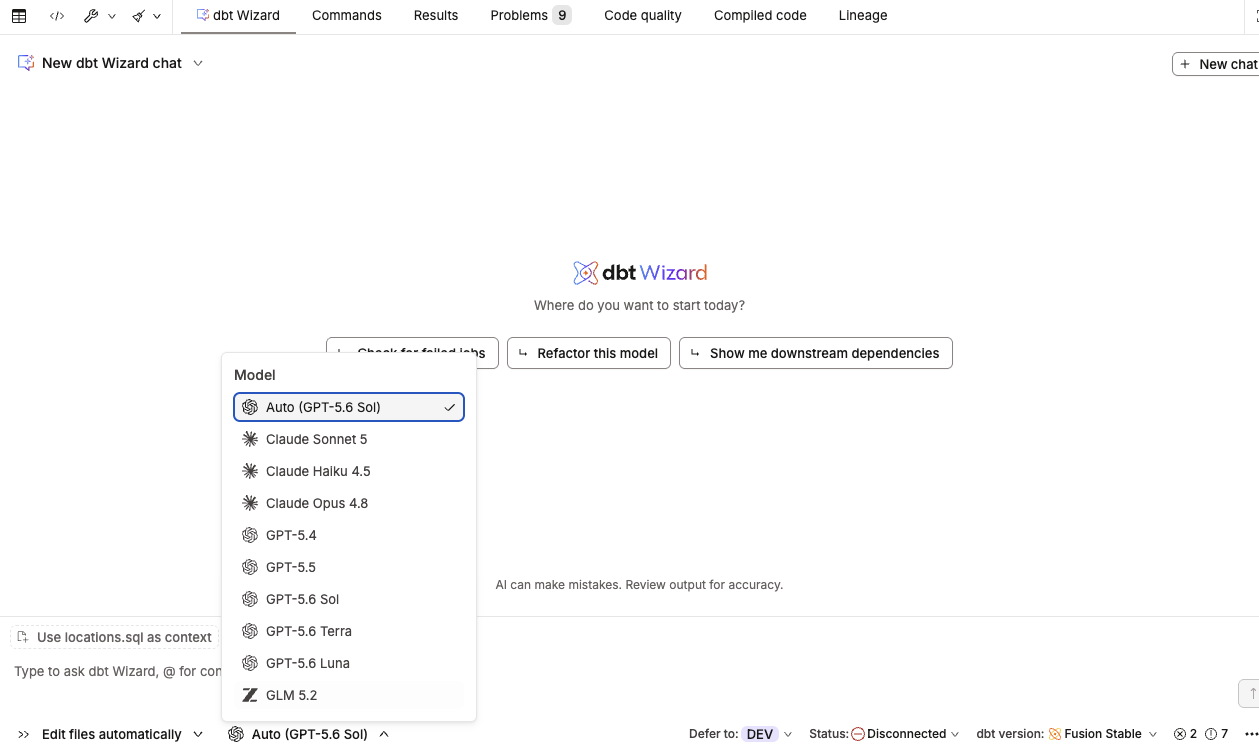 The model picker dropdown next to the Agent mode control in the Wizard panel.
Related docs
- Trial and billing for trials, spend limits, and paid access
- Billing for general dbt platform billing
- Model Provider Rate Table for per-model token rates
- Service Consumption Table
Was this page helpful?
This site is protected by reCAPTCHA and the Google Privacy Policy and Terms of Service apply.
