Integrate Databricks with dbt MCP
Databricks agents can call external MCP servers as tools. This guide walks you through connecting a Databricks agent to the remote dbt MCP server so it can query your Semantic Layer metrics and data in plain English through Genie and other Databricks tools.
To get started, install the server from Databricks Marketplace.
The connection uses OAuth with Dynamic Client Registration (DCR), so you don't need to manage a client secret. You authorize access from the MCP service page after installation.
Prerequisites
- A dbt platform account with access to the remote dbt MCP server. Refer to Set up the remote MCP server.
- Your dbt platform host URL. Find it in Account settings or in your browser's address bar. For example,
https://vu491.us1.dbt.com/. - A Databricks workspace where you can install marketplace listings and create objects in a catalog and schema.
Install from Databricks Marketplace
Use these steps to install the dbt MCP sever from the Databricks marketplace:
- Go to the dbt MCP listing on Databricks Marketplace.
- If you're logged in to Databricks, select Install.
- If you're not, select Get access, then log in to Databricks or create a new account.
- Select a Catalog and a Schema, then enter an MCP service name (such as
dbt_mcp) - Find your dbt platform access URL. It looks like
https://vu491.us1.dbt.com/. - In Host, leave the
{tenant}placeholder as is. If your access URL has a region such asus1, add it, so the host ishttps://{tenant}.us1.dbt.com. If it doesn't, keep the defaulthttps://{tenant}.dbt.com. - In Tenant, enter the first part of your access URL, before the first dot. For
https://vu491.us1.dbt.com/, entervu491. The Server host line under Tenant should now match your access URL. - Leave the remaining fields at their defaults, accept the terms, then select Install.
- Open the MCP service page and authorize access to dbt platform.
The install requests these OAuth scopes:
offline_access account:read projects:query catalog:read projects:develop jobs:run.
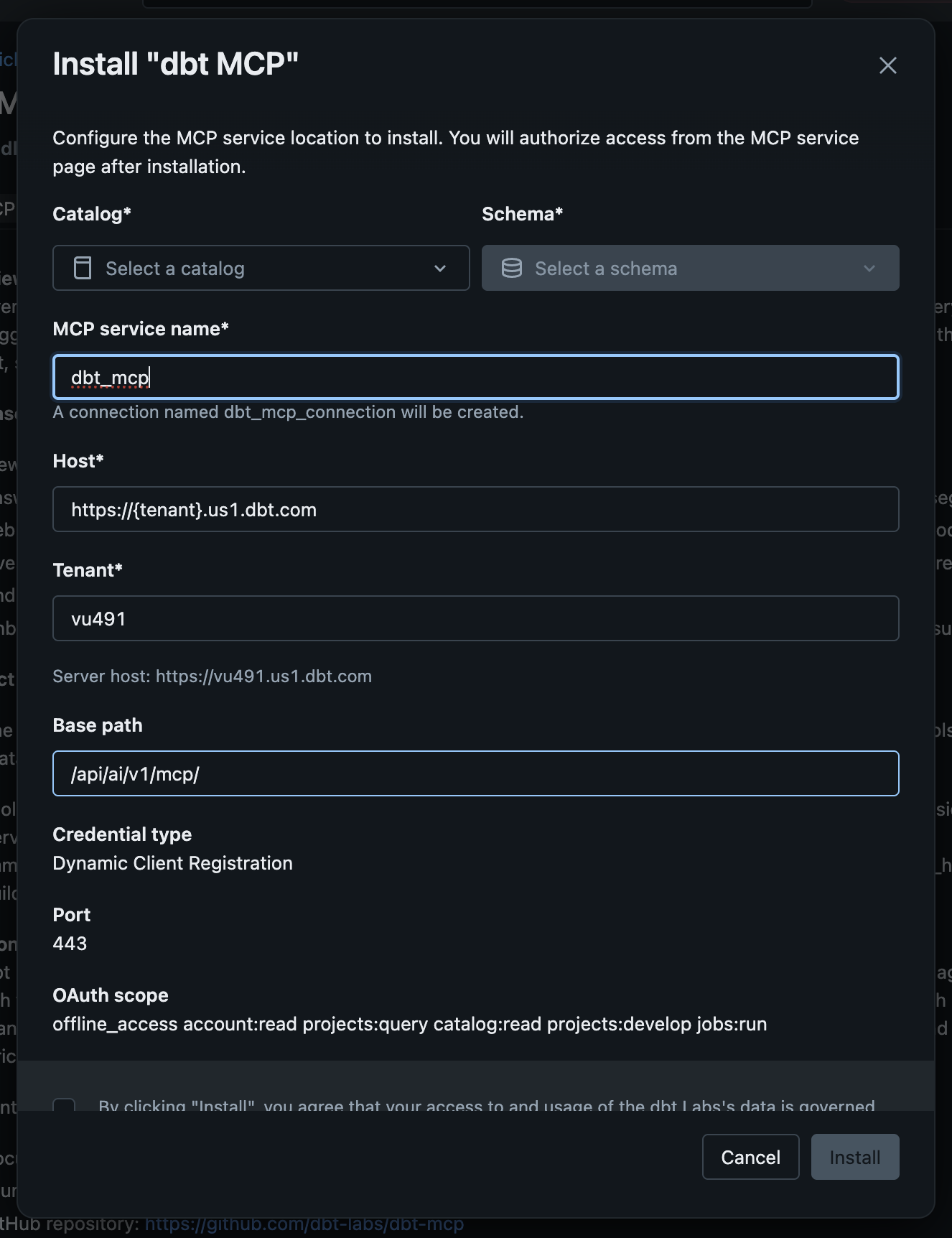 The Install dbt MCP dialog filled in for tenant vu491 in the us1 region
Use the dbt MCP server in Databricks
After you authorize access, add the MCP service to Genie Code, or use it in other Databricks tools that support MCP. Refer to Databricks MCP docs for the options.
Some models in Genie Playground don't accept tool calls, so they can't use the dbt MCP server. If tools don't show up, try a different model.
Legacy: manual DCR setup
We recommend using the marketplace install instead as it's the easiest but if you need to create the connection yourself, you can set it up manually:
- In Databricks, go to Connections and create a new connection.
- Select HTTP as the connection type.
- Enter a catalog and schema.
- Select Dynamic Client Registration as the credential type.
- Enter your host, for example
https://vu491.us1.dbt.com/. - Set the OAuth scope, for example
offline_access account:read projects:query catalog:read projects:develop jobs:run. - Set the base path to
/api/ai/v1/mcp, then create the connection. - Select Login and authorize access.
Related docs
Was this page helpful?
This site is protected by reCAPTCHA and the Google Privacy Policy and Terms of Service apply.
