dbt Copilot
dbt Copilot helps you generate SQL, documentation, tests, and semantic models in the dbt platform.
dbt Wizard is the recommended AI agent for governed data development in dbt. It handles the full development lifecycle — investigation, building, validation, and shipping — grounded in your dbt project's lineage, tests, contracts, and metric definitions.
Refer to dbt AI FAQs, Billing, and dbt's Terms of Use for more information.
The earlier version of dbt Copilot in the Studio IDE is available only to a limited set of accounts. dbt Wizard is available to all accounts and is the recommended way to develop with AI in the Studio IDE — it covers everything dbt Copilot's quick actions did, plus multi-step changes with built-in validation.
Where to access dbt Copilot
dbt Copilot is available across the following experiences in the dbt platform. Refer to the links for more info on how to use each experience.
- dbt Copilot in Canvas: Build visual models using natural language prompts in Canvas
- dbt Copilot in Insights: Chat with your data and get answers powered by the dbt Semantic Layer in Insights
Action limits by plan
dbt Copilot usage is metered in actions — one completed AI request counts as one action. Each plan includes a monthly action allotment per license:
| Plan | Actions per month |
|---|---|
| Developer | ❌ |
| Starter | 100 |
| Enterprise | 5,000 |
| Enterprise+ | 10,000 |
Enterprise and Enterprise+ limits don't apply if you bring your own key (BYOK), since your AI provider bills that usage directly. Legacy Enterprise-tier plans enrolled before May 1, 2025 have a 1,000 action limit.
Refer to dbt AI usage for what counts as an action, what happens when you hit the limit, and how to check your usage.
Configure AI provider for dbt Copilot
You need dbt admin permissions to change account settings and configure providers. dbt Copilot is configured separately from dbt Wizard — for dbt Wizard providers, refer to Manage AI features.
dbt Copilot supports fewer providers than dbt Wizard, including bring your own key (BYOK) on Starter, Enterprise, and Enterprise+ plans:
- dbt Labs-managed OpenAI API key
- BYOK OpenAI API key
- BYOK Azure OpenAI API key
Snowflake Cortex, AWS Bedrock, Azure AI Foundry, and Anthropic aren't supported for dbt Copilot.
dbt Copilot is available for inline assistance in Studio IDE, Canvas, and Insights. Configure it separately from dbt Wizard if your team uses these inline AI experiences.
To configure a provider:
- Click your account name and select Account settings in the side menu.
- Under Settings, click Copilot.
- Under AI providers, click Edit to configure the AI integration.
- Select your Key management option from the dropdown, then follow the steps for your provider below.
- dbt Labs OpenAI
- OpenAI
- Azure OpenAI
- Select the toggle for dbt Labs to use dbt Labs' managed OpenAI key.
- Click Save.
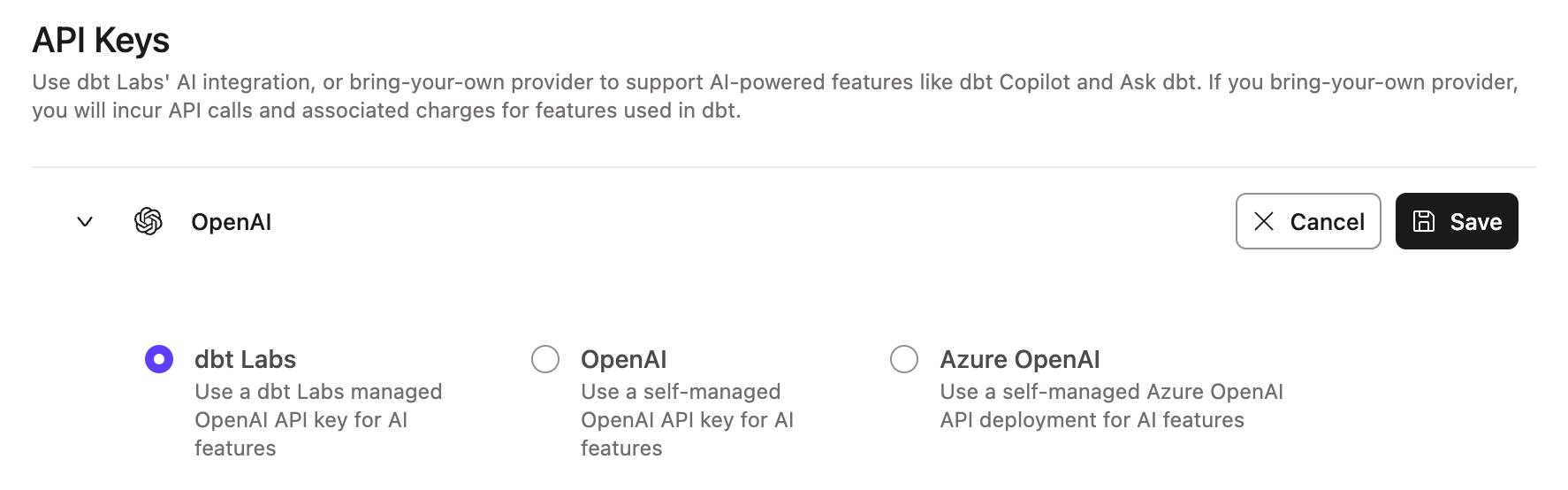 Example of the dbt Labs integration page
- Select the toggle for OpenAI to use your own OpenAI key.
- Enter the API key.
- Click Save.
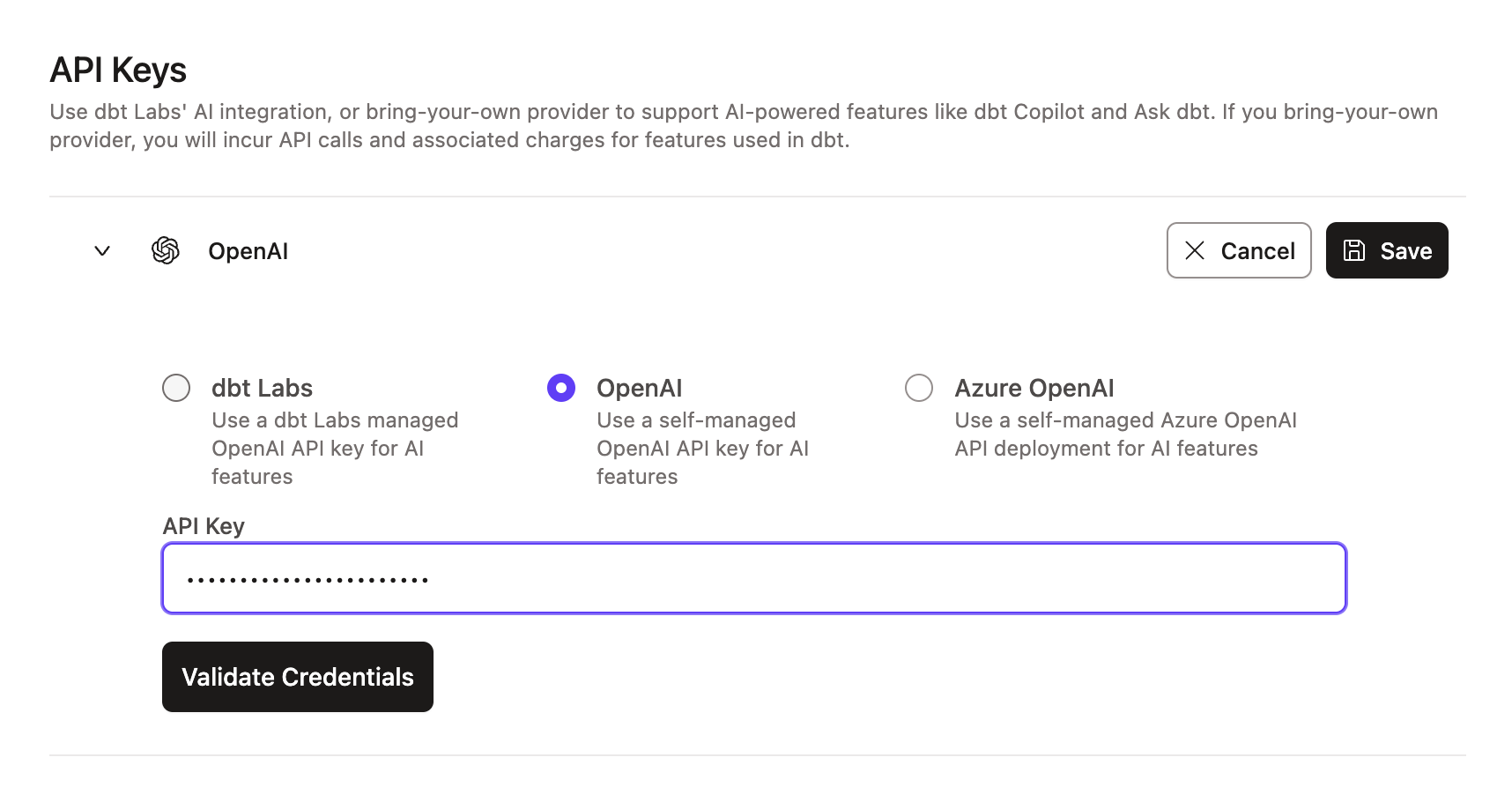 Example of the OpenAI integration page
OpenAI projects with data residency controls enabled and configured for the United States (project region set to US) don't currently support BYOK. These projects can only use the API key in the dbt platform configuration. Specifying custom endpoints required for data residency isn’t yet supported, and we’re evaluating a solution for this.
To use BYOK, ensure your OpenAI project doesn’t have data residency controls enabled. Projects without project region settings will use the standard OpenAI endpoint (https://api.openai.com) and support BYOK.
To learn about deploying your own OpenAI model on Azure, refer to Deploy models on Azure OpenAI.
Configure credentials for your Azure OpenAI deployment in dbt as follows:
- Locate your Azure OpenAI configuration in your Azure Deployment details page.
- Enter your Azure OpenAI API key.
- Enter the Endpoint, API Version, and Deployment / Model Name.
- Click Save.
For the Endpoint field, enter the full Azure Target URI from Azure — not just the base endpoint. Entering only the base endpoint, for example https://<resource>.openai.azure.com, prevents credential validation and blocks setup.
Supported formats include:
https://<resource>.openai.azure.com/openai/deployments/<deployment>/chat/completions?api-version=<version>https://<resource>.openai.azure.com/openai/responses?api-version=<version>
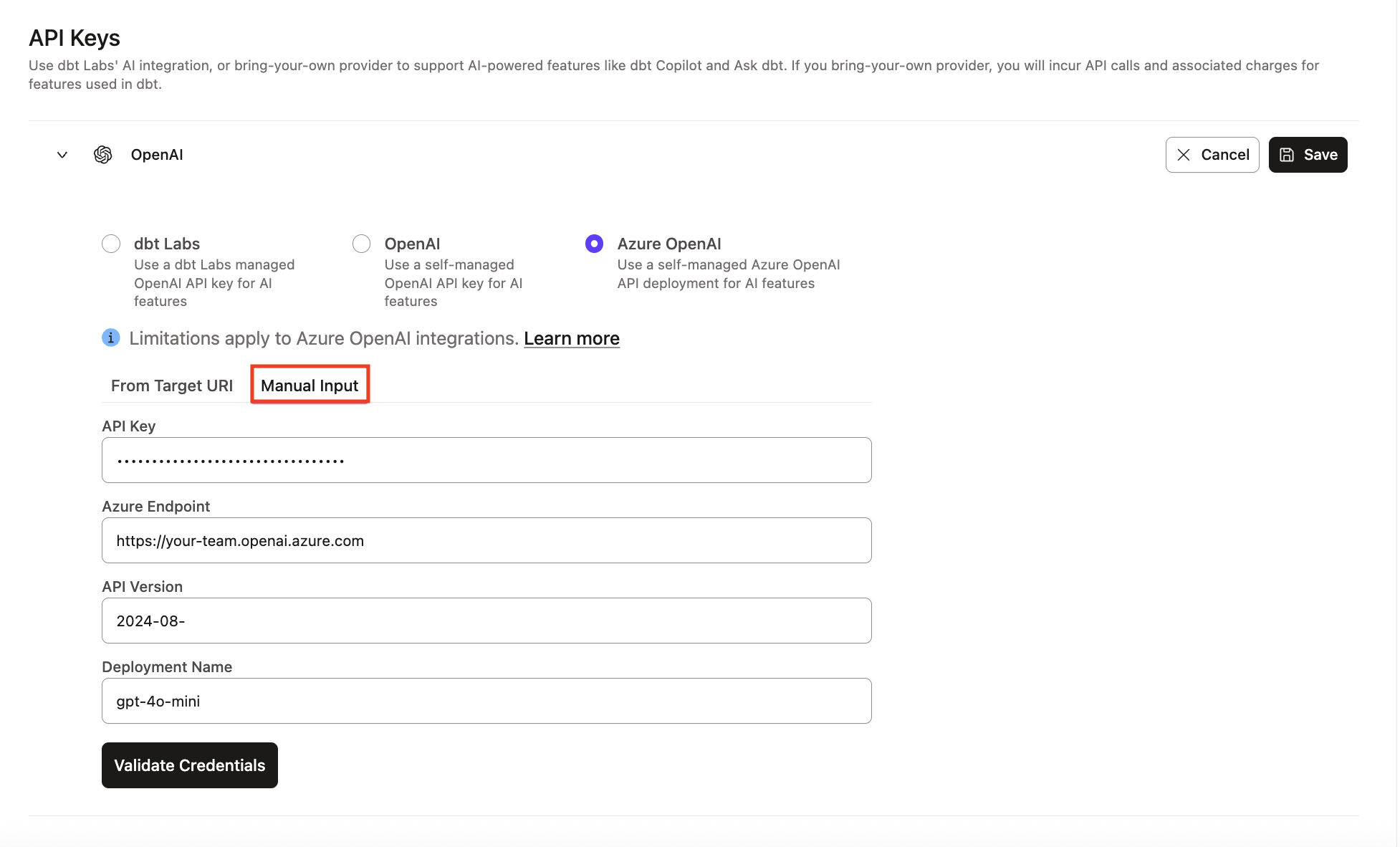 Example of Azure OpenAI integration section
- For BYOK, enable the latest text generation models as well as the
text-embedding-3-smallmodel. - Ensure your project doesn't have data residency controls enabled.
Considerations
- dbt Copilot is a separate experience from dbt Wizard. For agentic, full-lifecycle AI development, use dbt Wizard.
- AI features are enabled by default. Admins can turn them off or back on anytime.
- Certain features are only available on Enterprise and Enterprise+ plans. Refer to Billing for details.
- dbt Copilot doesn't yet support generating semantic models with the latest YAML spec.
Was this page helpful?
This site is protected by reCAPTCHA and the Google Privacy Policy and Terms of Service apply.
