Inside the dbt Wizard harness: building an agent that thinks in DAGs



Ask an analytics engineer to rename a column and they won't start with the SQL. They'll check what reads it downstream, which tests and dashboards will break, build only what changed, and compare the data before anyone reviews it. The dbt MCP server and agent skills can teach a coding agent those steps, but they can't make sure it follows them every time, builds on what's changed, or shows you the data diff before you review the changes.
We built dbt Wizard around a different idea. Wizard works like an analytics engineer: it thinks in DAGs, tests and fixes its own work, and keeps you in flow, so you review a working change instead of a first draft. None of that comes from the model; it comes from the harness, workflows, and UX we built around it.
Run parallel agents, review data diffs and lineage next to the code, and validate changes against your warehouse. Join the Wizard Desktop waitlist.
What an agent harness does
The LLM is the reasoning engine. The harness is everything else: what context gets loaded before the model thinks, how it interacts with the file system and codebase, what tools it can call, what happens when its output fails compilation, when it should stop and ask a human, and how it respects your team's conventions.
Think of the harness as a runtime that answers questions on every task:
- What does the agent know about this project right now?
- What tools can it call, and what's off-limits?
- When and how does it validate its own work?
- When does it stop and ask a human?
- What context gets loaded, and how?
- Can this task be split across focused helper agents?
- What happens when the generated code fails?
Wizard's harness is built in layers: metadata and context, tools, skills and memory, subagent orchestration, and safety and review. But the layers alone aren't the interesting part. The loops are.
 The harness wraps every turn of the agent loop: context feeds the model, the model calls permission-checked tools, and finished work goes through scoped validation before you review impact and data diffs.
Validation in the loop
As agents generate more and more code, validating the correctness of code changes and outputs becomes paramount to building reliable systems quickly. That's why Wizard ships with a dbt-native validation loop out of the box.
Catching errors before you see them
Wizard validates in two stages.
-
While it works, the agent checks its own changes with dbt-native tools: it compiles SQL, resolves
ref()s, and reads structured errors when something fails. Compiler and database errors go straight back to the model with the exact line and suggested fix, so it can revise before you see anything. -
When the change is ready, Wizard summarizes what it did and proposes a validation scope. How validation runs depends on where you use Wizard:
- Wizard Desktop and CLI: Choose the validation depth, from a quick compile-and-test check to a full prod-vs-dev comparison. In Desktop, start from the Validation panel. A dedicated validation agent runs builds and tests only for the models you approved. It won't widen the selection, change targets, or do a full refresh.
- dbt platform: Wizard takes a simpler, more proactive approach. Wizard decides which commands to run to validate its changes and runs them automatically if you've already approved them.
 A Wizard validation plan at the Medium depth: compile and lint, materialize, test, and build downstream dependents for the models in scope, with automatic deferral.
If any check fails, the harness routes that failure back into the model as context, the model revises, and the loop runs again.
The core idea is that the model writes something, dbt gives it real compiler and test feedback (bonus if you're using static analysis), and the harness manages that feedback cycle before a human ever sees the result. Humans can then review output that has already survived compilation and validation, not a first draft.
Keeping warehouse costs down
Another reason the validation loop is a first-class citizen in the agent lifecycle is cost. Wizard explores your project and checks its work more than a typical agent, so we carefully control which commands it can run. In our experiments, agents, especially at higher reasoning levels, liked to compile and build against the full dev schema to verify each change, which burns warehouse compute and congests dev environments. Access to dbt commands through the MCP server or the shell doesn't prevent that.
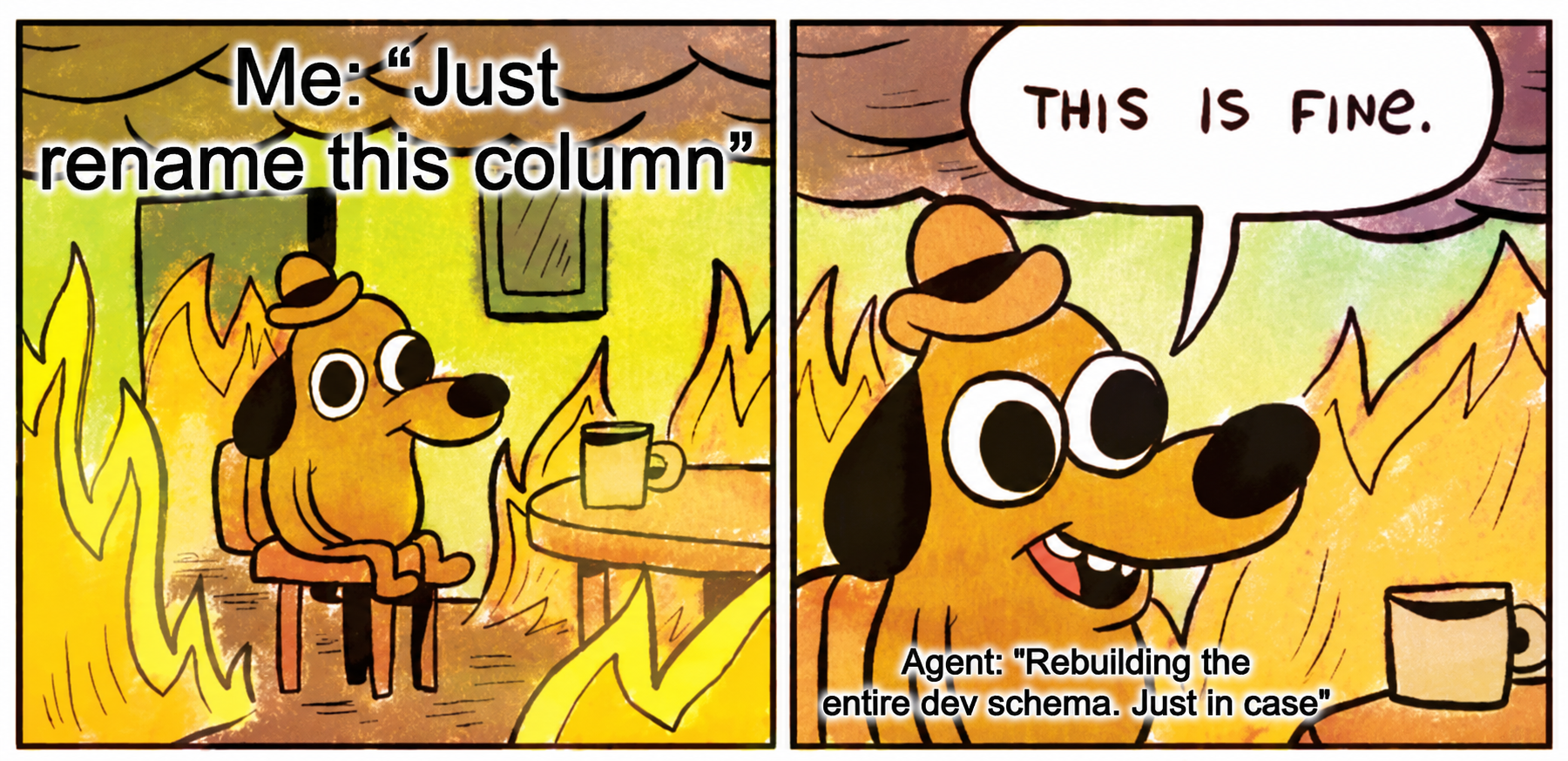 An agent rebuilds the entire dev schema after being asked to rename one column 🥲
To avoid this behavior, Wizard routes every dbt command through its own tools instead of the shell, applies deferral automatically, and keeps validation runs to the approved scope.
Deferral is an extremely powerful feature, and Wizard gives it first-class support. If you're working on a model three layers deep in your DAG and the agent rebuilds every upstream dependency in your dev environment, you're burning warehouse compute and time for no reason, and running certain commands could end up doing that several times per task. Wizard builds only the dev objects it needs and defers unchanged upstream models to production state. Where it helps, it also compares dev and prod behavior and checks downstream impact.
Wizard handles deferral for you by default, and it also works with dbt State or a manual setup if you already have one. Either way, validation runs against realistic state without the cost of a full rebuild.
 How Wizard uses deferral: after an agent edits fct_orders, rebuilding everything builds four models in dev, while deferring to prod reuses the upstream production copies, builds only the changed model, and adds a data diff and downstream impact check.
Validation in dbt was never just "does this file parse?" The real question is whether the change can run in a real warehouse without blowing up cost, run time, dependencies, contracts, or downstream models. That's what the loop is built to answer.
The impact in practice
Data practitioners spend most of their time on pipeline maintenance and putting out fires. This reactive work can wear teams down and prevent data teams from taking on new projects and meeting stakeholder demand.
As agents write more of the code, the question shifts from "does it run?" to "is it right?". To see what that looks like in practice, one of us (Alex) went through seven months of history on his personal trading data platform. It's built on Dagster, dbt, and BigQuery, with 239 assets (174 of them dbt models) and 1,114 data quality checks, and AI agents write most of its code. The history covers 24,388 runs and 405 merged PRs, from March 1 to October 3, 2026.
Fixes made up 57% of all merged PRs. That ratio barely moved as the platform grew. Fix PRs tracked merged PRs almost exactly week to week (ρ 0.96), while a roughly 100× increase in rows written had no measurable effect on the fix rate. Pipelines broke because the complexity scaled up and he didn't have an ergonomic way to catch those data quality issues before running.
When a run errors, the defect is found fast, in a median of one day here. A run that succeeds with the wrong number is a different story. In a sample of well-documented defects, silent ones took a median of 65 days to find, with some taking as long as 361 days. One liquidity metric (that was never queried) was off by 1,000× for 210 days. A non-trivial number of these came from upstream data quality issues from the vendor.
 Median days to detect a defect: loud defects where the run errors were found in 1 day, while silent defects where the run is green but the number is wrong took 65 days.
The busiest week of the period, when an analytics agent was hooked up to the platform, had 104 merged PRs and kept run success at 98%. That same week produced 36 correctness fixes, a third of the month's total. Passing CI isn't the bar either: about 90% of agent-written PRs passed CI on the first try, whichever model wrote them. The defects that cost the most passed CI and code review.
Since August, Wizard (running GLM 5.3) has taken an increased role in authoring any change that touches the platform. Our theory was that the validation loop and native project understanding would catch data quality issues earlier and introduce fewer errors. To test it, we analyzed every PR from that period by harness and model. Wizard running GLM had a 5% follow-up fix rate, lower than every other model and harness we measured, including frontier models with stronger reasoning. That's a huge benefit to developer throughput and stakeholder trust, and it lowers total AI token usage, CI minutes, and warehouse consumption.
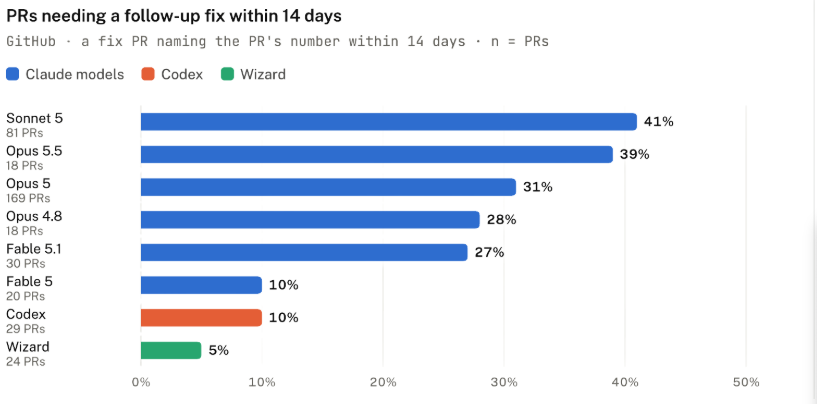 PRs needing a follow-up fix within 14 days, by model and harness: Wizard had the lowest rate at 5%.
Metadata-first, not file-first
One key piece of tooling we introduce to aid Wizard with context discovery is the dbt Information Schema for your dbt project. It's pre-built and ready before your first prompt, so instead of reading files to work out how your project fits together, Wizard queries the dbt Information Schema. It also checks upstream and downstream dependencies before it changes code.
 dbt build artifacts (manifest, catalog, run results, and semantic manifest) feed the dbt Information Schema, a set of DuckDB views over parquet artifacts that Wizard queries for impact analysis, health checks, validation planning, and data profiling.
That metadata includes models, columns, refs, lineage (including column-level lineage), tests, contracts, semantic definitions, run results, and model health. When you ask Wizard "what breaks if I rename this column?", it can answer immediately from the project graph without needing to hunt down every model in the lineage and read all their contents.
First, this gives the model precise, structured context instead of raw file contents. When you ask it to add tests to stg_customers, it already knows which files to look at, which schema YAML the model lives in, where stg_customers sits in lineage, and what similar staging models in your project already test for.
Second, it saves on input tokens, both in cost and in the active context window. Tokens that would have been spent discovering lineage go toward the actual change instead, and that matters more as projects get large.
Tools built for agents
dbt's console output is designed for people: per-node progress lines, colors, banners, and summaries. That's great in a terminal and mostly noise to an agent. So whenever Wizard runs a tool or a dbt command, only the useful parts reach the model's context.
Wizard runs dbt with structured JSON logging and turns the result into a compact report: pass/fail/skip counts, then only the nodes that failed, each with its error. On a sample build with a failing test, the agent sees about 150 tokens instead of about 1,300 from plain dbt output, or worse, 21,000 from an interactive terminal session. A SQL error arrives as the exact database message, line, and suggested column, nothing else.
The same idea applies across commands. During a long build, an agent doesn't need the status of each model as it finishes, so Wizard polls for a summary instead of streaming every line. Wizard also strips out the colors, loading bars, and other output meant for humans. For each dbt operation, we make sure Wizard returns only the most relevant information. When builds run, Wizard sees precisely which models were built and their status. When tests run, it only sees how many tests were executed, which tests failed, and how they failed.
Skills: customizable and portable
Wizard picks up many of your conventions from the project graph: how your models are named, tested, and materialized. Skills cover the rest, like a documentation template, a review checklist, or a naming rule older models don't follow yet.
Skills use the open Agent Skills format, so the ones your team already uses, including dbt's agent skills, work in Wizard, and skills you write for Wizard work elsewhere. Wizard ships with built-in dbt skills, loads only the ones a task needs, and lets your project's skills override the defaults.
Subagent orchestration
Some tasks are too big for one context window. Wizard comes with a team of subagents that can handle complex tasks like refactoring many models, updating whole suites of tests, large-scale documentation, and updating contracts. We do this by breaking down the work across focused helper subagents that work in parallel, freeing up the main agent's context to coordinate the task.
The built-in roles reflect how we think about analytics engineering workflows:
- explorer: read-only, answers scoped project questions by navigating lineage and metadata
- worker: implements file changes
- validation: runs structured dbt validation including SQL checks,
dbt run --defer, prod-vs-dev comparison, and impact analysis - test_writer: finds test coverage gaps and writes schema tests
So instead of one agent trying to hold an entire refactor in its head (under that pointy hat), Wizard acts as a coordinator that hands complex work to specialists.
Wizard Desktop takes this one level up. Subagents split up a single task, and parallel chats let you run several tasks at once. You can refactor a model in one chat, chase down a failing test in another, and answer a data question in a third. Each chat is isolated in both your repo and your warehouse, so parallel work never collides or writes to the same tables.
Desktop also lets you choose how much validation a change gets, from a quick compile-and-test check to a full prod-vs-dev comparison. And when something's off, you can comment on the exact line, table cell, or chart and send that feedback straight back to the agent. To try it, join the Wizard Desktop waitlist.
The safety model
dbt work affects production data pipelines. A bad merge can break dashboards, corrupt metrics, or silently change numbers that drive business decisions. So the safety model does two jobs: it limits what the agent can do, and it shows you what a change will do before you accept it.
Sandboxing and permission modes
By default, Wizard:
- Shows edits as diffs and asks before applying them.
- Runs shell commands in a read-only sandbox.
- Always requires explicit approval, regardless of other settings, for destructive commands like
--full-refresh,git reset --hard, or anything that could cause irreversible changes.
You control two things separately: what the agent can touch (from read-only up to full access) and how often it asks first (from every change to never).
In Wizard Desktop, that's a simple choice between Plan changes, Ask for approval, and Auto. You can relax permissions for exploratory work and tighten them for production-adjacent changes. But the default posture is conservative: the agent proposes, the human approves. The configuration docs and approval and sandboxing cover the full settings.
Seeing the impact before you approve
Data work is inherently visual. The bugs that hurt most usually don't throw an error. The pipeline runs and the PR gets approved, but a number on a dashboard is wrong. Approving a diff is only useful if you can see what it will do. So alongside the code, Wizard shows you:
- Impact analysis: which downstream models, tests, exposures, and metrics the change touches, pulled from the project graph and viewable in lineage.
- Transformation logic: enhanced SQL diffs and (in the dbt platform) a visual transformation DAG that breaks the logic into more familiar steps like joins, filters, aggregations, and projections, so you can understand how a model changed beyond the raw code itself.
- Data diffs: what the change actually did to the data, comparing dev against prod, so you see more than SQL that compiles.
In Wizard Desktop, all of this sits next to the chat: lineage, a dbt-compare view of how your change affected the data, and the diff for each model it touched. If something looks wrong, leave a comment on that line, table cell, or chart and the agent will pick it up.
You're reviewing what the change does to your data and your DAG, not just to your files.
Data work isn't just code
An agent with the dbt MCP server and skills can get you pretty far. It can read your project, run dbt, and follow your team's conventions. But shipping a dbt change has never been only about writing SQL. You need to know what sits downstream, check the change against real data, keep the warehouse bill sane, and actually see what changed before you approve it. A lot of that is visual, and a wall of text in a chat window only gets you so far.
That's the part we built Wizard for. It starts from your project graph, checks its own work against your warehouse with deferral on, and puts lineage and data diffs next to the code when it's your turn to review. You spend less time debugging first drafts and chasing numbers that quietly went wrong, and more time on the work your stakeholders are actually waiting for.
dbt Wizard is available in dbt platform, as a CLI, and as Wizard Desktop (join the waitlist).
To see Wizard work through real tasks on a personal project, read No babysitting, not today. To learn more about building custom skills for your team, check out the dbt Wizard documentation.