How dbt State actually works to save your compute costs


When building a dbt project, you start with the simplest strategy and only add complexity when you need more speed or reduced cost. At a model-by-model level, this is the view → table → incremental materialization pattern. At a project-wide level, optimizations used to require a lot more complexity - rebuilding only the relevant parts of a project meant you spent a lot of mental energy chaining together selectors like state:modified, source_status:fresher, or config.materialized:view and ensuring fresh JSON artifacts were distributed across your organization.
dbt State provides more speed, reduced cost, and less complexity all in one. It works wherever you do: dbt Core or Fusion, locally or on any orchestrator you choose. Since it's backed by a new paid service (with a 30 day free trial), you don't need to adopt the whole dbt platform to get these savings. dbt State supersedes state-aware orchestration, which required a dbt platform subscription and moving to Fusion.
The most technically interesting part of this is the query normalization process1 which means running the new dbt lint command doesn't instantly sign you up for a full rebuild. But before getting into the depths of syntax trees, let's recap what dbt State actually does for an end user.
The basic dbt State workflow
When dbt runs, it will check with the dbt State server whether a model:
- already exists in the target schema and can be reused
- already exists in another schema and can be reused, or
- needs to be built from scratch.
Reuse equivalent objects
In this example, a dbt build in the empty dev_joel environment will clone all provably unchanged objects from another environment that contains equivalent data, and will also reuse the test results for those nodes.
Skip unimportant modifications
“Provably unchanged” doesn't necessarily mean the file is exactly the same as before. dbt State’s SQL comprehension will ignore unimportant modifications like adding a comment or updating whitespace (for example, if you run dbt lint --fix).
Targeted rebuilds
When a file does change (or an upstream parent changes/gets new data), it will be rebuilt as you’d expect. But unlike state:modified+, downstream models can be skipped if dbt State determines they don't depend on that change. In this example, the customers view specifies the exact columns it uses, so adding a new column to orders doesn't cause an unnecessary rebuild.
Reuse from any matching schema
dbt State will cast a wide net when trying to reuse objects. If Toby checks out an in-progress branch and builds the same model, he’ll clone the dev table instead of rebuilding it from scratch, even though it hasn’t been built in production yet. One extra thing to note: the new test's definition is wrong, so it's failing. Even though the test isn’t being re-executed, its warning still appears.
A deeper dive
Let's go a bit deeper into how dbt State decides what to do with each node in the DAG. The three big questions are:
- Is there a logic change in the node or any of its parents?
- Is there fresh data that exceeds the configured
lag_tolerance? - Is there a config change in the node?
Query normalization
dbt’s normal state:modified selector hashes the contents of a file. dbt State is better because it parses the query into a syntax tree, and then calculates a hash of the query. This means it won’t rebuild on a syntactically equivalent change, like removing whitespace, adding a comment, or changing a table’s alias.
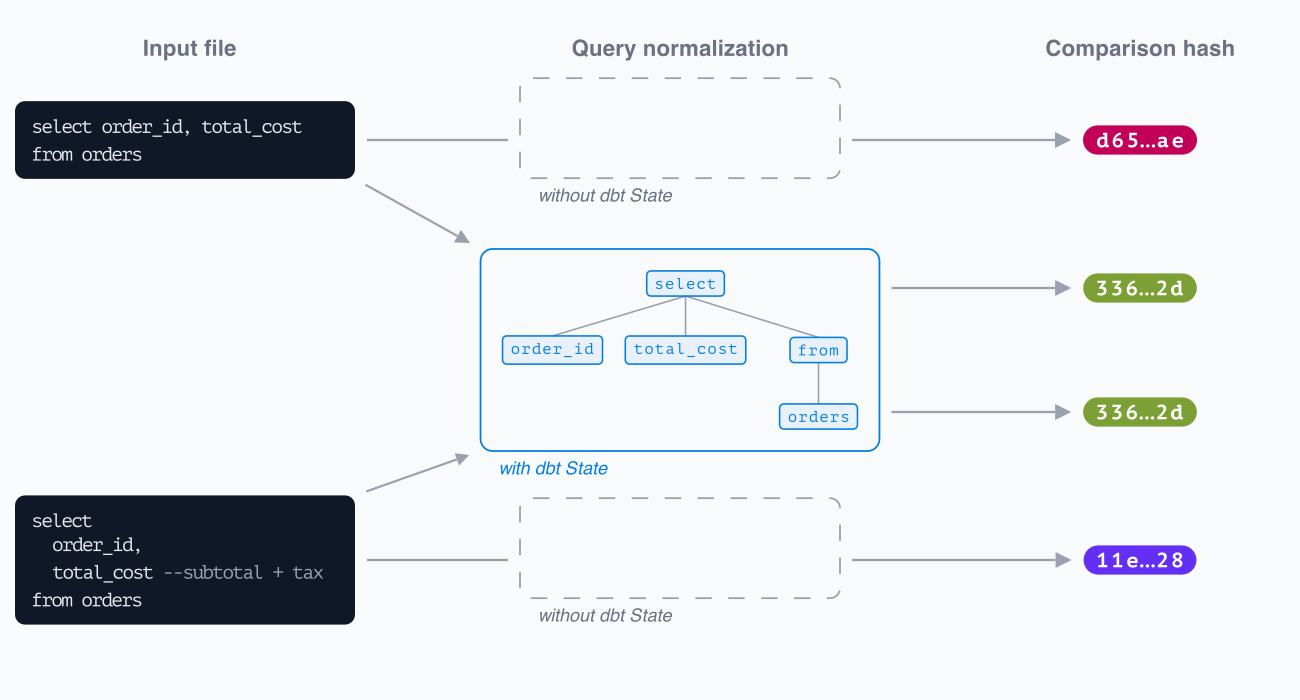 dbt State considers queries to be equivalent despite cosmetic differences
The purpose of this normalization is to ensure that your model only gets rebuilt when its logic or data changes. One wrinkle in this is volatile SQL functions, like current_timestamp() or random(). Are they logic, like every other piece of code? Or are they themselves data, and when they change the model is invalidated and should be rebuilt?
By default, volatile SQL is treated as logic. The hash is based on the function’s name, not the value it returns. Normally this is the right choice - otherwise every model using getdate() (and every one of its descendants) would be ineligible for reuse ever! But if you have a model where the hash should change when the function’s result changes, you have two options:
- Use a Jinja function instead - parsing and normalization happens after the Jinja has been rendered, so
{{ modules.datetime.datetime.now() }}will cause a different result each time - Set the
evaluate_volatile_sqlconfig in your model to true.
Of those options, setting the config is normally the better choice (it applies to all functions in the model at once, and can be inherited like any other config). When enabled, dbt State will emulate the function’s value and embed it into the hash of the SQL.
Freshness checks
dbt State fetches the last modified time for each Relation in the query. It defaults to using the warehouse's metadata for efficiency, but you can also specify a loaded_at_field/loaded_at_query.
If any of the input Relations are views without a loaded_at_field/loaded_at_query specified, then State will traverse further upstream until it finds a real table and will use that timestamp.
It sends the freshness information and the query text to the dbt State server to decide whether and how it can be reused (the query text is discarded after the server finishes its work).
lag_tolerance
In a development environment, you probably don't need to re-clone from elsewhere every time fresh data lands. As fast and cheap as it is to clone a model compared to building it from scratch, it's faster and cheaper to do nothing at all.
Put another way, there's a certain amount of lag you're willing to tolerate, and it's different for different environments. You can express that lag_tolerance as an environment-specific model config:
# dbt_project.yml

models:
  +state:
    lag_tolerance: "{{ '4h' if target.name == 'prod' else '7d' }}"
By doing that, dbt State won’t consider cloning models until there’s fresh data elsewhere, and the current data is 7 days old. A model inside its lag tolerance window will still be counted as a DATT if you select it for execution and it can be reused, so we recommend continuing to use selectors in development.
Configuration changes
Some configs on a model don’t change anything about it in the database, like meta or tags. Others, like on_schema_change, severity or materialization directly impact the way your model is built when changed. dbt State will only pay attention to the subset of relevant configs. If you have a custom post-hook which updates your tables based on ignored fields (like this), set execute_hooks_on_any_reuse to true.
Tips for setting up dbt State
Enforce usage across your team
The more people on your team who reuse models thanks to dbt State, the more benefit you'll see compared to them building those models from scratch every time.
At the beginning, we normally see one or two power users in a team take dbt State for a spin. During that experimentation phase, use the --manage-state flag, DBT_ENGINE_MANAGE_STATE environment variable or ~/.dbt/user_settings.yml file to turn State on for just yourself (this will happen automatically when you run dbt login).
When you're ready to deploy it more broadly, update your dbt_project.yml file and commit it to source control. Your colleagues on a modern version of dbt will be prompted to log in next time they invoke dbt. Remember that versions 1.11 and lower need to explicitly pip install dbt-state first.
# dbt_project.yml
flags:
  manage_state: true
Shape the development of dbt State
Using dbt State feels very familiar to the normal way of developing with dbt, but it's also a new way of thinking. The best way to start is by following the dbt State setup guide. After that, if you want to talk about how it's going, share feedback or ask questions, come and find us in #dbt-state on Slack.
Footnotes
-
The second-most interesting part is the pair of bylines on this post. Welcome to the Developer Blog, Toby! ↩