# Move from dbt Core to the dbt platform: Get started
[Back to guides](../guides.md) Total estimated time: 3-4 hours
Migration
dbt Core
dbt platform
Intermediate
[Menu ]()
## Introduction
Moving from dbt Core to dbt streamlines analytics engineering workflows by allowing teams to develop, test, deploy, and explore data products using a single, fully managed software service. The data layer is the foundation for trusted analytics and AI; dbt platform gives you the governance, shared definitions, and reliability to scale both — without the hidden cost of self-hosting in engineer hours and wasted compute.
Explore our 3-part-guide series on moving from dbt Core to dbt. This series is ideal for users aiming for streamlined workflows and enhanced analytics:
| Guide | Information | Audience |
| --------------------------------------------------------------------------------------------------------------- | -------------------------------------------------------------------------------------------- | ------------------------------------------------- |
| [Move from dbt Core to dbt platform: What you need to know](./core-migration-2.md) | Understand the considerations and methods needed in your move from dbt Core to dbt platform. | Team leads
Admins |
| [Move from dbt Core to dbt platform: Get started](./core-migration-1.md?step=1) | Learn the steps needed to move from dbt Core to dbt platform. | Developers
Data engineers
Data analysts |
| [Move from dbt Core to dbt platform: Optimization tips](./core-migration-3.md) | Learn how to optimize your dbt experience with common scenarios and useful tips. | Everyone |
### Why move to the dbt platform?
If your team is using dbt Core today, you could be reading this guide because:
* You've realized the burden of maintaining that deployment.
* The person who set it up has since left.
* You're interested in what dbt could do to better manage the complexity of your dbt deployment, democratize access to more contributors, or improve security and governance practices.
* You need a governed data foundation for AI—shared definitions, lineage, and testing so analytics and AI give answers the business can trust.
Self-hosting hides its true cost in engineer hours and wasted compute. dbt platform eliminates that overhead with managed infrastructure and browser-based development so more people can contribute without you being the bottleneck.
State-aware orchestration is now dbt State
[dbt State](../docs/deploy/dbt-state-about.md) works with all engines and environments: dbt Core, the dbt platform, and dbt Fusion engine.
If you're using state-aware orchestration prior to June 1, 2026, you can continue using it. Existing state-aware orchestration customers automatically receive a 90-day trial of dbt State. To get started, refer to [Migrate from state-aware orchestration](../docs/deploy/dbt-state-migration.md).
The data layer is the AI layer—make sure it's tested, defined, and trusted end to end.
Moving from dbt Core to dbt simplifies workflows by providing a fully managed environment that improves collaboration, security, and orchestration. With dbt, you gain access to features like cross-team collaboration ([dbt Mesh](../best-practices/how-we-mesh/mesh-1-intro.md)), version management, streamlined CI/CD, [Catalog](../docs/explore/explore-projects.md) for comprehensive insights, and more — making it easier to manage complex dbt deployments and scale your data workflows efficiently.
It's ideal for teams looking to reduce the burden of maintaining their own infrastructure while enhancing governance and productivity.
What are dbt and dbt Core?
* dbt is the fastest and most reliable way to deploy dbt. It enables you to develop, test, deploy, and explore data products using a single, fully managed service. Infrastructure is managed for you — no custom scripts or fragile orchestration. State-aware orchestration only builds what's changed, so you waste less compute and time. Browser-based development and dbt Wizard open up development to analysts, so you're no longer the bottleneck for every change. With end-to-end lineage, shared metric definitions, and CI that catches regressions before production, you spend less time debugging and more time building. dbt also supports:
* Development experiences tailored to multiple personas ([Studio IDE](../docs/platform/studio-ide/develop-in-studio.md) or [dbt CLI](../docs/platform/dbt-cli-installation.md))
* Out-of-the-box [CI/CD workflows](../docs/deploy/ci-jobs.md)
* The [Semantic Layer](../docs/use-dbt-semantic-layer/dbt-sl.md) for consistent metrics
* Domain ownership of data with multi-project [dbt Mesh](../best-practices/how-we-mesh/mesh-1-intro.md) setups
* [Catalog](../docs/explore/explore-projects.md) for easier data discovery and understanding
Learn more about [dbt features](../docs/platform/about-platform/dbt-platform-features.md).
* dbt Core is an open-source tool that enables data teams to define and execute data transformations in a cloud data warehouse following analytics engineering best practices. While this can work well for 'single players' and small technical teams, all development happens on a command-line interface (CLI), and production deployments must be self-hosted and maintained.
You absorb the cost of every upgrade, every broken CI run, and every request that pulls you away from real work: maintaining infrastructure, debugging the CI pipeline, and fielding every change that requires CLI access. Compute runs unchecked, upgrades are risky, and there's no easy way to trace what broke or why. This requires significant, costly work that adds up over time to maintain and scale — and without governance, shared definitions, or reliable testing.
## What you'll learn
This guide outlines the steps you need to take to move from dbt Core to dbt and highlights the necessary technical changes:
* [Account setup](./core-migration-1.md?step=4): Learn how to create a dbt account, invite team members, and configure it for your team.
* [Data platform setup](./core-migration-1.md?step=5): Find out about connecting your data platform to dbt.
* [Git setup](./core-migration-1.md?step=6): Learn to link your dbt project's Git repository with dbt.
* [Developer setup:](./core-migration-1.md?step=7) Understand the setup needed for developing in dbt.
* [Environment variables](./core-migration-1.md?step=8): Discover how to manage environment variables in dbt, including their priority.
* [Orchestration setup](./core-migration-1.md?step=9): Learn how to prepare your dbt environment and jobs for orchestration.
* [Models configuration](./core-migration-1.md?step=10): Get insights on validating and running your models in dbt, using either the Studio IDE or dbt CLI.
* [What's next?](./core-migration-1.md?step=11): Summarizes key takeaways and introduces what to expect in the following guides.
### Related docs
* [Learn dbt](https://learn.getdbt.com) on-demand video learning.
* Book [expert-led demos](https://www.getdbt.com/resources/dbt-cloud-demos-with-experts) and insights
* Work with the [dbt Labs' Professional Services](https://www.getdbt.com/dbt-labs/services) team to support your data organization and migration.
## Prerequisites
* You have an existing dbt Core project connected to a Git repository and data platform supported in [dbt](../docs/platform/connect-data-platform/about-connections.md).
* You have a dbt account. **[Don't have one? Start your free trial today](https://www.getdbt.com/signup)**!
## Account setup
This section outlines the steps to set up your dbt account and configure it for your team.
1. [Create your dbt account](https://www.getdbt.com/signup).
2. Provide user [access](../docs/platform/manage-access/about-user-access.md) and [invite users](../docs/platform/manage-access/about-user-access.md) to your dbt account and project.
3. Configure [Single Sign-On (SSO)](../docs/platform/manage-access/sso-overview.md) or [Role-based access control (RBAC)](../docs/platform/manage-access/about-user-access.md#role-based-access-control) for easy and secure access. [Enterprise](https://www.getdbt.com/pricing "Go to https://www.getdbt.com/pricing")[Enterprise +](https://www.getdbt.com/pricing "Go to https://www.getdbt.com/pricing")
* This removes the need to save passwords and secret environment variables locally.
### Additional configuration
Explore these additional configurations for performance and reliability improvements:
1. In **Account settings**, enable [partial parsing](../docs/platform/account-settings.md#partial-parsing) to only reparse changed files, saving time.
2. In **Account settings**, enable [Git repo caching](../docs/platform/account-settings.md#git-repository-caching) for job reliability & third-party outage protection. [Enterprise](https://www.getdbt.com/pricing "Go to https://www.getdbt.com/pricing")[Enterprise +](https://www.getdbt.com/pricing "Go to https://www.getdbt.com/pricing")
## Data platform setup
This section outlines the considerations and methods to connect your data platform to dbt.
1. In dbt, set up your [data platform connections](../docs/platform/connect-data-platform/about-connections.md) and [environment variables](../docs/build/environment-variables.md). dbt can connect with a variety of data platform providers including:
* [AlloyDB](../docs/platform/connect-data-platform/connect-postgresql-alloydb.md)
* [Amazon Athena](../docs/platform/connect-data-platform/connect-amazon-athena.md)
* [Amazon Redshift](../docs/platform/connect-data-platform/connect-redshift.md)
* [Apache Spark](../docs/platform/connect-data-platform/connect-apache-spark.md)
* [Azure Synapse Analytics](../docs/platform/connect-data-platform/connect-azure-synapse-analytics.md)
* [Databricks](../docs/platform/connect-data-platform/connect-databricks.md)
* [Google BigQuery](../docs/platform/connect-data-platform/connect-bigquery.md)
* [Microsoft Fabric](../docs/platform/connect-data-platform/connect-microsoft-fabric.md)
* [PostgreSQL](../docs/platform/connect-data-platform/connect-postgresql-alloydb.md)
* [Snowflake](../docs/platform/connect-data-platform/connect-snowflake.md)
* [Starburst or Trino](../docs/platform/connect-data-platform/connect-starburst-trino.md)
* [Teradata](../docs/platform/connect-data-platform/connect-teradata.md)
2. You can verify your data platform connections by clicking the **Test connection** button in your deployment and user credentials settings.
### Additional configuration
Explore these additional configurations to optimize your data platform setup further:
1. Use [OAuth connections](../docs/platform/manage-access/set-up-snowflake-oauth.md), which enables secure authentication using your data platform's SSO. [Enterprise](https://www.getdbt.com/pricing "Go to https://www.getdbt.com/pricing")[Enterprise +](https://www.getdbt.com/pricing "Go to https://www.getdbt.com/pricing")
## Git setup
Your existing dbt project source code should live in a Git repository. In this section, you will connect your existing dbt project source code from Git to dbt.
1. Ensure your dbt project is in a Git repository.
2. In **Account settings**, select **Integrations** to [connect your Git repository](../docs/platform/git/configure-git.md) to dbt:
* (**Recommended**) Connect with one of the [native integrations](../docs/platform/git/configure-git.md) in dbt (such as GitHub, GitLab, and Azure DevOps).
This method is preferred for its simplicity, security features (including secure OAuth logins and automated workflows like CI builds on pull requests), and overall ease of use.
* [Import a Git repository](../docs/platform/git/import-a-project-by-git-url.md) from any valid Git URL that points to a dbt project.
## Developer setup
This section highlights the development configurations you'll need for your dbt project. The following categories are covered in this section:
* [dbt environments](./core-migration-1.md?step=7#dbt-cloud-environments)
* [Initial setup steps](./core-migration-1.md?step=7#initial-setup-steps)
* [Additional configuration](./core-migration-1.md?step=7#additional-configuration-2)
* [dbt commands](./core-migration-1.md?step=7#dbt-cloud-commands)
### dbt environments
The most common data environments are production, staging, and development. The way dbt Core manages [environments](../docs/environments-in-dbt.md) is through `target`, which are different sets of connection details.
[dbt environments](../docs/dbt-platform-environments.md) go further by:
* Integrating with features such as job scheduling or version control, making it easier to manage the full lifecycle of your dbt projects within a single platform.
* Streamlining the process of switching between development, staging, and production contexts.
* Making it easy to configure environments through the dbt UI instead of manually editing the `profiles.yml` file. You can also [set up](../reference/dbt-jinja-functions/target.md) or [customize](../docs/build/custom-target-names.md) target names in dbt.
* Adding `profiles.yml` attributes to dbt environment settings with [Extended Attributes](../docs/dbt-platform-environments.md#extended-attributes).
* Using [Git repo caching](../docs/platform/account-settings.md#git-repository-caching) to protect you from third-party outages, Git auth failures, and more. [Enterprise](https://www.getdbt.com/pricing "Go to https://www.getdbt.com/pricing")[Enterprise +](https://www.getdbt.com/pricing "Go to https://www.getdbt.com/pricing")
### Initial setup steps
1. **Set up development environment** — Set up your [development](../docs/dbt-platform-environments.md#create-a-development-environment) environment and [user credentials](../docs/platform/studio-ide/develop-in-studio.md#get-started-with-the-studio-ide). You'll need this to access your dbt project and start developing.
2. **dbt Core version** — In your dbt environment, select a [release track](../docs/dbt-versions/dbt-release-tracks.md) for ongoing dbt version upgrades. If your team plans to use both dbt Core and dbt for developing or deploying your dbt project, you can run `dbt --version` in the command line to find out which version of dbt Core you're using.
* When using dbt Core, you need to think about which version you're using and manage your own upgrades. When using dbt, leverage [release tracks](../docs/dbt-versions/dbt-release-tracks.md) so you don't have to.
3. **Connect to your data platform** — When using dbt, you can [connect to your data platform](../docs/platform/connect-data-platform/about-connections.md) directly in the UI.
* Each environment is roughly equivalent to an entry in your `profiles.yml` file. This means you don't need a `profiles.yml` file in your project.
4. **Development tools** — Set up your development workspace with the [dbt CLI](../docs/platform/dbt-cli-installation.md) (command line interface or code editor) or [Studio IDE](../docs/platform/studio-ide/develop-in-studio.md) (browser-based) to build, test, run, and version control your dbt code in your tool of choice.
* If you've previously installed dbt Core, the [dbt CLI installation doc](../docs/platform/dbt-cli-installation.md?install=pip#install-dbt-cloud-cli) has more information on how to install the dbt CLI, create aliases, or uninstall dbt Core for a smooth transition.
### Additional configuration
Explore these additional configurations to optimize your developer setup further:
1. **Custom target names** — Using [`custom target.names`](../docs/build/custom-target-names.md) in your dbt projects helps identify different environments (like development, staging, and production). While you can specify the `custom target.name` values in your development credentials or orchestration setup, we recommend using [environment variables](../docs/build/environment-variables.md) as the preferred method. They offer a clearer way to handle different environments and are better supported by dbt's partial parsing feature, unlike using [`{{ target }}` logic](../reference/dbt-jinja-functions/target.md) which is meant for defining the data warehouse connection.
### dbt commands
1. Review the [dbt commands](../reference/dbt-commands.md) supported for dbt development. For example, `dbt init` isn't needed in dbt as you can create a new project directly in dbt.
## Environment variables
This section will help you understand how to set up and manage dbt environment variables for your project. The following categories are covered:
* [Environment variables in dbt](./core-migration-1.md?step=7#environment-variables-in-dbt-cloud)
* [dbt environment variables order of precedence](./core-migration-1.md?step=7#dbt-cloud-environment-variables-order-of-precedence)
* [Set environment variables in dbt](./core-migration-1.md?step=7#set-environment-variables-in-dbt-cloud)
In dbt, you can set [environment variables](../docs/build/environment-variables.md) in the dbt user interface (UI). Read [Set up environment variables](#set-environment-variables-in-dbt-cloud) for more info.
In dbt Core, environment variables, or the [`env_var` function](../reference/dbt-jinja-functions/env_var.md), are defined manually by the developer or within the external application running dbt.
### Environment variables in dbt
* dbt environment variables must be prefixed with `DBT_` (including `DBT_ENV_CUSTOM_ENV_` or `DBT_ENV_SECRET`).
* If your dbt Core environment variables don't follow this naming convention, perform a ["find and replace"](../docs/platform/studio-ide/develop-in-studio.md#studio-ide-features) in your project to make sure all references to these environment variables contain the proper naming conventions.
* dbt secures environment variables that enable more flexible configuration of data warehouse connections or git provider integrations, offering additional measures for sensitive values, such as prefixing keys with `DBT_ENV_SECRET`to obscure them in logs and the UI.
[](#)Setting project level and environment level values
### dbt environment variables order of precedence
Environment variables in dbt are managed with a clear [order of precedence](../docs/build/environment-variables.md#setting-and-overriding-environment-variables), allowing users to define values at four levels (highest to lowest order of precedence):
* The job level (job override) or in the Studio IDE for an individual developer (personal override). *Highest precedence*
* The environment level, which can be overridden by the job level or personal override.
* A project-wide default value, which can be overridden by the environment level, job level, or personal override.
* The optional default argument supplied to the `env_var` Jinja function in the code. *Lowest precedence*
[](#)Environment variables order of precedence
### Set environment variables in dbt
* To set these variables for an entire project or specific environments, navigate to **Deploy** > **Environments** > **Environment variables** tab.
* To set these variables at the job level, navigate to **Deploy** > **Jobs** > **Select your job** > **Settings** > **Advanced settings**.
* To set these variables at the personal override level, navigate to **Your profile** > **Credentials** > **Select your project** > **Environment variables**.
## Orchestration setup
This section outlines the considerations and methods to set up your dbt environments and jobs for orchestration. The following categories are covered in this section:
* [dbt environments](./core-migration-1.md?step=8#dbt-cloud-environments-1)
* [Initial setup steps](./core-migration-1.md?step=8#initial-setup-steps-1)
* [Additional configuration](./core-migration-1.md?step=8#additional-configuration-3)
* [CI/CD setup](./core-migration-1.md?step=8#cicd-setup)
### dbt environments
To use the [dbt's job scheduler](../docs/deploy/job-scheduler.md), set up one environment as the production environment. This is the [deployment](../docs/deploy/deploy-environments.md) environment. You can set up multiple environments for different stages of your deployment pipeline, such as development, staging/QA, and production.
### Initial setup steps
1. **dbt Core version** — In your environment settings, configure dbt with the same dbt Core version.
* Once your full migration is complete, we recommend upgrading your environments to [release tracks](../docs/dbt-versions/dbt-release-tracks.md) to always get the latest features and more. You only need to do this once.
2. **Configure your jobs** — [Create jobs](../docs/deploy/deploy-jobs.md#create-and-schedule-jobs) for scheduled or event-driven dbt jobs. You can use cron execution, manual, pull requests, or trigger on the completion of another job.
* Note that alongside [jobs in dbt](../docs/deploy/jobs.md), discover other ways to schedule and run your dbt jobs with the help of other tools. Refer to [Integrate with other tools](../docs/deploy/deployment-tools.md) for more information.
### Additional configuration
Explore these additional configurations to optimize your dbt orchestration setup further:
1. **Custom target names** — Use environment variables to set a `custom target.name` for every [corresponding dbt job](../docs/build/custom-target-names.md) at the environment level.
2. **dbt commands** — Add any relevant [dbt commands](../docs/deploy/job-commands.md) to execute your dbt jobs runs.
3. **Notifications** — Set up [notifications](../docs/deploy/job-notifications.md) by configuring email and Slack alerts to monitor your jobs.
4. **Monitoring tools** — Use [monitoring tools](../docs/deploy/monitor-jobs.md) like run history, job retries, job chaining, dashboard status tiles, and more for a seamless orchestration experience.
5. **API access** — Create [API auth tokens](../docs/dbt-apis/authentication.md) and access to [dbt APIs](../docs/dbt-apis/overview.md) as needed. [Starter](https://www.getdbt.com/pricing "Go to https://www.getdbt.com/pricing")[Enterprise](https://www.getdbt.com/pricing "Go to https://www.getdbt.com/pricing")
6. **Catalog** — If you use [Catalog](../docs/explore/explore-projects.md) and run production jobs with an external orchestrator, ensure your production jobs run `dbt run` or `dbt build` to update and view models and their [metadata](../docs/explore/explore-projects.md#generate-metadata) in Catalog. Running `dbt compile` alone will not update model metadata. In addition, features like column-level lineage also requires catalog metadata produced through running `dbt docs generate`. [Starter](https://www.getdbt.com/pricing "Go to https://www.getdbt.com/pricing")[Enterprise](https://www.getdbt.com/pricing "Go to https://www.getdbt.com/pricing")
### CI/CD setup
Building a custom solution to efficiently check code upon pull requests is complicated. With dbt, you can enable [continuous integration / continuous deployment (CI/CD)](../docs/deploy/continuous-integration.md) and configure dbt to run your dbt projects in a temporary schema when new commits are pushed to open pull requests.
[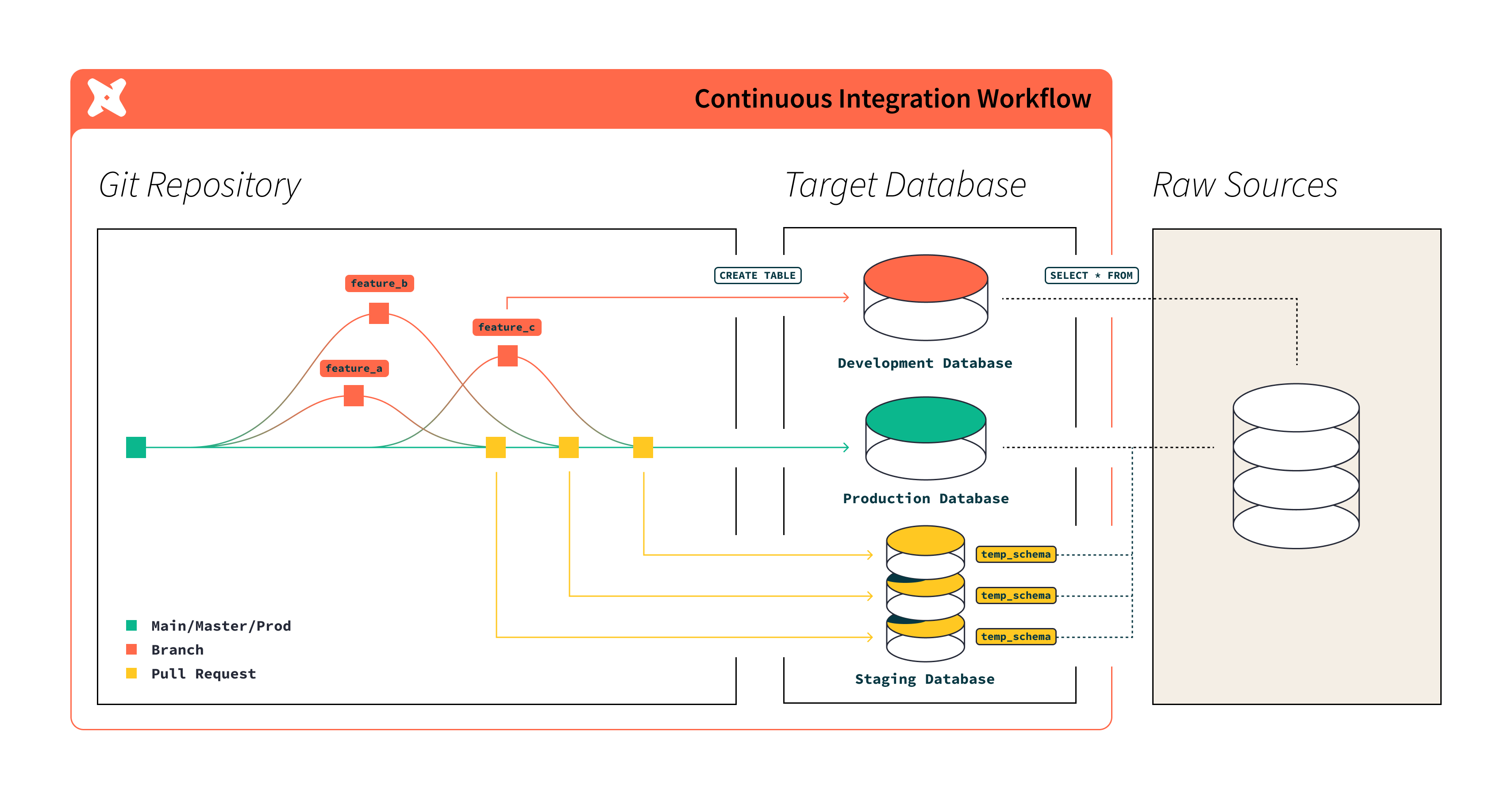](#)Workflow of continuous integration in dbt
This build-on-PR functionality is a great way to catch bugs before deploying to production, and an essential tool for data practitioners.
1. Set up an integration with a native Git application (such as Azure DevOps, GitHub, GitLab) and a CI environment in dbt.
2. Create [a CI/CD job](../docs/deploy/ci-jobs.md) to automate quality checks before code is deployed to production.
3. Run your jobs in a production environment to fully implement CI/CD. Future pull requests will also leverage the last production runs to compare against.
## Model development and discovery
In this section, you'll be able to validate whether your models run or compile correctly in your development tool of choice: The [Studio IDE](../docs/platform/studio-ide/develop-in-studio.md) or [dbt CLI](../docs/platform/dbt-cli-installation.md).
You'll want to make sure you set up your [development environment and credentials](../docs/dbt-platform-environments.md#set-developer-credentials).
1. In your [development tool](../docs/platform/about-develop-dbt.md) of choice, you can review your dbt project, ensure it's set up correctly, and run some [dbt commands](../reference/dbt-commands.md):
* Run `dbt compile` to make sure your project compiles correctly.
* Run a few models in the Studio IDE or dbt CLI to ensure you're experiencing accurate results in development.
2. Once your first job has successfully run in your production environment, use [Catalog](../docs/explore/explore-projects.md) to view your project's [resources](../docs/build/projects.md) (such as models, tests, and metrics) and their data lineage to gain a better understanding of its latest production state. [Starter](https://www.getdbt.com/pricing "Go to https://www.getdbt.com/pricing")[Enterprise](https://www.getdbt.com/pricing "Go to https://www.getdbt.com/pricing")
## What's next?
Congratulations on completing the first part of your move to dbt 🎉!
You have learned:
* How to set up your dbt account
* How to connect your data platform and Git repository
* How to configure your development, orchestration, and CI/CD environments
* How to set up environment variables and validate your models
For the next steps, you can continue exploring our 3-part-guide series on moving from dbt Core to dbt:
| Guide | Information | Audience |
| --------------------------------------------------------------------------------------------------------------- | -------------------------------------------------------------------------------------------- | ------------------------------------------------- |
| [Move from dbt Core to dbt platform: What you need to know](./core-migration-2.md) | Understand the considerations and methods needed in your move from dbt Core to dbt platform. | Team leads
Admins |
| [Move from dbt Core to dbt platform: Get started](./core-migration-1.md?step=1) | Learn the steps needed to move from dbt Core to dbt platform. | Developers
Data engineers
Data analysts |
| [Move from dbt Core to dbt platform: Optimization tips](./core-migration-3.md) | Learn how to optimize your dbt experience with common scenarios and useful tips. | Everyone |
### Why move to the dbt platform?
If your team is using dbt Core today, you could be reading this guide because:
* You've realized the burden of maintaining that deployment.
* The person who set it up has since left.
* You're interested in what dbt could do to better manage the complexity of your dbt deployment, democratize access to more contributors, or improve security and governance practices.
* You need a governed data foundation for AI—shared definitions, lineage, and testing so analytics and AI give answers the business can trust.
Self-hosting hides its true cost in engineer hours and wasted compute. dbt platform eliminates that overhead with managed infrastructure and browser-based development so more people can contribute without you being the bottleneck.
State-aware orchestration is now dbt State
[dbt State](../docs/deploy/dbt-state-about.md) works with all engines and environments: dbt Core, the dbt platform, and dbt Fusion engine.
If you're using state-aware orchestration prior to June 1, 2026, you can continue using it. Existing state-aware orchestration customers automatically receive a 90-day trial of dbt State. To get started, refer to [Migrate from state-aware orchestration](../docs/deploy/dbt-state-migration.md).
The data layer is the AI layer—make sure it's tested, defined, and trusted end to end.
Moving from dbt Core to dbt simplifies workflows by providing a fully managed environment that improves collaboration, security, and orchestration. With dbt, you gain access to features like cross-team collaboration ([dbt Mesh](../best-practices/how-we-mesh/mesh-1-intro.md)), version management, streamlined CI/CD, [Catalog](../docs/explore/explore-projects.md) for comprehensive insights, and more — making it easier to manage complex dbt deployments and scale your data workflows efficiently.
It's ideal for teams looking to reduce the burden of maintaining their own infrastructure while enhancing governance and productivity.
### Related docs
* [Learn dbt](https://learn.getdbt.com) video courses for on-demand learning.
* Book [expert-led demos](https://www.getdbt.com/resources/dbt-cloud-demos-with-experts) and insights.
* Work with the [dbt Labs' Professional Services](https://www.getdbt.com/dbt-labs/services) team to support your data organization and migration.
* [How dbt compares with dbt Core](https://www.getdbt.com/product/dbt-core-vs-dbt-cloud) for a detailed comparison of dbt Core and dbt.
* Subscribe to the [dbt RSS alerts](https://status.getdbt.com/)
## Was this page helpful?
YesNo
[Privacy policy](https://www.getdbt.com/cloud/privacy-policy)[Create a GitHub issue](https://github.com/dbt-labs/docs.getdbt.com/issues)
This site is protected by reCAPTCHA and the Google [Privacy Policy](https://policies.google.com/privacy) and [Terms of Service](https://policies.google.com/terms) apply.