Cost Insights shows estimated costs and compute time for your dbt projects and models directly in the dbt platform, so you can measure and share the impact of optimizations like dbt State and state-aware orchestration.
State-aware orchestration is now dbt State
dbt State works with all engines and environments: dbt v1, dbt platform, and dbt v2
If you were using state-aware orchestration prior to June 1, 2026, you can continue using it. Once you start your free dbt State trial, it will be extended beyond the standard 30-day period. If the extension isn't applied to your account, contact your account team. To get started, refer to Migrate from state-aware orchestration.
dbt State and state-aware orchestration make your dbt workflows more efficient by reusing models and tests instead of running full rebuilds. When either is enabled, Cost Insights helps you demonstrate the resulting cost reductions and efficiency gains. These cost and cost reduction estimates are based on a retroactive analysis of runs after you enable dbt State or state-aware orchestration. They reflect actual historical usage, not forecasts of future costs or cost reductions.
With Cost Insights, you can see:
How much your dbt models cost to run: See the compute cost and times for each model and job in your warehouse's native units.
The cost reductions from using dbt State or state-aware orchestration: Understand the cost reduction when dbt State or state-aware orchestration reuses unchanged models.
Cost trends over time: Track your warehouse spend and optimization impact across your dbt projects.
Asset type filtering: On Cost Insights charts (Cost, Usage, Query run time, Builds), use the Assets dropdown menu to filter data by Models, Tests, or All. Each tab keeps its own selection.
Per-job cost breakdown: In the Cost Insights table view, use the All and Jobs buttons to switch between an aggregated view and a per-job cost breakdown.
The Cost Insights section is available in different dbt platform areas and lets you view your cost data and the impact of dbt State and state-aware orchestration optimizations across various dimensions:
Cost estimates are intended for visibility and optimization, not billing reconciliation.
dbt calculates the cost of running your dbt models using your data warehouse's usage metadata and billing context. dbt computes costs daily using up to the last seven days of available data.
The following sections explain how costs are calculated for each supported warehouse. Expand each section to view the details.
Snowflake
dbt computes Snowflake query costs using Snowflake's query attribution data and your credit price (price_per_credit). dbt pulls the price_per_credit value directly from Snowflake when available; otherwise, dbt uses the configured or default value in the dbt platform. For more information about configuring or viewing these values, see Configure Cost Insights settings.
Formula:
credits_per_query * price_per_credit
Report incorrect code
Where:
credits_per_query — Cloud services, compute, and query acceleration credits attributed to the query.
price_per_credit — Your Snowflake credit price (from Snowflake system tables when available, otherwise from your configured input or the default rate).
Snowflake attribution limitation
Snowflake doesn't attribute cost to queries that run in roughly 100 milliseconds or less. As a result, Cost Insights totals may be lower than the compute spend shown in your Snowflake billing dashboards. For more information, see the Snowflake documentation.
BigQuery
BigQuery does not expose per-query cost directly in system tables. Instead, dbt estimates cost by combining query usage with a pricing input (either from your configuration or the default rate).
On-demand pricing
The cost is determined by how much data each query processes. The usage shows the amount of that data billed for the query.
Formula:
data_processed_per_query * price_per_tib
Report incorrect code
Where:
data_processed_per_query - Total data billed for the query (normalized to TiB). dbt sources this value from information_schema.jobs.total_bytes_billed. For more information, see the BigQuery documentation.
price_per_tib - BigQuery on-demand price per TiB (from your configuration or the default rate).
Capacity pricing (reservations)
The cost is determined by how long each query runs on reserved compute. The usage shows the amount of that reserved compute time consumed by a query.
Formula:
compute_time_per_query * price_per_slot_hour
Report incorrect code
Where:
compute_time_per_query - Total slot time used by the query (in hours). dbt sources this value from information_schema.jobs.total_slot_ms. For more information, see the BigQuery documentation.
price_per_slot_hour - BigQuery capacity price per slot-hour (from your configuration or the default rate)
Cached queries
Queries served from cache do not consume compute and are counted as $0.
Databricks
Databricks does not directly attribute usage to individual queries. Instead, dbt estimates per-query cost by proportionally allocating Databricks Units (DBUs) based on how long each query ran during a billing period.
Queries that run longer receive a larger share of usage.
Usage is converted to dollars using your list price.
Formula:
usage_per_query * cost_per_dbu
Report incorrect code
Where:
usage_per_query - DBUs attributed to the query.
cost_per_dbu - Dollar cost per DBU for the relevant stock-keeping unit. For information about the pricing system table, see the Databricks documentation.
Databricks reports usage in billing windows. These windows are periods of time where a compute resource consumed a known number of DBUs. Queries have their own start and end times. For information about the billing usage system table, see the Databricks documentation.
To attribute usage to queries:
dbt identifies which billing windows each query overlaps.
dbt calculates how long the query ran during each window.
dbt allocates DBUs proportionally based on the query’s share of total execution time on that compute resource during the same window.
Cost Insights supports both Amazon Redshift Serverless and provisioned cluster deployments. dbt detects your deployment type automatically when testing the connection.
note
On Redshift, dbt attributes query costs using the comments it automatically injects into each query. If another process removes or replaces these comments, dbt can't tie the query back to its model, and its cost won't be attributed. Make sure nothing in your Redshift environment removes or replaces dbt's query comments.
Redshift Serverless
dbt estimates cost by identifying which Redshift Processing Unit (RPU) billing periods overlap with each query's execution time and attributing the proportional share of RPU-hours to the query.
Formula:
rpu_hours_per_query * rpu_price_per_hour
Report incorrect code
Where:
rpu_hours_per_query - RPU-hours attributed to the query based on its proportional overlap with each billing period. dbt sources billing period data from SYS_SERVERLESS_USAGE. For more information, see the Amazon Redshift documentation.
rpu_price_per_hour - Your RPU price per hour (from your configured value in Cost Insights settings).
Redshift Provisioned
dbt estimates cost based on how long each query ran and how many nodes your cluster has.
elapsed_time_hours - Query execution time in hours. dbt sources this from SYS_QUERY_HISTORY.
node_count - Number of nodes in your cluster. dbt sources this from STV_SLICES.
node_price_per_hour - Your price per node per hour (from your configured value in Cost Insights settings).
Additional considerations:
Data retention: Redshift system tables (SYS_QUERY_HISTORY, SYS_SERVERLESS_USAGE) retain only seven days of history. Cost data for Redshift may cover a shorter window than other warehouses. dbt calculates costs for whatever data is available within that window.
Pricing required: There are no default price values for Redshift. Costs will appear as $0 until you configure rpu_price_per_hour (serverless) or node_price_per_hour (provisioned) in Cost Insights settings.
Concurrent query costs
Redshift attributes cost to each query as if it ran alone on the cluster. If queries run concurrently, the sum of individual query costs may exceed your actual bill.
dbt calculates cost reductions by comparing actual costs to what costs would have been without model reuse. To do this, dbt uses data from the last seven days (where available) and performs the following steps:
Calculates the average cost per model build.
Counts how many times a model was reused instead of rebuilt.
Multiplies the reused model count by the average cost per build to determine total cost reduction.
Formula:
average_cost_per_build * reuse_count
Report incorrect code
dbt calculates reductions per model and per deployment environment (production and staging), based on recent historical runs.
Additional notes:
dbt calculates estimated costs and savings daily.
Pricing inputs come from warehouse system tables (where available), connection-level configuration, or default list prices.
The following example shows how dbt calculates cost reductions. Looking back seven days, assuming a model runs on two distinct days:
Day
Total cost
Total executions
Day 1
$5
5
Day 2
$10
10
Total
$15
15
The average cost per execution: $15 ÷ 15 runs = $1 per run
If the model was reused eight times instead of rebuilt during this same period, the estimated cost reduction is: $1 average cost per run * 8 reuses = $8
Keep the following in mind when using Cost Insights:
Data collection and refresh
Cost Insights uses your platform metadata credentials to access warehouse system tables. No separate credentials are needed beyond the platform metadata setup.
You need sufficient permissions to query warehouse metadata tables.
Cost data is calculated once per day by a scheduled job that runs at approximately 17:00 UTC.
The data collection job processes completed calendar days only. It does not include the current day because warehouse usage data may still be incomplete.
Jobs that ran yesterday (or earlier) will have cost data available after the next daily refresh.
Jobs that ran today will not have cost data until the following day’s refresh, regardless of what time they ran.
If you don’t see cost data for a recent job, make sure at least one full calendar day has passed since it ran. The Updated badge in the Cost Insights section shows when the last refresh occurred.
Cost accuracy
dbt calculates costs using warehouse-reported usage data and applies default credit or compute costs based on standard warehouse pricing.
If you have custom pricing agreements with your warehouse provider, override the default values in your account settings to ensure accurate cost reporting. For more information, see Set up Cost Insights.
Update your cost variables whenever your warehouse pricing contracts change to maintain accurate tracking.
Changes to cost variables only apply to future calculations — historical cost data remains unchanged.
Optimization data
Optimization and usage reduction data is available once dbt State or state-aware orchestration is enabled and begins reusing models across runs.
For accounts already using dbt State or state-aware orchestration, run at least one full model build within the last 10 days before enabling Cost Insights to establish a baseline for cost reduction calculations. If you don't see cost reduction data, run a full build to establish the baseline.
Cost Insights currently calculates estimated reductions in warehouse compute usage at the model level and will expand to include tests and seeds in the future.
Exporting data
You can export cost data as a CSV file for further analysis and reporting. For more information, see Explore cost data.
Why might my actual warehouse costs differ from displayed costs?
Cost Insights shows estimates based on warehouse-reported usage and your configured pricing variables. These estimates are based on a retroactive analysis of historical runs and reflect actual usage, not forecasts of future costs. Adjustments and differences may occur if:
Your warehouse has custom pricing that differs from the default compute credit unit.
There are discounts or credits applied at the billing level that aren't reflected in usage tables.
Costs include other charges beyond compute.
Costs Insights in the dbt platform is designed to be directionally accurate, showing you dbt-specific components rather than matching your billing exactly.
How often is cost data refreshed?
Cost data refreshes daily and reflects the previous day's usage. This means there is a lag of up to one day between when a job runs and when its cost data appears in Cost Insights.
How do I troubleshoot if cost data isn't appearing?
If cost data isn't appearing in Cost Insights, check the following:
Verify that platform metadata credentials are configured in your account settings and that the credential test is passing. For more information, see Set up Cost Insights.
Ensure you have one of the required permissions to view cost data. For more information, see Assign required permissions.
Confirm that at least one job is running in a production environment. Cost data only appears after jobs have executed.
Cost data refreshes daily and reflects the previous day's usage, which means there is a lag of up to one day between when a job runs and when its cost data appears. If you just ran a job, wait until the next day to see the data.
After enabling Cost Insights, dbt looks back 10 days to build baselines for cost reduction calculations. If you don't see cost reduction data, ensure you have sufficient job history within the last 10 days.
Does the Cost Insights feature incur warehouse costs?
dbt issues lightweight, read-only queries against your warehouse to retrieve metadata and to power features such as Cost Insights. dbt scopes and filters these queries to minimize impact, and most customers see negligible costs (typically on the order of cents).
How does increasing job frequency affect cost reduction estimates?
Cost reduction metrics reflect how dbt optimizes compute costs by reusing existing results instead of running the same model again.
When you increase your job run frequency (for example, because performance improvements make it easier to schedule jobs more often), dbt has more opportunities to reuse models. As reuse increases, dbt optimizes more compute, which means your reported cost reductions may also increase.
This metric shows the efficiency impact of reuse within your current workload. It reflects the compute costs that dbt reduces by reusing models instead of rebuilding them, rather than showing your total warehouse spend reduction.
What happened to state-aware orchestration?
On June 1, 2026, dbt Labs and Fivetran announced dbt State as a new and improved version of state-aware orchestration. A key feature is lag_tolerance, which controls how much time must pass since the last upstream data change before a node is eligible for a rebuild.
dbt State improves upon state-aware orchestration in a few key ways:
Works everywhere — dbt State works with dbt v1, dbt v2, and dbt platform, as well as external orchestrators, across both development and deployment environments.
Smarter data freshness tracking — dbt State tracks data freshness across the DAG and automatically propagates it through models materialized as views. Unlike state-aware orchestration's build_after config which compares against the model's last successful execution, dbt State's lag_tolerance compares against the freshness of the underlying data.
Advanced change detection — dbt State can detect and ignore file modifications that don't change actual transformation logic, such as adding a comment or cleaning up whitespace.
If you were using state-aware orchestration prior to June 1, 2026, you can continue using it. Once you start your free dbt State trial, it will be extended beyond the standard 30-day period. If the extension isn't applied to your account, contact your account team. For details on billing after the trial ends, refer to dbt State usage and pricing.
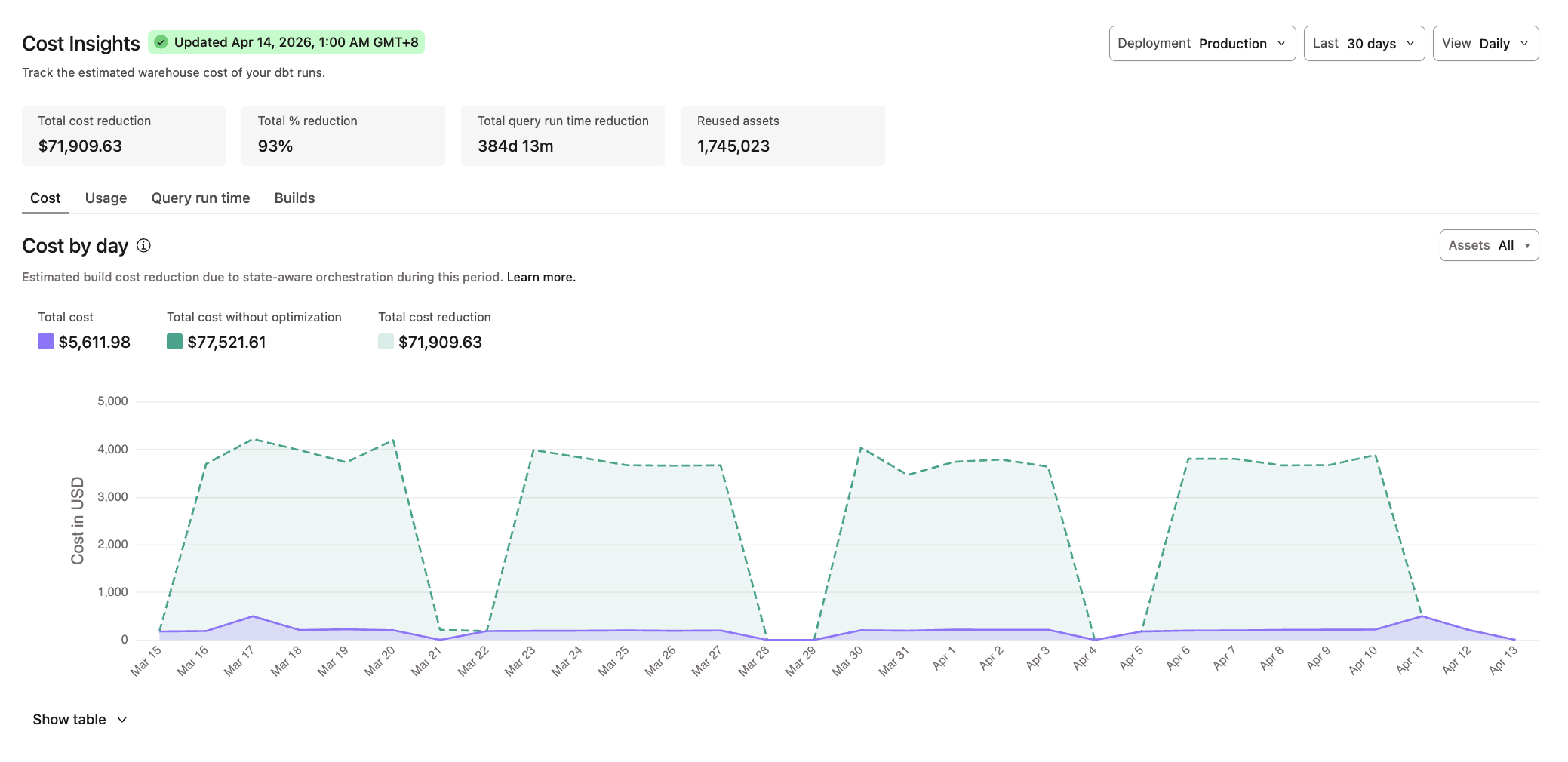 Cost Insights in the project dashboard
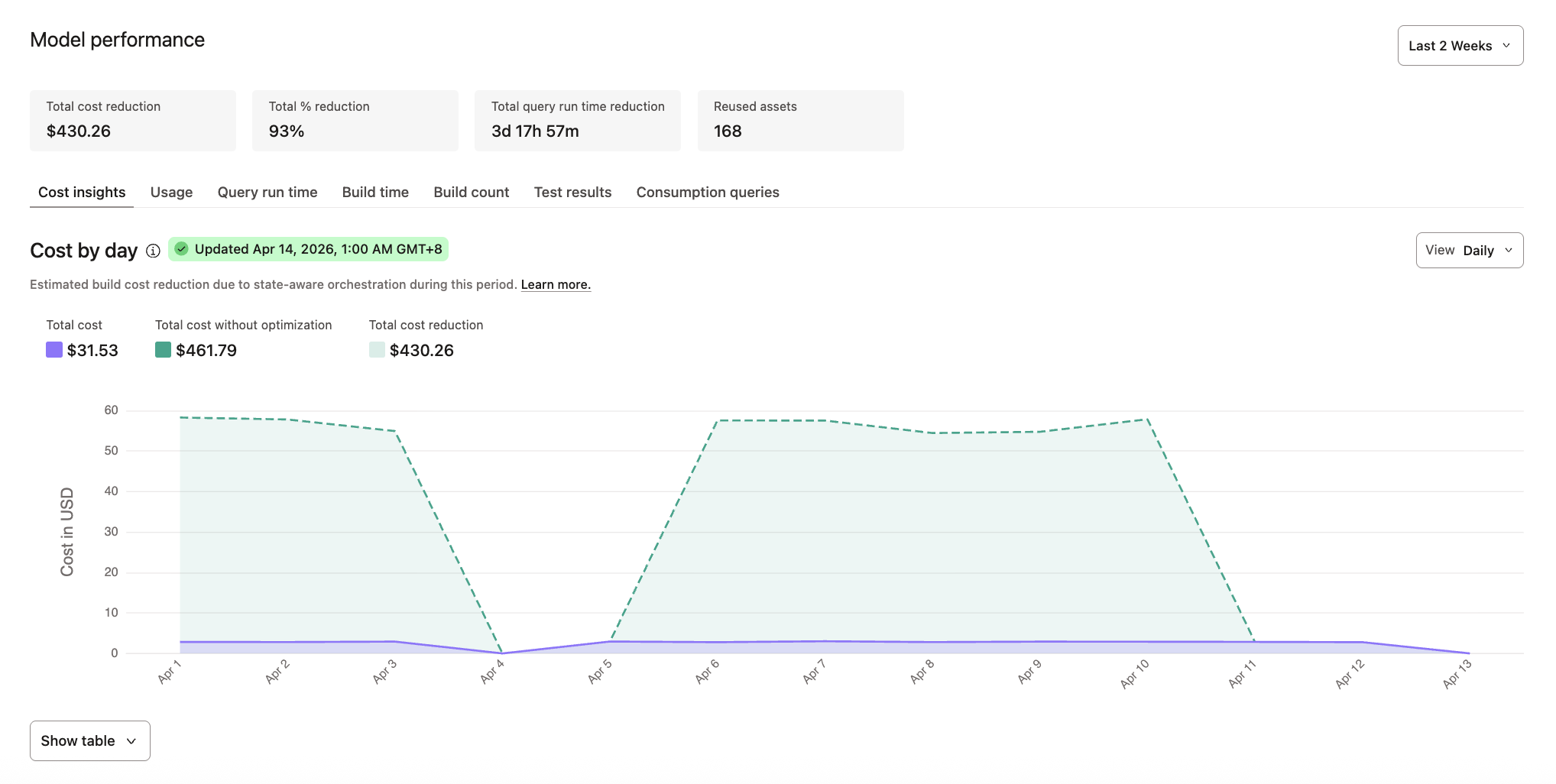 Cost Insights in Catalog
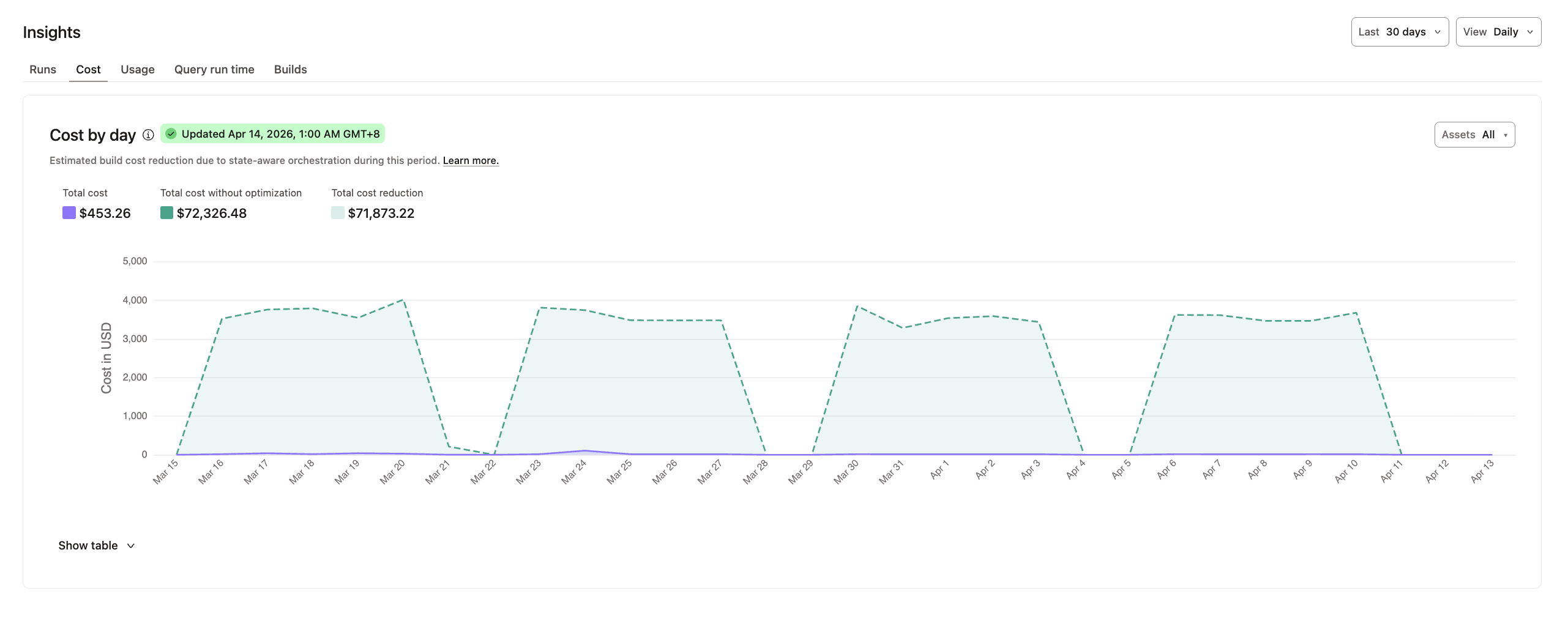 Cost Insights in job details