# Setting up state-aware orchestration [Private preview](https://docs.getdbt.com/docs/dbt-versions/product-lifecycles "Go to https://docs.getdbt.com/docs/dbt-versions/product-lifecycles")
dbt platform | Enterprise, Enterprise+
Set up state-aware orchestration to automatically determine which models to build by detecting changes in code or data and only building the changed models each time a job is run.
State-aware orchestration is now dbt State
[dbt State](./dbt-state-about.md) works with all engines and environments: dbt Core, dbt platform, and Fusion
If you're using state-aware orchestration prior to June 1, 2026, you can continue using it. Your dbt State trial will be extended until the billing period begins on September 1, 2026. If your trial wasn't extended, contact your account team. To get started, refer to [Migrate from state-aware orchestration](./dbt-state-migration.md).
important
The dbt Fusion engine is currently available for installation in:
* [Local command line interface (CLI) tools](../local/install-dbt.md?version=2) [Preview](https://docs.getdbt.com/docs/dbt-versions/product-lifecycles "Go to https://docs.getdbt.com/docs/dbt-versions/product-lifecycles")
* [VS Code and Cursor with the dbt extension](../install-dbt-extension.md) [Preview](https://docs.getdbt.com/docs/dbt-versions/product-lifecycles "Go to https://docs.getdbt.com/docs/dbt-versions/product-lifecycles")
* [dbt platform environments](../dbt-versions/upgrade-dbt-platform-version.md#dbt-fusion-engine)
Join the conversation in our Community Slack channel [`#dbt-fusion-engine`](https://getdbt.slack.com/archives/C088YCAB6GH).
Read the [Fusion Diaries](https://github.com/dbt-labs/dbt-core/discussions/categories/announcements?discussions_q=is:open+diaries+category:Announcements) for the latest updates.
## Prerequisites
To use state-aware orchestration, make sure you meet these prerequisites:
* You must have a dbt [Enterprise and Enterprise+ accounts](https://www.getdbt.com/signup/) and a [Developer seat license](../platform/manage-access/seats-and-users.md).
* You have updated the environment that will run state-aware orchestration to the dbt Fusion engine. For more information, refer to [Upgrading to dbt Fusion engine](../dbt-versions/core-upgrade/upgrading-to-v2.md).
* Your account must have access to state-aware orchestration. Contact your account manager to request access.
* You must have a dbt project connected to a [data platform](../platform/connect-data-platform/about-connections.md).
* You must have [access permission](../platform/manage-access/about-user-access.md) to view, create, modify, or run jobs.
* You must set up a [deployment environment](./deploy-environments.md) that is production or staging only.
* You must use a deploy job. Continuous integration (CI) and merge jobs currently do not support state-aware orchestration.
* (Optional) To customize behavior, you have configured your model or source data with [advanced configurations](#advanced-configurations).
info
State-aware orchestration is available for SQL models only. Python models are not supported.
## Default settings
Once your account has access to state-aware orchestration, any new deploy job you create in a Fusion environment is automatically state-aware. Without additional configuration, the job only builds models when code has changed or new data exists in a source.
## Create a job
New jobs are state-aware by default
For existing jobs, select **Enable Fusion cost optimization features** in the **Job settings** page to enable state-aware orchestration.
To create a state-aware job:
1. From your deployment environment page, click **Create job** and select **Deploy job**.
2. Options in the **Job settings** section:
* **Job name**: Specify the name, for example, `Daily build`.
* (Optional) **Description**: Provide a description of what the job does (for example, what the job consumes and what the job produces).
* **Environment**: By default, it’s set to the deployment environment you created the state-aware job from.
3. Options in the **Execution settings** and **Triggers** sections:
[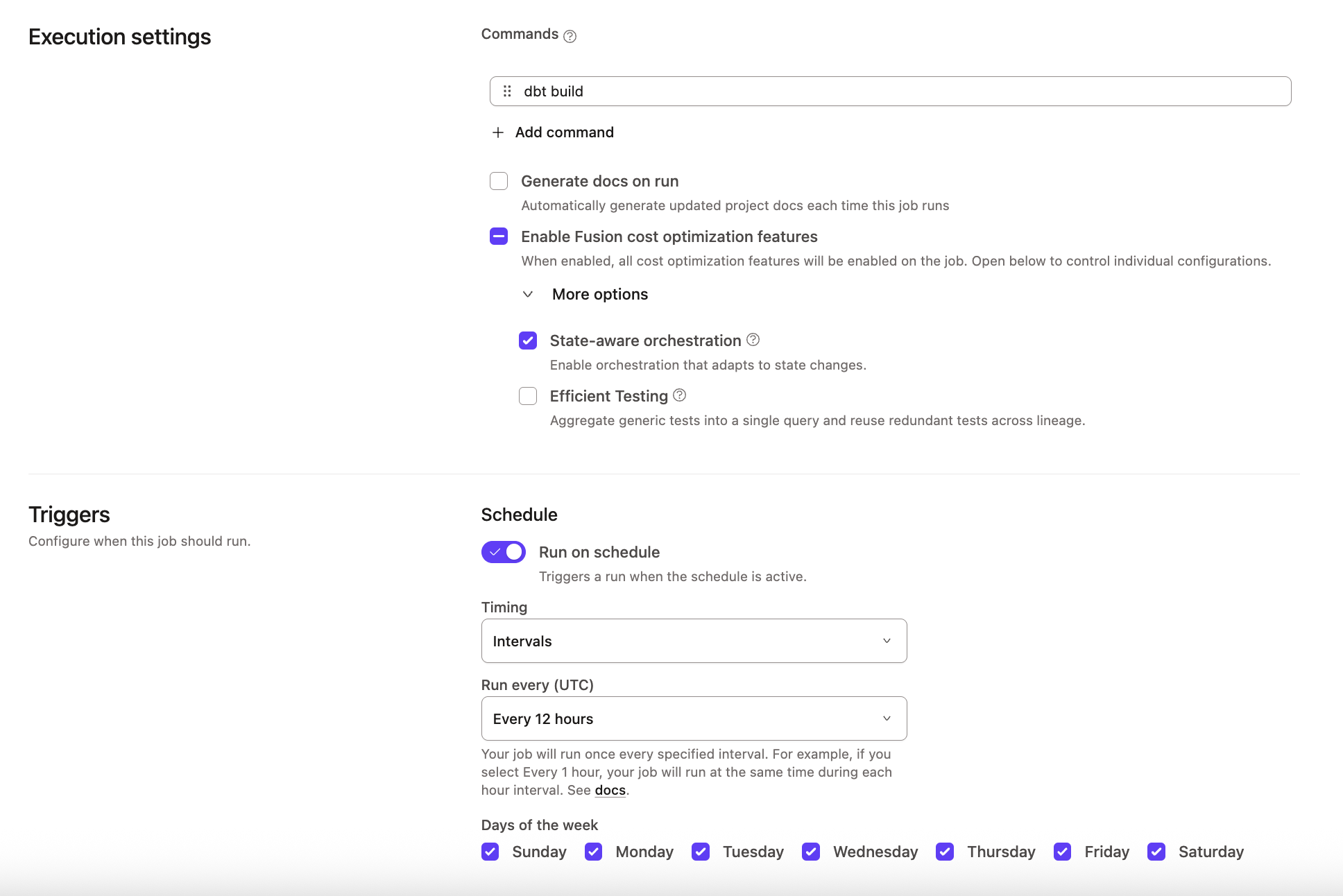](#)Example of Triggers on the Deploy Job page
* **Execution settings** section:
* **Commands**: By default, it includes the `dbt build` command. Click **Add command** to add more [commands](./job-commands.md) that you want to be invoked when the job runs.
* **Generate docs on run**: Enable this option if you want to [generate project docs](../build/documentation.md) when this deploy job runs.
* **Enable Fusion cost optimization features**: Select this option to enable **State-aware orchestration**. **Efficient testing** is disabled by default. You can expand **More options** to enable or disable individual settings.
* **Triggers** section:
* **Run on schedule**: Run the deploy job on a set schedule.
* **Timing**: Specify whether to [schedule](#schedule-days) the deploy job using **Intervals** that run the job every specified number of hours, **Specific hours** that run the job at specific times of day, or **Cron schedule** that run the job specified using [cron syntax](#cron-schedule).
* **Days of the week**: By default, it’s set to every day when **Intervals** or **Specific hours** is chosen for **Timing**.
* **Run when another job finishes**: Run the deploy job when another *upstream* deploy [job completes](#trigger-on-job-completion).
* **Project**: Specify the parent project that has that upstream deploy job.
* **Job**: Specify the upstream deploy job.
* **Completes on**: Select the job run status(es) that will [enqueue](./job-scheduler.md#scheduler-queue) the deploy job.
6. (Optional) Options in the **Advanced settings** section:
* **Environment variables**: Define [environment variables](../build/environment-variables.md) to customize the behavior of your project when the deploy job runs.
* **Target name**: Define the [target name](../build/custom-target-names.md) to customize the behavior of your project when the deploy job runs. Environment variables and target names are often used interchangeably.
* **Run timeout**: Cancel the deploy job if the run time exceeds the timeout value.
* **Compare changes against**: By default, it’s set to **No deferral**. Select either **Environment** or **This Job** to let dbt know what it should compare the changes against.
7. Click **Save**.
You can see which models dbt builds in the run summary logs. Models that weren't rebuilt during the run are tagged as **Reused** with context about why dbt skipped rebuilding them (and saving you unnecessary compute!). You can also see the reused models under the **Reused** tab.
[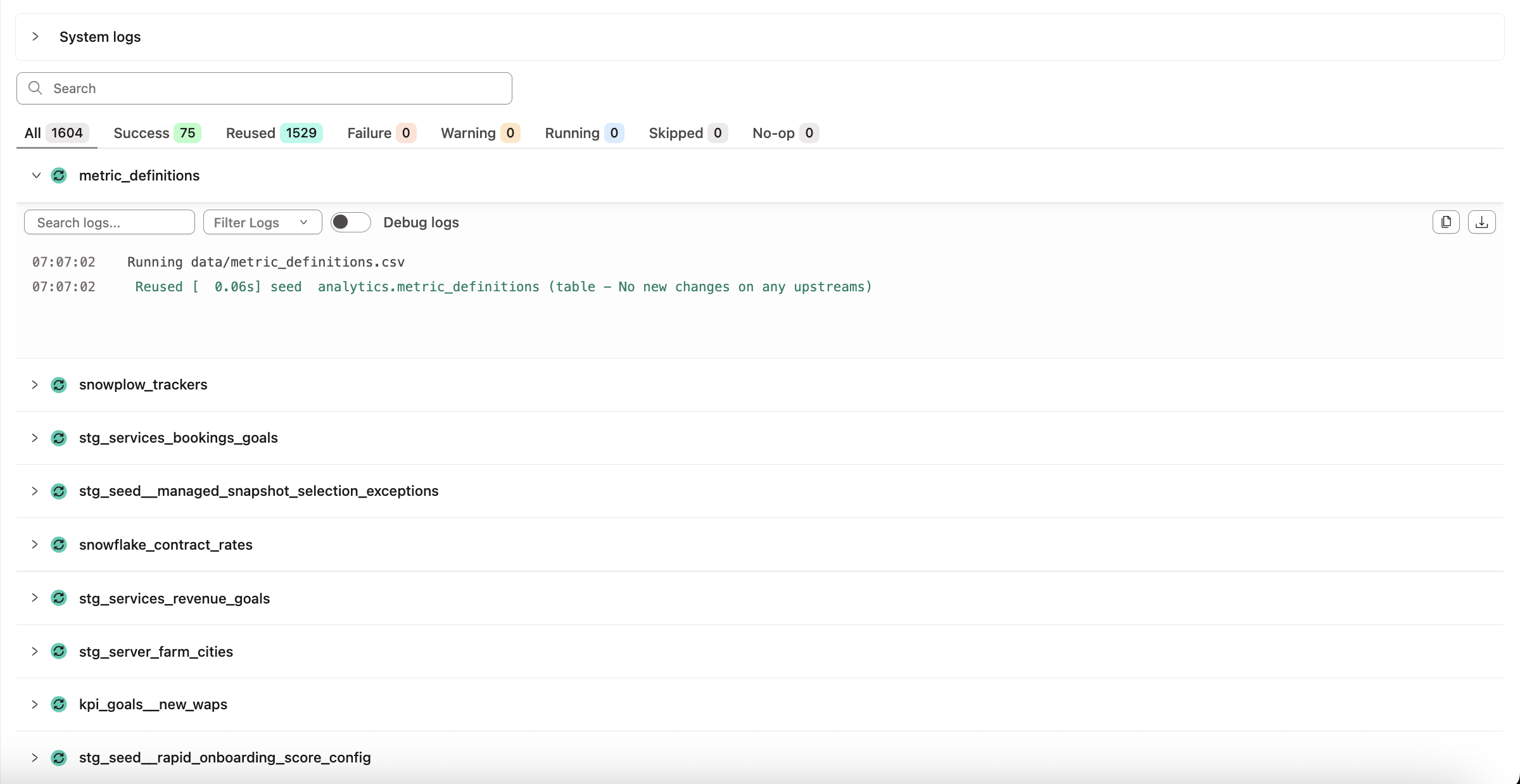](#)Example logs for state-aware orchestration
## Delete a job
To delete a job or multiple jobs in dbt:
1. Click **Deploy** on the navigation header.
2. Click **Jobs** and select the job you want to delete.
3. Click **Settings** on the top right of the page and then click **Edit**.
4. Scroll to the bottom of the page and click **Delete job** to delete the job.
[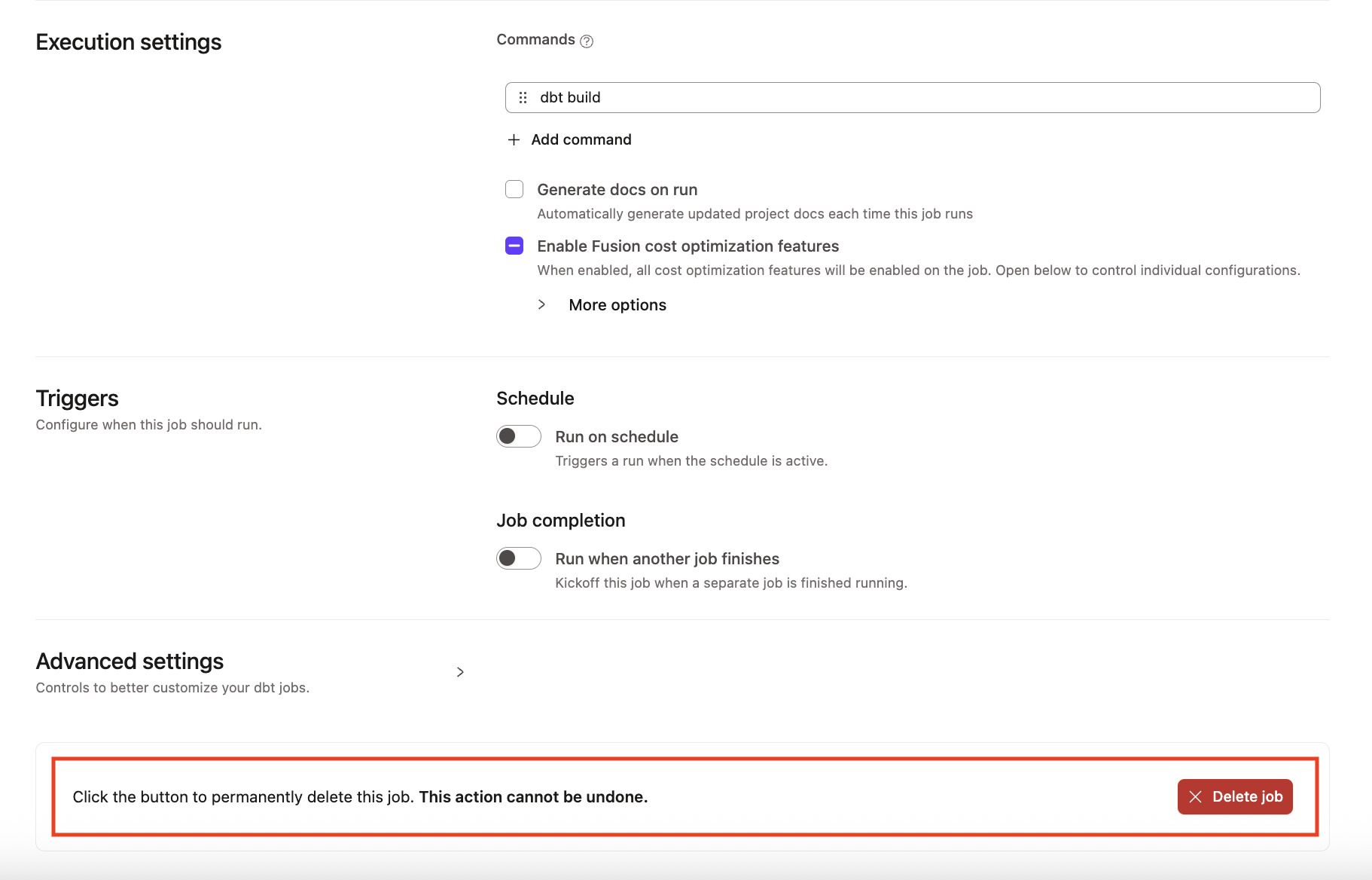](#)Delete a job
5. Confirm your action in the pop-up by clicking **Confirm delete** in the bottom right to delete the job immediately. This action cannot be undone. However, you can create a new job with the same information if the deletion was made in error.
6. Refresh the page, and the deleted job should now be gone. If you want to delete multiple jobs, you'll need to perform these steps for each job.
If you're having any issues, feel free to [contact us](mailto:support@getdbt.com) for additional help.
## Advanced configurations
By default, we use the warehouse metadata to check if sources (or upstream models in the case of Mesh) are fresh. For more advanced use cases, dbt provides other options that enable you to specify what gets run by state-aware orchestration.
You can use the following optional parameters to customize your state-aware orchestration:
| Parameter | Description | Allowed values | Supports Jinja |
| ------------------------ | --------------------------------------------------------------------------------------------------------------------------------------------- | ---------------------------------------------------------------------------------------------------------------------------------------------------------------------------------------------------------------------------------------------------------------------------------------------------------------------------------------------------------------------------------------- | -------------- |
| `loaded_at_field` | Specifies a specific column to use from the data. | Name of timestamp column. For example, `created_at`, `"CAST(created_at AS TIMESTAMP)"`. | ✅ |
| `loaded_at_query` | Defines a custom freshness condition in SQL to account for partial loading or streaming data. | SQL string. For example, `"select {{ current_timestamp() }}"`. For a multi-line query, see the example after this table. | ✅ |
| `build_after.count` | Determines how many units of time must pass before a model can be rebuilt to help reduce build frequency. | A positive integer or a Jinja expression. For example, `4` or `"{{ var('build_after_count', 4) }}"`. | ✅ |
| `build_after.period` | The time unit for the count to define the build interval. | `minute`, `hour`, `day`, or a Jinja expression (for example, `"{{ var('build_after_period', 'day') }}"`). | ✅ |
| `build_after.updates_on` | Determines whether a model rebuild is triggered when any upstream dependency has fresh data or only when all upstream dependencies are fresh. | * `any` (default) — Use this value when you want a downstream model to rebuild if *any* of its upstream dependencies receives fresh data, even if others haven’t.* `all` — Use this value when you want to trigger a rebuild only when *all* upstream dependencies are fresh — minimizing unnecessary builds and reducing compute cost. Recommended to use in state-aware orchestration. | ❌ |
Some notes when using `loaded_at_field` or `loaded_at_query`:
* You can either define `loaded_at_field` or `loaded_at_query` but not both.
* To use a multi-line SQL query for a `loaded_at_query` configuration, include your query as a YAML block so dbt can execute it as the custom freshness query. For example:
```yaml
loaded_at_query: |
select max(ingested_at)
from {{ this }}
where ingested_at >= current_timestamp - interval '3 days'
```
* If a source is a view in the data warehouse, the available metadata is usually insufficient to discern freshness, and dbt emits a warning during freshness checks. To determine freshness for sources that are views, add a `loaded_at_field` or `loaded_at_query` to your configuration.
To learn more about model freshness and `build_after`, refer to [model `freshness` config](../../reference/resource-configs/freshness.md). To learn more about source and upstream model freshness configs, refer to [resource `freshness` config](../../reference/resource-properties/freshness.md).
### Customizing behavior
You can optionally configure state-aware orchestration when you want to fine-tune orchestration behavior for these reasons:
* **Defining source freshness:**
By default, dbt uses metadata from the data warehouse to automatically detect when source data changes. Freshness configuration is not required for state-aware orchestration to work.
You can optionally configure source freshness if you want to:
* Receive alerts when sources don't update within your expected Service Level Agreement (SLA) using `warn_after`/`error_after`.
* Specify a custom column using `loaded_at_field`.
* Specify a custom SQL statement using `loaded_at_query` to define what freshness means.
Not all source freshness is equal — especially with partial ingestion pipelines. You may want to delay a model build until your sources have received a larger volume of data or until a specific time window has passed.
You can define what "fresh" means on a source-by-source basis using a custom freshness query. This lets you:
* Add a time difference to account for late-arriving data
* Delay freshness detection until a threshold is reached (for example, number of records or hours of data)
The following examples show how to configure a source so that state-aware orchestration detects new upstream data only when your custom condition is met.
### loaded\_at\_field
State-aware orchestration treats the source as fresh when the maximum value of the `loaded_at_field` column changes since the previous run:
models/sources.yml
```yaml
sources:
- name: jaffle_shop
config:
freshness:
warn_after: {count: 12, period: hour}
error_after: {count: 24, period: hour}
loaded_at_field: _etl_loaded_at
```
### loaded\_at\_query
To define freshness with custom SQL, use `loaded_at_query`. State-aware orchestration runs the query to get a single timestamp. When that value changes compared to the previous run, the source is considered fresh.
models/sources.yml
```yaml
sources:
- name: raw_orders
tables:
- name: orders
loaded_at_query: |
select max(ingested_at)
from {{ this }}
where ingested_at >= current_timestamp - interval '3 days'
```
In this example, dbt runs the custom `loaded_at_query` to get a single timestamp — the latest `ingested_at` within the last three days. On each run, dbt compares this new maximum timestamp to the value from the previous run. If the maximum timestamp is newer, state-aware orchestration considers the source to have fresh data and may trigger rebuilds.
* **Reducing model build frequency**
Some models don’t need to be rebuilt every time their source data is updated. To control this:
* Set a refresh interval on models, folders, or the project to define how often they should be rebuilt at most
* This helps avoid overbuilding and reduces costs by only running what's really needed
* **Changing the default from `any` to `all`**
Based on what a model depends on upstream, you may want to wait until all upstream models have been refreshed rather than going as soon as there is any new data.
* Change what orchestration waits on from any to all for models, folders, or the project to wait until all upstream models have new data
* This helps avoid overbuilding and reduces costs by building models once everything has been refreshed
To configure and customize behavior, you can do so in the following places using the `build_after` config:
* `dbt_project.yml` at the project level in YAML
* `model/properties.yml` at the model level in YAML
* `model/model.sql` at the model level in SQL These configurations are powerful because you can define a sensible default at the project level or for specific model folders, and override it for individual models or model groups that require more frequent updates.
### Handling late-arriving data
If your incremental models use a lookback window to capture [late-arriving data](../../best-practices/materializations/4-incremental-models.md#late-arriving-facts), make sure your freshness logic aligns with that window.
When you use a `loaded_at_field` or `loaded_at_query`, state-aware orchestration uses that value to determine whether new data has arrived. When the `loaded_at` value reflects an event timestamp (for example, `event_date`), late-arriving records may not update this value if the event occurred in the past. In these cases, state-aware orchestration may not trigger a rebuild, even though your incremental model’s lookback window would normally include those rows.
To ensure late-arriving data is detected by state-aware orchestration, use `loaded_at_query` and make sure it aligns with the same lookback window used in your incremental filter. See the following samples of a lookback window and its corresponding `loaded_at_query` value:
### Lookback window
```sql
{{
config(
materialized='incremental',
unique_key='order_id'
)
}}
select * from {{ source('raw_orders', 'orders') }}
{% if is_incremental() %}
where
ingested_at > (select max(ingested_at) from {{ this }}) - interval '3 days'
{% endif %}
```
### loaded\_at\_query
```yaml
loaded_at_query: |
select max(ingested_at)
from {{ this }}
where ingested_at >= current_timestamp - interval '3 days'
```
## Example
Let's use an example to illustrate how to customize our project so a model and its parent model are rebuilt only if they haven't been refreshed in the past 4 hours — even if a job runs more frequently than that.
A Jaffle shop has recently expanded globally and wanted to make savings. To reduce spend, they found out about dbt's state-aware orchestration and want to rebuild models only when needed. Maggie — the analytics engineer — wants to configure her dbt `jaffle_shop` project to only rebuild certain models if they haven't been refreshed in the last 4 hours, even if a job runs more often than that.
To do this, she uses the model `freshness` config. This config helps state-aware orchestration decide *when* a model should be rebuilt.
Note that for every `freshness` config, you're required to set values for both `count` and `period`. This applies to all `freshness` types: `freshness.warn_after`, `freshness.error_after`, and `freshness.build_after`.
Refer to the following examples for using the `freshness` config in the model file, in the project YAML file, and in the config block of the `model.sql` file:
### Model YAML
models/model.yml
```yaml
models:
- name: dim_wizards
config:
freshness:
build_after:
count: 4 # how long to wait before rebuilding
period: hour # unit of time
updates_on: all # only rebuild if all upstream dependencies have new data
- name: dim_worlds
config:
freshness:
build_after:
count: 4
period: hour
updates_on: all
```
### Project YAML file
dbt\_project.yml
```yaml
models:
:
+freshness:
build_after:
count: 4
period: hour
updates_on: all
```
### SQL file config
models/\.sql
```jinja
{{
config(
freshness={
"build_after": {
"count": 4,
"period": "hour",
"updates_on": "all"
}
}
)
}}
```
With this config, dbt:
* Checks if there's new data in the upstream sources
* Checks when `dim_wizards` and `dim_worlds` were last built
If any new data is available *and* at least 4 hours have passed, dbt rebuilds the models.
You can override freshness rules set at higher levels in your dbt project. For example, in the project YAML file, you set:
dbt\_project.yml
```yml
models:
+freshness:
build_after:
count: 4
period: hour
jaffle_shop: # this needs to match your project `name:` in dbt_project.yml
staging:
+materialized: view
marts:
+materialized: table
```
This configuration means that every model in the project has a `build_after` of 4 hours. To change this for specific models or groups of models, you could set:
dbt\_project.yml
```yml
models:
+freshness:
build_after:
count: 4
period: hour
marts: # only applies to models inside the marts folder
+freshness:
build_after:
count: 1
period: hour
```
If you want to exclude a model from the freshness rule set at a higher level, set `freshness: null` for that model. With freshness disabled, state-aware orchestration falls back to its default behavior and builds the model whenever there’s an upstream code or data change.
### Differences between `all` and `any`
* Since Maggie configured `updates_on: all`, this means *both* models must have new upstream data to trigger a rebuild. If only one model has fresh data and the other doesn't, nothing is built -- which will massively reduce unnecessary compute costs and save time.
* If Maggie wanted these models to rebuild more often (for example, if *any* upstream source has new data), she would then use `updates_on: any` instead:
models/model.yml
```yaml
freshness:
build_after:
count: 1
period: hour
updates_on: any
```
This way, if either `dim_wizards` or `dim_worlds` has fresh upstream data and enough time passed, dbt rebuilds the models. This method helps when the need for fresher data outweighs the costs.
## Related docs
* [State-aware orchestration configuration](./state-aware-about.md)
* [Artifacts](./artifacts.md)
* [Continuous integration (CI) jobs](./ci-jobs.md)
* [`freshness`](../../reference/resource-configs/freshness.md)
* [About dbt State](./dbt-state-about.md)
* [Setting up dbt State](./dbt-state-setup.md)
* [Set up dbt State](./dbt-state-setup.md)
* [dbt State configs](../../reference/resource-configs/dbt-state-configs.md)
* [Migrate to dbt State](./dbt-state-migration.md)
## Was this page helpful?
YesNo
[Privacy policy](https://www.getdbt.com/cloud/privacy-policy)[Create a GitHub issue](https://github.com/dbt-labs/docs.getdbt.com/issues)
This site is protected by reCAPTCHA and the Google [Privacy Policy](https://policies.google.com/privacy) and [Terms of Service](https://policies.google.com/terms) apply.