Continuous deployment in dbt
To help you improve data transformations and ship data products faster, you can run merge jobs to implement a continuous deployment (CD) workflow in dbt. Merge jobs can automatically build modified models whenever a pull request (PR) merges, making sure the latest code changes are in production. You don't have to wait for the next scheduled job to run to get the latest updates.
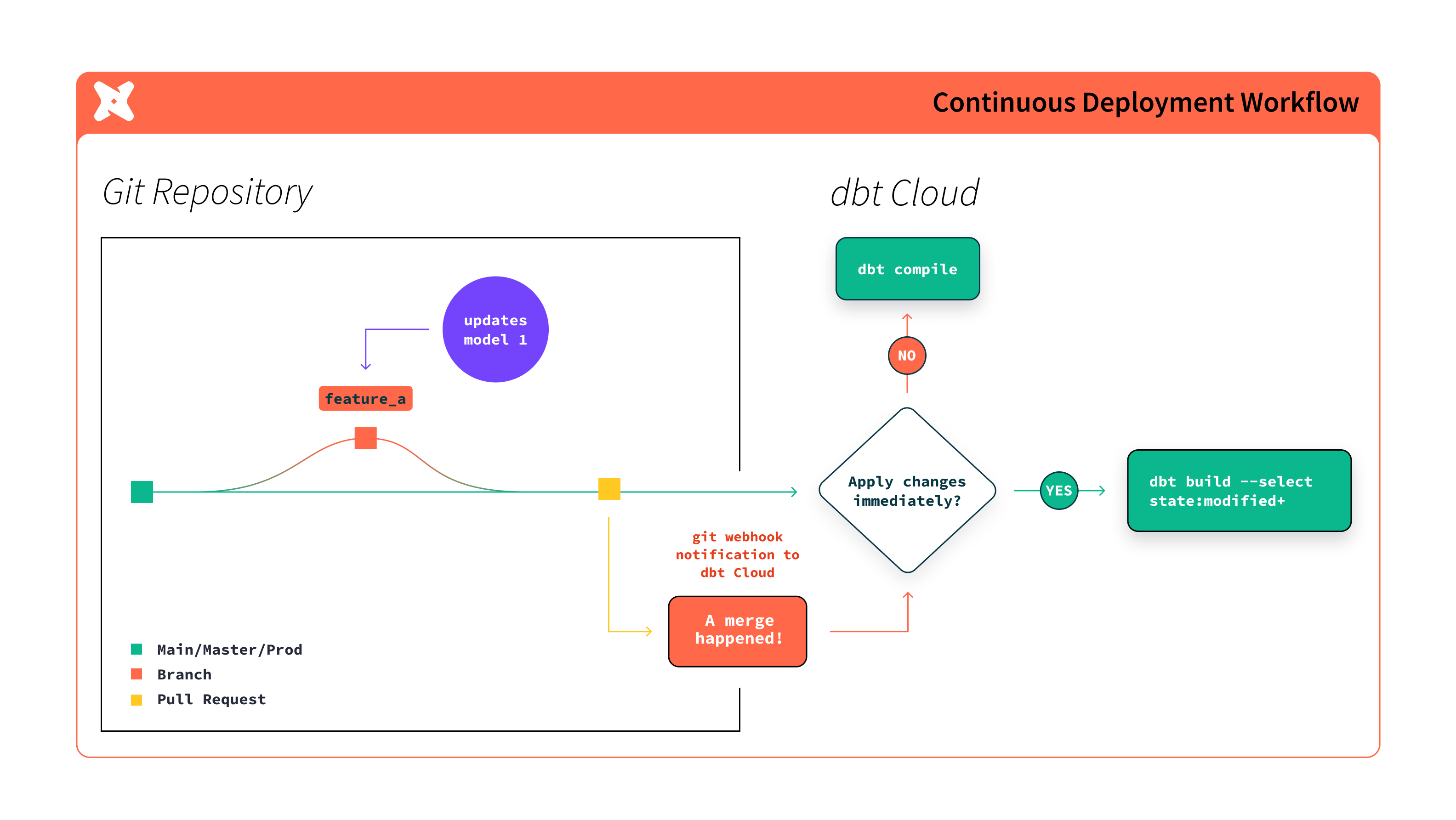 Workflow of continuous deployment in dbt
You can also implement continuous integration (CI) in dbt, which can further reduce the time it takes to push changes to production and improve code quality. To learn more, refer to Continuous integration in dbt.
Trigger jobs with automation or APIs
Merge jobs and deploy jobs start from your Git provider or from other triggers you configure inside dbt. Merge jobs that react to merges use the webhook flow summarized in How merge jobs work below and detailed under Set up job trigger on Git merge.
To start the same merge or deployment job from your own tooling, use the Administrative API and Trigger Job Run. Configure and validate the job in dbt first, note the account and job identifiers from the deployment URL or job settings, authenticate with service tokens or personal access tokens, assemble the HTTPS request headers and JSON body from Trigger Job Run, then monitor the resulting run alongside any webhook-triggered executions in job history.
- CI triggered through Administrative API payloads behaves differently than rerunning deployment or merge jobs. Follow Trigger a CI job with the API on the CI jobs page.
- Integrations with schedulers and platforms (for example Airflow and dbt, Prefect, Databricks) are collected on Deployment tools.
How merge jobs work
When you set up merge jobs, dbt listens for notifications from your Git provider indicating that a PR has been merged. When dbt receives one of these notifications, it enqueues a new run of the merge job.
You can set up merge jobs to perform one of the following when a PR merges:
Command to run | Usage description |
|---|---|
dbt build --select state:modified+ | (Default) Build the modified data with every merge. dbt builds only the changed data models and anything downstream of it, similar to CI jobs. This helps reduce computing costs and ensures that the latest code changes are always pushed to production. |
dbt compile | Refresh the applied state for performant (the slimmest) CI job runs. dbt generates the executable SQL (from the source model, test, and analysis files) but does not run it. This ensures the changes are reflected in the manifest for the next time a CI job is run and keeps track of only the relevant changes. |
Was this page helpful?
This site is protected by reCAPTCHA and the Google Privacy Policy and Terms of Service apply.
