# Continuous integration jobs in dbt
dbt platform
You can set up [continuous integration](./continuous-integration.md) (CI) jobs to run when someone opens a new pull request (PR) in your Git repository. By running and testing only *modified* models, dbt keeps these jobs as resource-conscious as possible on your data platform.
Triggering CI jobs in monorepos
If you have a monorepo with several dbt projects, opening a single pull request in one of your projects will trigger jobs for all projects connected to the monorepo. To address this, you can use separate target branches per project (for example, `main-project-a`, `main-project-b`) to separate CI triggers.
## Prerequisites
* You have a dbt account.
* CI features:
* For both the [concurrent CI checks](./continuous-integration.md#concurrent-ci-checks) and [smart cancellation of stale builds](./continuous-integration.md#smart-cancellation) features, your dbt account must be on the [Starter, Enterprise, or Enterprise+ plan](https://www.getdbt.com/pricing/).
* [SQL linting](./continuous-integration.md#sql-linting) is available on [dbt release tracks](../dbt-versions/dbt-release-tracks.md) and to dbt [Starter, Enterprise, or Enterprise+](https://www.getdbt.com/pricing/) accounts. Refer to [Configure SQLFluff linting](./continuous-integration.md#to-configure-sqlfluff-linting) when you add SQLFluff to your project.
SQLFluff and the dbt Fusion engine
SQLFluff linting is not yet supported for dbt platform jobs that run on the dbt Fusion engine. For more information, refer to [Fusion limitations](../fusion/supported-features.md#limitations).
* [Advanced CI](./advanced-ci.md) features:
* For the [compare changes](./advanced-ci.md#compare-changes) feature, your dbt account must be on an [Enterprise-tier plan](https://www.getdbt.com/pricing/) and have enabled Advanced CI features. Please ask your [dbt administrator to enable](../platform/account-settings.md#account-access-to-advanced-ci-features) this feature for you. After enablement, the **dbt compare** option becomes available in the CI job settings.
* Set up a [connection with your Git provider](../platform/git/configure-git.md). This integration lets dbt run jobs on your behalf for job triggering.
* If you're using a native [GitLab](../platform/git/connect-gitlab.md) integration, you need a paid or self-hosted account that includes support for GitLab webhooks and [project access tokens](https://docs.gitlab.com/ee/user/project/settings/project_access_tokens.html). If you're using GitLab Free, merge requests will trigger CI jobs but CI job status updates (success or failure of the job) will not be reported back to GitLab.
## Availability of features by Git provider
* If your git provider has a [native dbt integration](../platform/git/configure-git.md), you can seamlessly set up [continuous integration (CI)](./ci-jobs.md) jobs directly within dbt.
* For providers without native integration, you can still use the [Git clone method](../platform/git/import-a-project-by-git-url.md) to import your git URL and leverage the [dbt Administrative API](../dbt-apis/admin-api.md) to trigger a CI job to run.
The following table outlines the available integration options and their corresponding capabilities.
| **Git provider** | **Native dbt integration** | **Automated CI job** | **Git clone** | **Information** | **Supported plans** |
| -------------------------------------------------------------------------------------------------------------------------------------------------------------------------------------------------------------------------------------------------------------------------------------------------------------------------------------------- | -------------------------- | -------------------- | ------------- | ------------------------------------------------------------------------------------------------------------------------------------------------------------------------------------------------ | ----------------------- |
| [Azure DevOps](../platform/git/connect-azure-devops.md)
| ✅ | ✅ | ✅ | Organizations on the Starter and Developer plans can connect to Azure DevOps using a deploy key. Note, you won’t be able to configure automated CI jobs but you can still develop. | Enterprise, Enterprise+ |
| [GitHub](../platform/git/connect-github.md)
| ✅ | ✅ | ✅ | | All dbt plans |
| [GitLab](../platform/git/connect-gitlab.md)
| ✅ | ✅ | ✅ | | All dbt plans |
| All other git providers using [Git clone](../platform/git/import-a-project-by-git-url.md) ([BitBucket](../platform/git/import-a-project-by-git-url.md#bitbucket), [AWS CodeCommit](../platform/git/import-a-project-by-git-url.md#aws-codecommit), and others) | ❌ | ❌ | ✅ | Refer to the [Customizing CI/CD with custom pipelines](../../guides/custom-cicd-pipelines.md?step=1) guide to set up continuous integration and continuous deployment (CI/CD). | |
## Set up CI jobs
dbt Labs recommends that you create your CI job in a dedicated dbt [deployment environment](./deploy-environments.md#create-a-deployment-environment) that's connected to a staging database. A separate CI environment improves isolation between your temporary CI schemas and production builds.
You can trigger CI jobs for pull requests targeting a branch other than `main`. For example, if you use a long-lived staging branch, you can associate a CI environment with that branch via [custom branch](../../faqs/Environments/custom-branch-settings.md) settings. Then the job in that environment runs only when someone opens PRs against that branch.
To learn more, refer to [Get started with CI tests](../../guides/set-up-ci.md).
To make CI job creation easier, many options on the **CI job** page are set to default values that dbt Labs recommends that you use. If you don't want to use the defaults, you can change them.
1. On your deployment environment page, click **Create job** > **Continuous integration job** to create a new CI job.
2. Options in the **Job settings** section:
* **Job name** — Specify the name for this CI job.
* **Description** — Provide a description about the CI job.
* **Environment** — By default, this will be set to the environment you created the CI job from. Use the dropdown to change the default setting.
3. Options in the **Git trigger** section:
* **Triggered by pull requests** — By default, it’s enabled. Every time a developer opens up a pull request or pushes a commit to an existing pull request, this job will get triggered to run.
* **Run on draft pull request** — Enable this option if you want to also trigger the job to run every time a developer opens up a draft pull request or pushes a commit to that draft pull request.
4. Options in the **Execution settings** section:
* **Commands** — By default, this includes the `dbt build --select state:modified+` command. This informs dbt to build only new or changed models and their downstream dependents. Importantly, state comparison can only happen when there is a deferred environment selected to compare state to. Click **Add command** to add more [commands](./job-commands.md) that you want to be invoked when this job runs.
* **Linting** — Enable this option for dbt to [lint the SQL files](./continuous-integration.md#sql-linting) in your project as the first step in `dbt run`. If this check runs into an error, dbt can either **Stop running on error** or **Continue running on error**.
* **dbt compare**[Enterprise](https://www.getdbt.com/pricing "Go to https://www.getdbt.com/pricing")[Enterprise +](https://www.getdbt.com/pricing "Go to https://www.getdbt.com/pricing") — Enable this option to compare the last applied state of the production environment (if one exists) with the latest changes from the pull request, and identify what those differences are. To enable record-level comparison and primary key analysis, you must add a [primary key constraint](../../reference/resource-properties/constraints.md) or [uniqueness test](../../reference/resource-properties/data-tests.md#unique). Otherwise, you'll receive a "Primary key missing" error message in dbt.
To review the comparison report, navigate to the [Compare tab](./run-visibility.md#compare-tab) in the job run's details. A summary of the report is also available from the pull request in your Git provider (refer to the [CI report example](#example-ci-report)).
Optimization tip
When you enable the **dbt compare** checkbox, you can customize the comparison command to optimize your CI job. For example, if you have large models that take a long time to compare, you can exclude them to speed up the process using the [`--exclude` flag](../../reference/node-selection/exclude.md). Refer to [compare changes custom commands](./job-commands.md#compare-changes-custom-commands) for more details.
Additionally, if you set [`event_time`](../../reference/resource-configs/event-time.md) in your models/seeds/snapshots/sources, it allows you to compare matching date ranges between tables by filtering to overlapping date ranges. This is useful for faster CI workflows or custom sampling setups.
* **Compare changes against an environment (Deferral)** — By default, it’s set to the **Production** environment if you created one. This option allows dbt to check the state of the code in the PR against the code running in the deferred environment, so as to only check the modified code, instead of building the full table or the entire DAG.
Comparison manifests
The latest successful run in the environment can come from *any* job that updates artifacts there. If many jobs run with different settings, your CI comparison state can change in ways that are hard to predict. Even when you defer to Production, a merge or deploy that refreshes the manifest while other pull requests are open can make those runs pick up unrelated `state:modified` nodes until branches are updated.
* **Run timeout** — Cancel the CI job if the run time exceeds the timeout value. You can use this option to help ensure that a CI check doesn't consume too much of your warehouse resources. If you enable the **dbt compare** option, the timeout value defaults to `3600` (one hour) to prevent long-running comparisons.
* **Enable dbt State** [Preview](https://docs.getdbt.com/docs/dbt-versions/product-lifecycles "Go to https://docs.getdbt.com/docs/dbt-versions/product-lifecycles") — [dbt State](./dbt-state-about.md) reduces unnecessary model rebuilds by reusing nodes when neither the logic nor the data has changed. For more details, refer to [Setting up dbt State](./dbt-state-setup.md) and [Enabling dbt State on individual jobs](./dbt-state-enable-jobs.md).
5. (optional) Options in the **Advanced settings** section:
* **Environment variables** — Define [environment variables](../build/environment-variables.md) to customize the behavior of your project when this CI job runs. You can specify that a CI job is running in a *Staging* or *CI* environment by setting an environment variable and modifying your project code to behave differently, depending on the context. It's common for teams to process only a subset of data for CI runs, using environment variables to branch logic in their dbt project code.
* **Target name** — Define the [target name](../build/custom-target-names.md). Similar to **Environment Variables**, this option lets you customize the behavior of the project. You can use this option to specify that a CI job is running in a *Staging* or *CI* environment by setting the target name and modifying your project code to behave differently, depending on the context.
* **dbt version** — By default, it’s set to inherit the [dbt version](../dbt-versions.md) from the environment. dbt Labs strongly recommends that you don't change the default setting. This option to change the version at the job level is useful only when you upgrade a project to the next dbt version; otherwise, mismatched versions between the environment and job can lead to confusing behavior.
* **Threads** — By default, it’s set to 4 [threads](../local/profiles.yml.md#understanding-threads). Increase the thread count to increase model execution concurrency.
* **Generate docs on run** — Enable this if you want to [generate project docs](../explore/build-and-view-your-docs.md) when this job runs. This is disabled by default since testing doc generation on every CI check is not a recommended practice.
* **Run source freshness** — Enable this option to invoke the `dbt source freshness` command before running this CI job. Refer to [Source freshness](./source-freshness.md) for more details.
[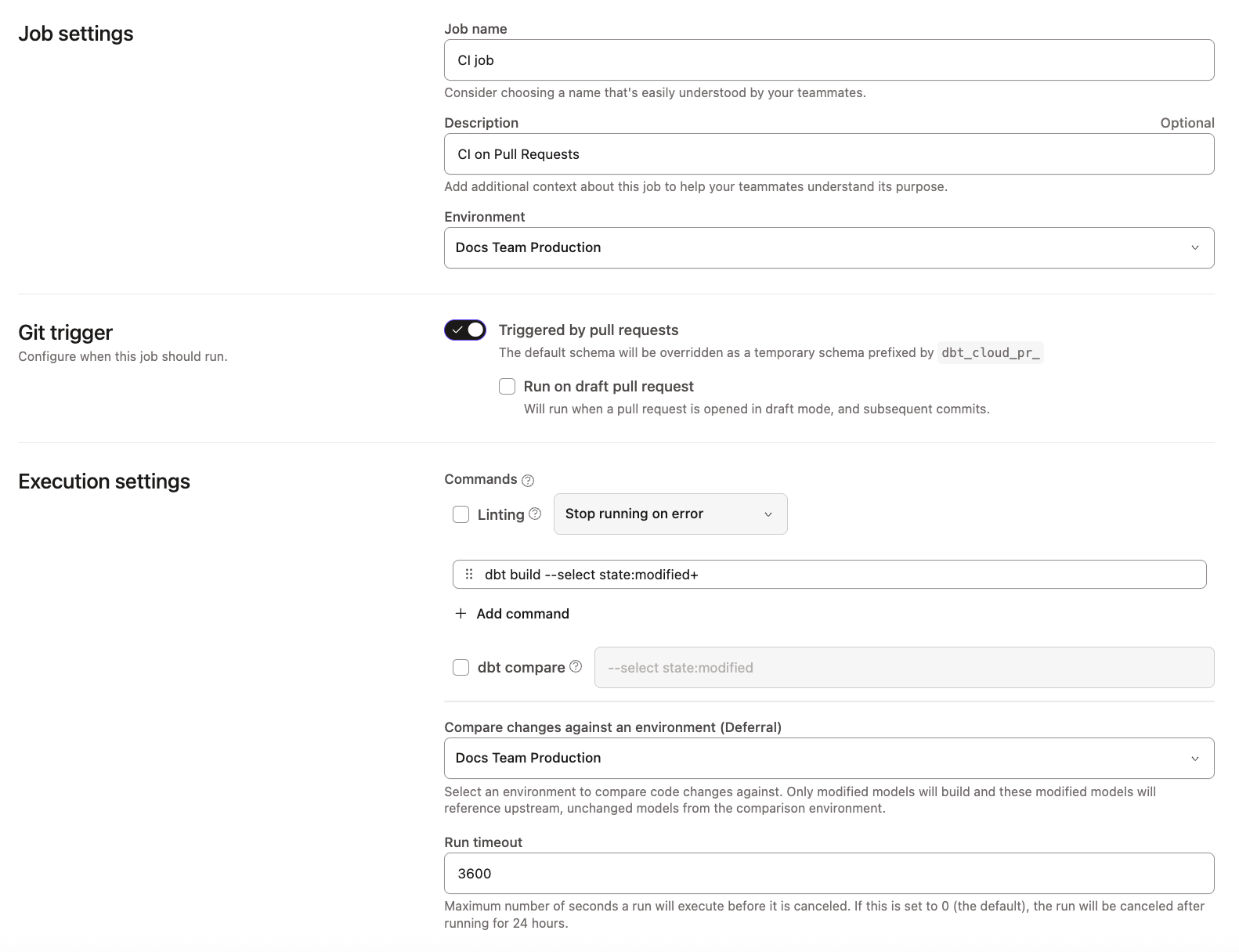](#)Example of CI Job page in the dbt UI
### Example of CI check in pull request
The following is an example of a CI check in a GitHub pull request. The green checkmark means the dbt build and tests were successful. Clicking on the dbt section takes you to the relevant CI run in dbt.
[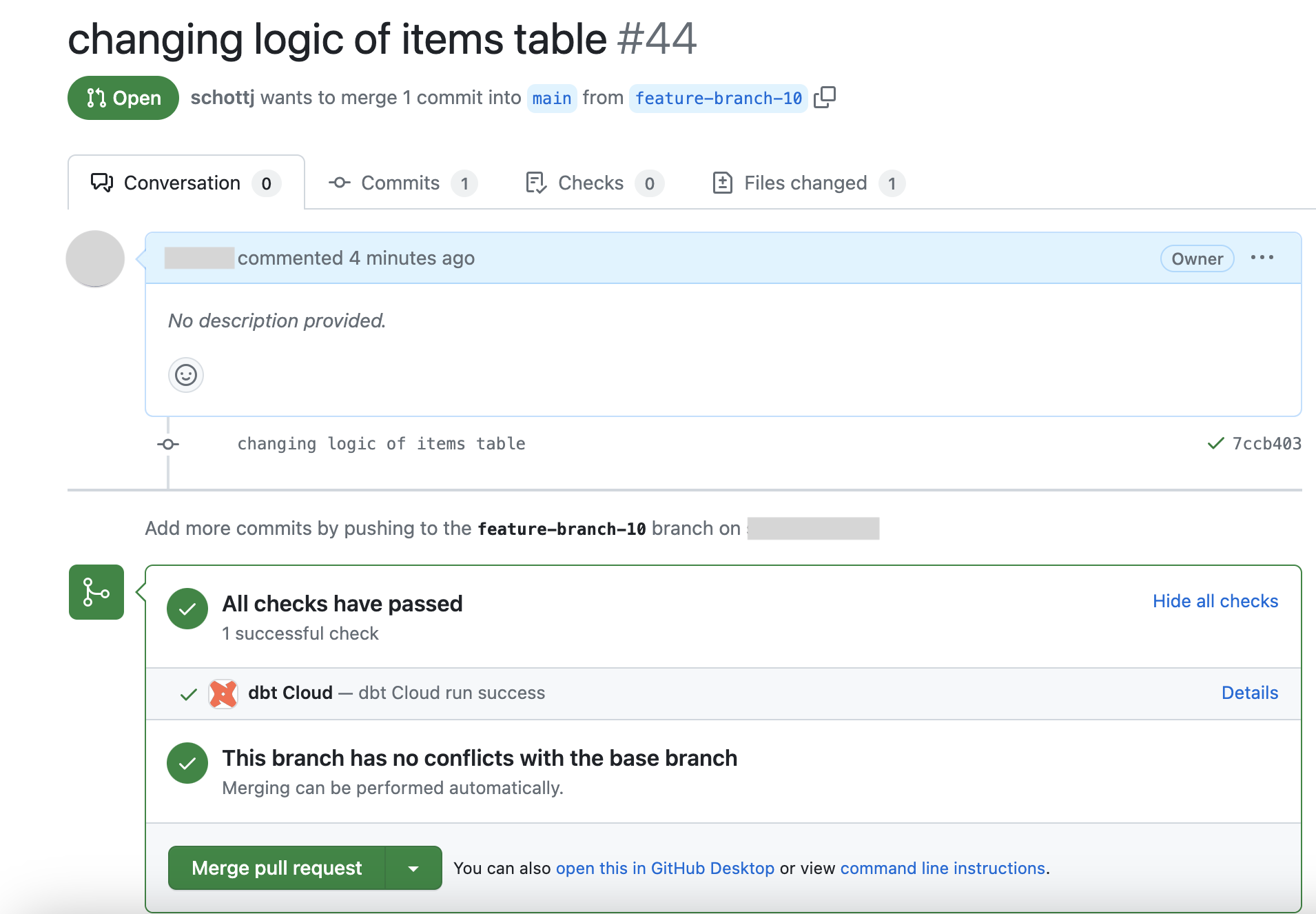](#)Example of CI check in GitHub pull request
### Example of CI report in pull request [Preview](https://docs.getdbt.com/docs/dbt-versions/product-lifecycles "Go to https://docs.getdbt.com/docs/dbt-versions/product-lifecycles")
The following is an example of a CI report in a GitHub pull request, which is shown when the **dbt compare** option is enabled for the CI job. It displays a high-level summary of the models that changed from the pull request.
[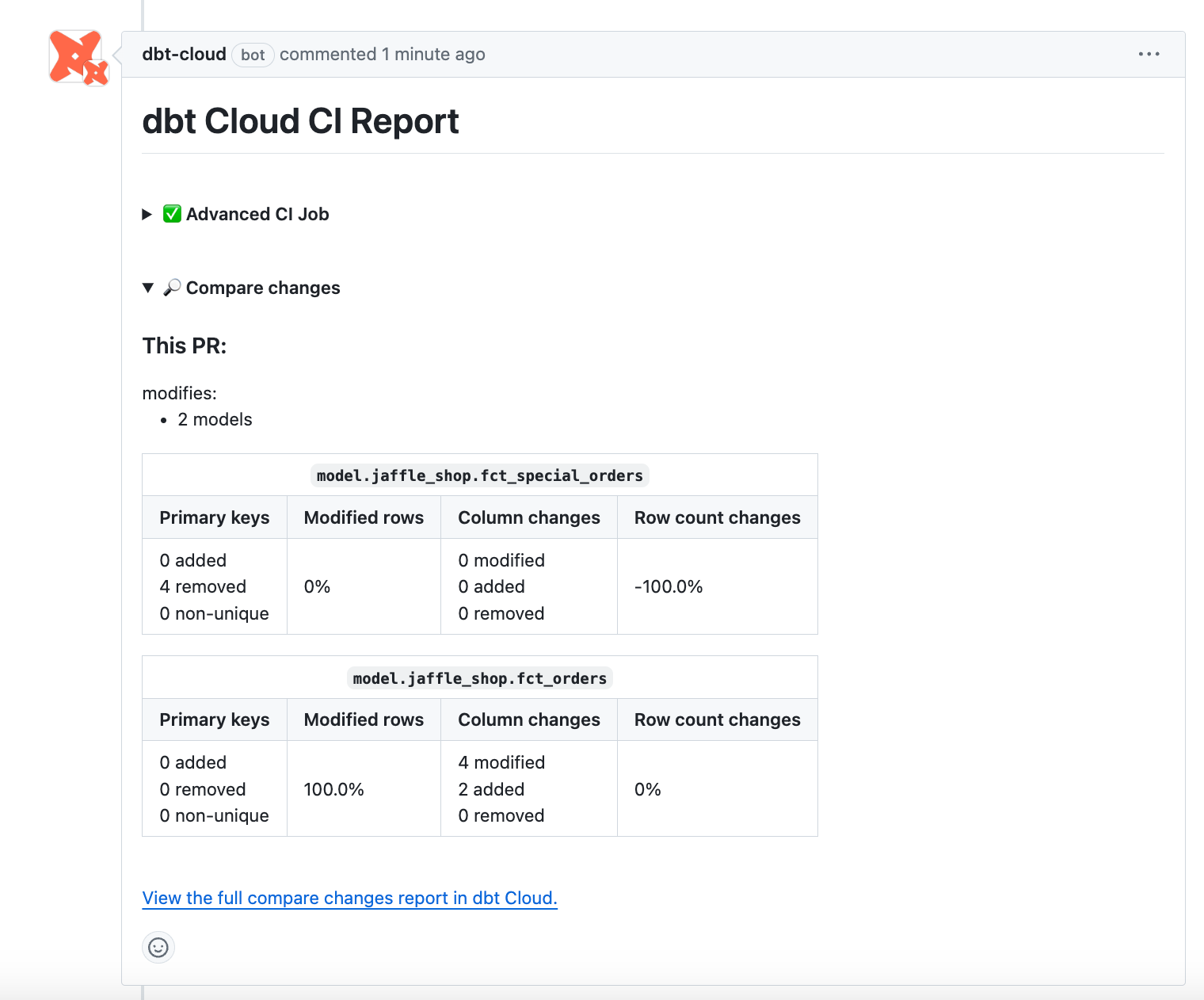](#)Example of CI report comment in GitHub pull request
## Trigger a CI job with the API [Enterprise](https://www.getdbt.com/pricing "Go to https://www.getdbt.com/pricing")[Enterprise +](https://www.getdbt.com/pricing "Go to https://www.getdbt.com/pricing")
If you're not using dbt’s native Git integration with [GitHub](../platform/git/connect-github.md), [GitLab](../platform/git/connect-gitlab.md), or [Azure DevOps](../platform/git/connect-azure-devops.md), you can use the [Administrative API](../dbt-apis/admin-api.md) to trigger a CI job to run. However, dbt will not automatically delete the temporary schema for you. This is because automatic deletion relies on incoming webhooks from Git providers, which is only available through the native integrations.
If you instead need workflows that run after a merge (not CI checks on an open pull request), refer to [Continuous deployment in dbt](./continuous-deployment.md) and [Merge jobs](./merge-jobs.md).
### Prerequisites
* You have a dbt account.
* You have a dbt [Enterprise or Enterprise+ plan](https://www.getdbt.com/pricing/). Legacy Team plans also retain access.
* For the [Concurrent CI checks](./continuous-integration.md#concurrent-ci-checks) and [Smart cancellation of stale builds](./continuous-integration.md#smart-cancellation) features, your dbt account must be on the [Enterprise or Enterprise+ plan](https://www.getdbt.com/pricing/), and legacy Team plans. Starter plans do not have access to these features when triggering a CI job with the API.
1. Set up a CI job with the [Create Job](https://docs.getdbt.com/dbt-cloud/api-v2#/operations/Create%20Job) API endpoint using `"job_type": ci` or from the [dbt UI](#set-up-ci-jobs).
2. Call the [Trigger Job Run](https://docs.getdbt.com/dbt-cloud/api-v2#/operations/Trigger%20Job%20Run) API endpoint to trigger the CI job. You must include both of these fields to the payload:
* Provide the pull request (PR) ID using one of these fields:
* `github_pull_request_id`
* `gitlab_merge_request_id`
* `azure_devops_pull_request_id`
* `non_native_pull_request_id` (for example, Bitbucket)
* Provide the `git_sha` or `git_branch` to target the correct commit or branch to run the job against.
## Semantic validations in CI [Starter](https://www.getdbt.com/pricing "Go to https://www.getdbt.com/pricing")[Enterprise](https://www.getdbt.com/pricing "Go to https://www.getdbt.com/pricing")[Enterprise +](https://www.getdbt.com/pricing "Go to https://www.getdbt.com/pricing")
Automatically test your semantic nodes (metrics, semantic models, and saved queries) during code reviews by adding warehouse validation checks in your CI job, guaranteeing that any code changes made to dbt models don't break these metrics.
To do this, add the command `dbt sl validate --select state:modified+` in the CI job. This ensures the validation of modified semantic nodes and their downstream dependencies.
[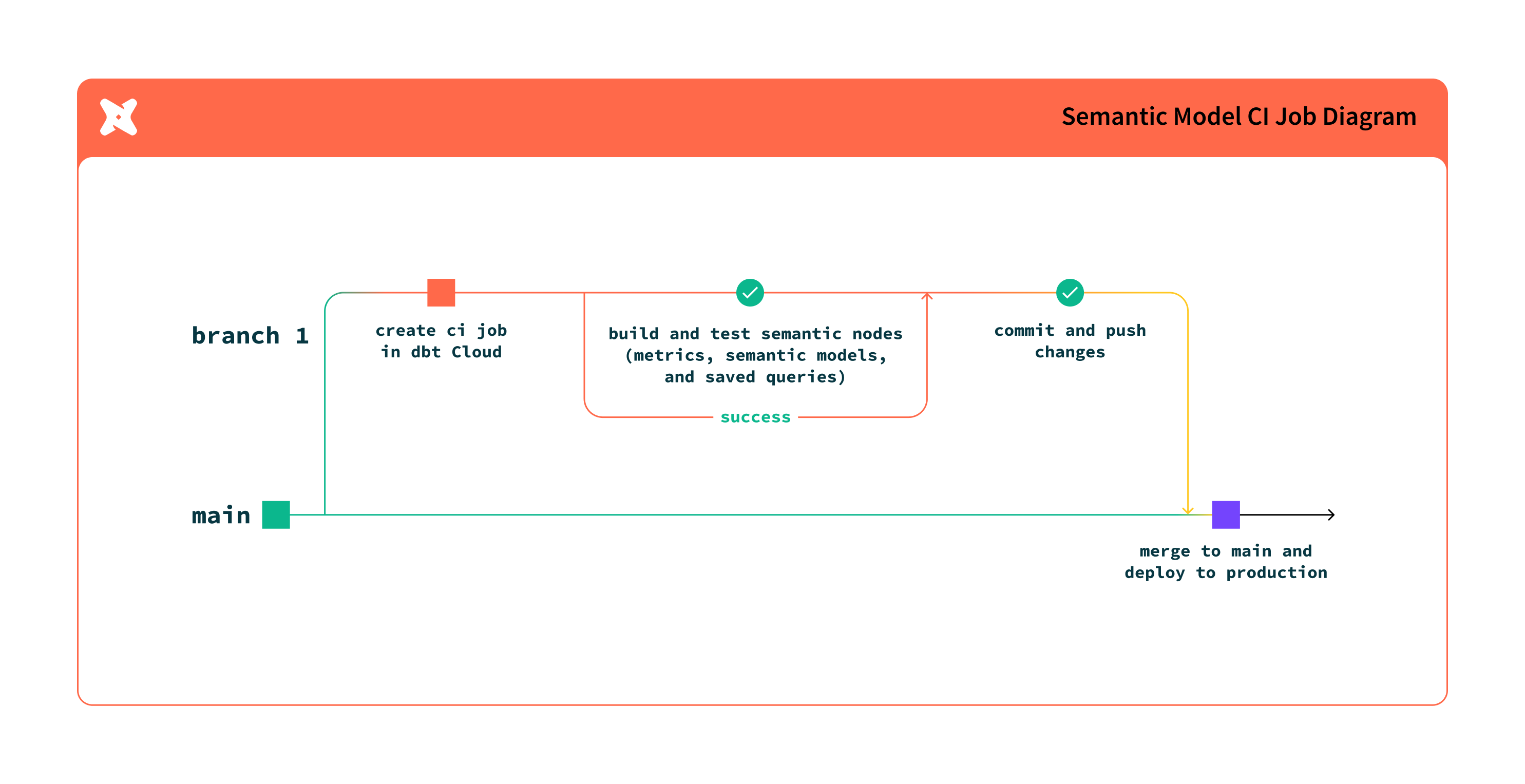](#)Semantic validations in CI workflow
#### Benefits
* Testing semantic nodes in a CI job supports deferral and selection of semantic nodes.
* It allows you to catch issues early in the development process and deliver high-quality data to your end users.
* Semantic validation executes an explain query in the data warehouse for semantic nodes to ensure the generated SQL will execute.
* For semantic nodes and models that aren't downstream of modified models, dbt defers to the production models.
### Set up semantic validations in your CI job
To learn how to set this up, refer to the following steps:
1. Click **Orchestration**.
2. Click **Jobs**.
3. Select the relevant job.
4. Click **Settings**.
5. Click **Edit**.
6. Add the `dbt sl validate --select state:modified+` command to the **Commands** field in the **Execution settings** section. The command uses state selection and deferral to run validation on any semantic nodes downstream of model changes. To reduce job times, we recommend only running CI on modified semantic models.
7. Click **Save** to save your changes.
There are additional commands and use cases described in the [next section](#use-cases), such as validating all semantic nodes, validating specific semantic nodes, and so on.
[](#)Validate semantic nodes downstream of model changes in your CI job.
### Use cases
Use or combine different selectors or commands to validate semantic nodes in your CI job. Semantic validations in CI support the following use cases:
Semantic nodes downstream of model changes (recommended)
To validate semantic nodes that are downstream of a model change, add the two commands in your job **Execution settings** section:
```bash
dbt build --select state:modified+
dbt sl validate --select state:modified+
```
* The first command builds the modified models.
* The second command validates the semantic nodes downstream of the modified models.
Before running semantic validations, dbt must build the modified models. This process ensures that downstream semantic nodes are validated using the CI schema through the dbt Semantic Layer API.
For semantic nodes and models that aren't downstream of modified models, dbt defers to the production models.
[](#)Validate semantic nodes downstream of model changes in your CI job.
Semantic nodes that are modified or affected by downstream modified nodes.
To only validate modified semantic nodes, use the following command (with [state selection](../../reference/node-selection/state-selection.md)):
```bash
dbt sl validate --select state:modified+
```
[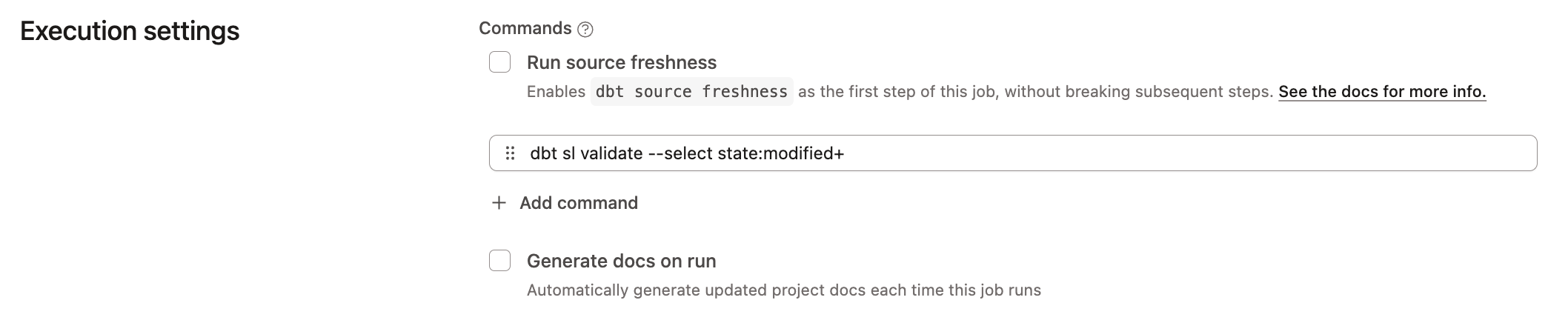](#)Use state selection to validate modified metric definition models in your CI job.
This will only validate semantic nodes. It will use the defer state set configured in your orchestration job, deferring to your production models.
Select specific semantic nodes
Use the selector syntax to select the *specific* semantic node(s) you want to validate:
```bash
dbt sl validate --select metric:revenue
```
[](#)Use state selection to validate modified metric definition models in your CI job.
In this example, the CI job will validate the selected `metric:revenue` semantic node. To select multiple semantic nodes, use the selector syntax: `dbt sl validate --select metric:revenue metric:customers`.
If you don't specify a selector, dbt will validate all semantic nodes in your project.
Select all semantic nodes
To validate *all* semantic nodes in your project, add the following command to defer to your production schema when generating the warehouse validation queries:
```bash
dbt sl validate
```
[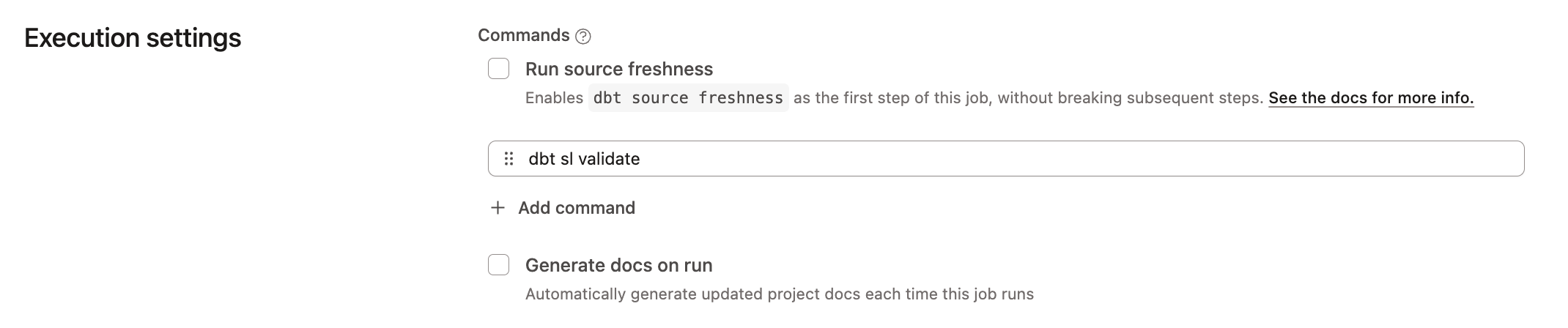](#)Validate all semantic nodes in your CI job by adding the command: 'dbt sl validate' in your job execution settings.
## Troubleshooting
Unable to trigger a CI job with GitLab
When you connect dbt to a GitLab repository, GitLab automatically registers a webhook in the background, viewable under the repository settings. This webhook is also used to trigger [CI jobs](./ci-jobs.md) when you push to the repository.
If you're unable to trigger a CI job, this usually indicates that the webhook registration is missing or incorrect.
To resolve this issue, navigate to the repository settings in GitLab and view the webhook registrations by navigating to GitLab --> **Settings** --> **Webhooks**.
Some things to check:
* The webhook registration is enabled in GitLab.
* The webhook registration is configured with the correct URL and secret.
If you're still experiencing this issue, reach out to the Support team at and we'll be happy to help!
CI selects or fails on models that are not in my pull request
This usually means the comparison manifest does not line up with your branch’s commits. Another job overwrote `manifest.json` with different settings, Production (or another deferred environment) advanced after someone else merged while your pull request stayed open, or the manifest is stale right after a merge. Built-in deferral targets an environment, not a hand-picked job ID.
To resolve this, merge or rebase the latest base branch into your pull request so your branch includes recent merges. To refresh the comparison manifest without waiting on a long deploy, use a [merge job](./merge-jobs.md) in the same environment your CI job defers to. For example, one that runs `dbt parse --no-partial-parse` (or [`dbt compile`](../../reference/commands/compile.md)) immediately after merges.
CI jobs aren't triggering occasionally when opening a PR using the Azure DevOps (ADO) integration
dbt won't trigger a CI job run if the latest commit in a pull or merge request has already triggered a run for that job. However, some providers (like GitHub) will enforce the result of the existing run on multiple pull/merge requests.
Scenarios where dbt does not trigger a CI job with Azure DevOps:
1. Reusing a branch in a new PR
* If you abandon a previous PR (PR 1) that triggered a CI job for the same branch (`feature-123`) merging into `main`, and then open a new PR (PR 2) with the same branch merging into`main` — dbt won't trigger a new CI job for PR 2.
2. Reusing the same commit
* If you create a new PR (PR 2) on the same commit (`#4818ceb`) as a previous PR (PR 1) that triggered a CI job — dbt won't trigger a new CI job for PR 2.
Temporary schemas aren't dropping
If your temporary schemas aren't dropping after a PR merges or closes, this typically indicates one of these issues:
* You have overridden the `generate_schema_name` macro and it isn't using `dbt_cloud_pr_` as the prefix.
To resolve this, change your macro so that the temporary PR schema name contains the required prefix. For example:
* ✅ Temporary PR schema name contains the prefix `dbt_cloud_pr_` (like `dbt_cloud_pr_123_456_marketing`).
* ❌ Temporary PR schema name doesn't contain the prefix `dbt_cloud_pr_` (like `marketing`).
A macro is creating a schema but there are no dbt models writing to that schema. dbt doesn't drop temporary schemas that weren't written to as a result of running a dbt model.
Error messages that refer to schemas from previous PRs
If you receive a schema-related error message referencing a *previous* PR, this is usually an indicator that you are not using a production job for your deferral and are instead using *self*. If the prior PR has already been merged, the prior PR's schema may have been dropped by the time the CI job for the current PR is kicked off.
To fix this issue, select a production job run to defer to instead of self.
Production job runs failing at the 'Clone Git Repository step'
dbt can only check out commits that belong to the original repository. dbt *cannot* checkout commits that belong to a fork of that repository.
If you receive the following error message at the **Clone Git Repository** step of your job run:
```text
Error message:
Cloning into '/tmp/jobs/123456/target'...
Successfully cloned repository.
Checking out to e845be54e6dc72342d5a8f814c8b3316ee220312...>
Failed to checkout to specified revision.
git checkout e845be54e6dc72342d5a8f814c8b3316ee220312
fatal: reference is not a tree: e845be54e6dc72342d5a8f814c8b3316ee220312
```
Double-check that your PR isn't trying to merge using a commit that belongs to a fork of the repository attached to your dbt project.
CI job not triggering for Virtual Private dbt users
To trigger jobs on dbt using the [API](../dbt-apis/admin-api.md), your Git provider needs to connect to your dbt account.
If you're on a Virtual Private dbt Enterprise plan using security features like ingress PrivateLink or IP Allowlisting, registering CI hooks may not be available and can cause the job to fail silently.
PR status for CI job stays in 'pending' in Azure DevOps after job run finishes
When you start a CI job, the pull request status should show as `pending` while it waits for an update from dbt. Once the CI job finishes, dbt sends the status to Azure DevOps (ADO), and the status will change to either `succeeded` or `failed`.
If the status doesn't get updated after the job runs, check if there are any git branch policies in place blocking ADO from receiving these updates.
One potential issue is the **Reset conditions** under **Status checks** in the ADO repository branch policy. If you enable the **Reset status whenever there are new changes** checkbox (under **Reset conditions**), it can prevent dbt from updating ADO about your CI job run status.
You can find relevant information here:
* [Azure DevOps Services Status checks](https://learn.microsoft.com/en-us/azure/devops/repos/git/branch-policies?view=azure-devops\&tabs=browser#status-checks)
* [Azure DevOps Services Pull Request Stuck Waiting on Status Update](https://support.hashicorp.com/hc/en-us/articles/18670331556627-Azure-DevOps-Services-Pull-Request-Stuck-Waiting-on-Status-Update-from-Terraform-Cloud-Enterprise-Run)
* [Pull request status](https://learn.microsoft.com/en-us/azure/devops/repos/git/pull-request-status?view=azure-devops#pull-request-status)
## Was this page helpful?
YesNo
[Privacy policy](https://www.getdbt.com/cloud/privacy-policy)[Create a GitHub issue](https://github.com/dbt-labs/docs.getdbt.com/issues)
This site is protected by reCAPTCHA and the Google [Privacy Policy](https://policies.google.com/privacy) and [Terms of Service](https://policies.google.com/terms) apply.