# Set up remote MCP
dbt platform
The remote MCP server uses an HTTP connection and makes calls to dbt-mcp hosted on the cloud-based dbt platform. The self-hosted installation is not required for remote MCP use and is ideal for data consumption use cases.
[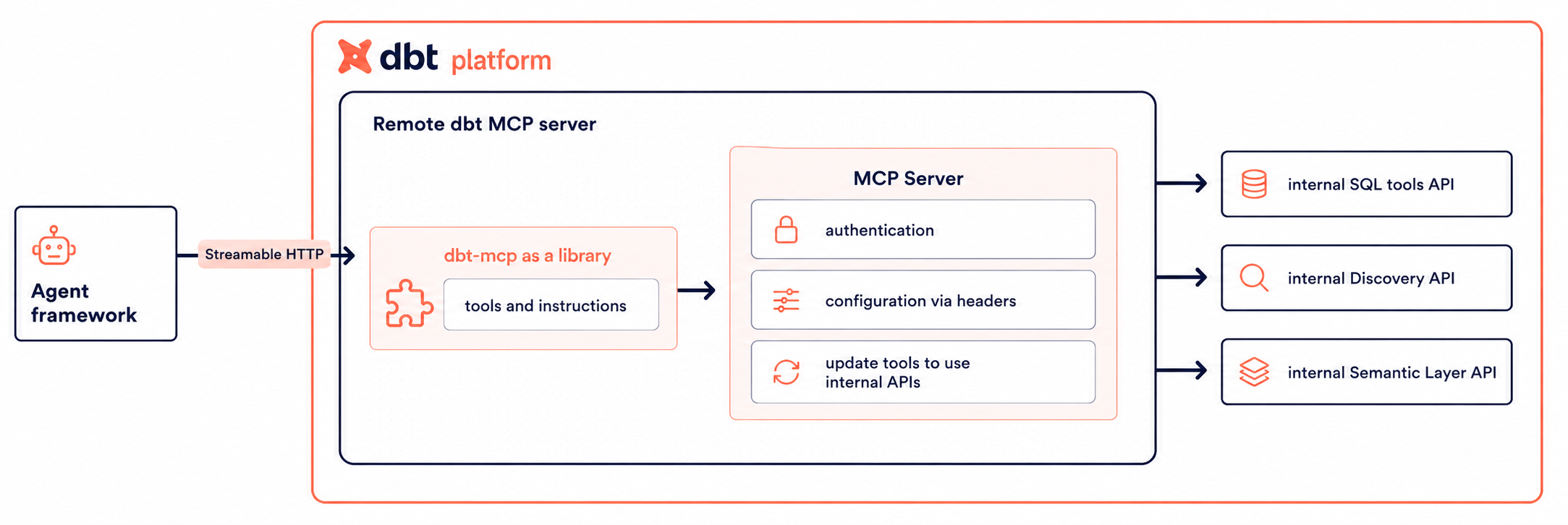](#)Remote dbt MCP server architecture
## When to use remote MCP
The remote MCP server is the ideal choice when:
* You don't want to or are restricted from installing additional software (`uvx`, `dbt-mcp`) on your system.
* Your primary use case is *consumption-based*: querying metrics, exploring metadata, viewing lineage.
* You need access to Semantic Layer, Administrative, and Discovery APIs without maintaining a local dbt project.
* You don't need to execute CLI commands. Remote MCP does not support self-hosted dbt CLI commands (`dbt run`, `dbt build`, `dbt test`, and more). If you need to execute dbt commands, use the [self-hosted MCP server](./setup-local-mcp.md) instead.
info
Only [`text_to_sql`](./mcp-available-tools.md) consumes your dbt Copilot action allotment. Other MCP tools do not.
When your account runs out of dbt Copilot actions, the remote MCP server blocks every tool that runs through it, including tools invoked from a self-hosted MCP server and [proxied](https://github.com/dbt-labs/dbt-mcp/blob/main/src/dbt_mcp/tools/toolsets.py#L24) to remote MCP, such as SQL and remote Fusion tools.
If you reach your dbt Copilot actions limit, remote MCP tools remain unavailable until the limit resets. If you need help, contact your account manager.
## Choose your auth method
| If you need... | Use... |
| ------------------------------------------------------------------------------------------------------ | ----------------------------------------------------------------------------------------------------------------------- |
| Fastest first-time setup and your MCP client supports OAuth for HTTP servers (including `execute_sql`) | **[OAuth (remote)](#oauth-remote-mcp)**
Available in public beta for Starter, Enterprise, and Enterprise+ accounts |
| `execute_sql` with token-based auth, automation, shared setup, or clients without OAuth | **Token-based** with a [personal access token (PAT)](../dbt-apis/user-tokens.md) |
| Shared or team setup | **Service token** (token-based) |
| CI or automation | **Service token** (token-based) |
Service tokens do not work for `execute_sql`
If you connect with a token instead of OAuth, `execute_sql` only works with a [personal access token (PAT)](../dbt-apis/user-tokens.md). Service tokens won't work. To run SQL without creating a PAT, use [OAuth (remote MCP)](#oauth-remote-mcp) instead.
## OAuth (remote MCP) [Beta](https://docs.getdbt.com/docs/dbt-versions/product-lifecycles "Go to https://docs.getdbt.com/docs/dbt-versions/product-lifecycles")[Starter](https://www.getdbt.com/pricing "Go to https://www.getdbt.com/pricing")[Enterprise](https://www.getdbt.com/pricing "Go to https://www.getdbt.com/pricing")[Enterprise +](https://www.getdbt.com/pricing "Go to https://www.getdbt.com/pricing")
OAuth lets you connect to the remote MCP server without copying API tokens into your MCP client, when your client supports OAuth for HTTP-based MCP servers.
### Prerequisites
* [AI features](https://docs.getdbt.com/docs/cloud/enable-dbt-copilot) enabled for your account.
* Starter, Enterprise, or Enterprise+ account
* An MCP client that supports OAuth for remote (HTTP) MCP servers.
* Your **MCP URL** from **Account settings** → **Access URLs** → **MCP Endpoint URL** in dbt platform. Check out the next section [MCP URL](#mcp-url) for more information.
### MCP URL
You can copy your full **MCP URL** from **Account settings** → **Access URLs** → **MCP Endpoint URL** in dbt platform, and paste it directly into your AI tool.
Build your own MCP URL
We recommend using the MCP URL from **Account settings** → **Access URLs** → **MCP Endpoint URL** in dbt platform. However, if you want to build your own MCP URL, use your **Access URL** from **Account settings** in dbt platform. The remote MCP endpoint is `https://YOUR_DBT_HOST_URL/api/ai/v1/mcp`. Replace `YOUR_DBT_HOST_URL` with your hostname only (no `https://`).
For default hosts, multi-cell accounts, and regions, see [Access, Regions, & IP addresses](../platform/about-platform/access-regions-ip-addresses.md).
### How it works
1. In your MCP client, navigate to the connector or integrations settings and add your MCP URL (refer to [MCP URL](#mcp-url)). For example, if you used Claude or ChatGPT, you would go to:
* **Claude (web)**: **Customize** → **Connectors** → **+** → **Add custom connector**
* **ChatGPT**: **Settings** → **Apps** → **Create App**
* For Claude Desktop and Claude Code, refer to [Integrate Claude with dbt MCP](./integrate-mcp-claude.md).
2. When prompted in your MCP client, complete sign-in in the browser and approve the requested scopes on the consent screen.
3. Return to your MCP client; subsequent requests use the OAuth session according to your client's behavior.
You can use `execute_sql` with OAuth. Add your MCP URL to your client and sign in when your MCP client prompts you. You don't need a personal access token or extra headers.
### Register your MCP client
OAuth requires every client to be registered with dbt platform. There are two paths:
* **Dynamic registration (default)** — Clients that implement [Dynamic Client Registration (RFC 7591)](../platform/manage-access/connect-apps-oauth.md#dynamic-registration) self-register the first time a user connects. No admin action required. Most modern MCP clients (such as Claude Desktop, Claude Code, Cursor, and VS Code) support this.
* **Manual registration** — For clients that don't support dynamic registration, an account admin registers the client in **Account settings → Integrations → App integrations**. Manually registered clients use [PKCE (RFC 7636)](../platform/manage-access/connect-apps-oauth.md#manual-registration) instead of a client secret. Refer to [Manual registration](../platform/manage-access/connect-apps-oauth.md#manual-registration) for the admin walkthrough.
Both types appear in **App integrations** in dbt platform, where admins can review and audit each connected client.
### Scopes you'll consent to
The first time you connect, dbt shows a consent screen listing the scopes (the specific permissions the client is allowed to use) the MCP client is requesting. Scopes act as a **filter on your existing permissions** — they don't grant new access. You can also choose whether the client gets access to all projects or only selected projects.
For the full list of scopes and what each one allows, refer to [Scopes and consent](../platform/manage-access/connect-apps-oauth.md#scopes-and-consent). For sessions, refresh tokens, revoking access, and audit logging, refer to [Connect apps with OAuth](../platform/manage-access/connect-apps-oauth.md).
### Limitations
* Remote MCP doesn't support self-hosted dbt CLI commands (like `dbt run`, `dbt build`, `dbt test`, and more) or local project access; use the [self-hosted MCP server](./setup-local-mcp.md) for those workflows.
For client-specific steps, refer to [Integrate Claude with MCP](./integrate-mcp-claude.md), [Integrate Cursor with MCP](./integrate-mcp-cursor.md), [Integrate Snowflake Cortex with MCP](./integrate-mcp-snowflake-cortex.md), or [Integrate VS Code with MCP](./integrate-mcp-vscode.md).
## Token-based authentication
Token-based authentication lets you connect to the remote MCP server without OAuth by passing a PAT or service token in your MCP client config. Use it when your client doesn't support OAuth for HTTP-based MCP servers, when you need a shared or CI setup, or when you need `execute_sql`, which requires a PAT.
### Setup instructions
1. Ensure that you have [AI features](https://docs.getdbt.com/docs/platform/enable-dbt-ai) turned on.
2. Obtain the following information from dbt platform:
* **dbt platform host**: Use this to form the full URL. For example, replace `YOUR_DBT_HOST_URL` here: `https://YOUR_DBT_HOST_URL/api/ai/v1/mcp/`. It may look like: `https://cloud.getdbt.com/api/ai/v1/mcp/`. If you have a multi-cell account, the host URL will be in the `ACCOUNT_PREFIX.us1.dbt.com` format. For more information, refer to [Access, Regions, & IP addresses](../platform/about-platform/access-regions-ip-addresses.md).
* **Production environment ID**: From **Orchestration** → **Environments** in dbt platform. Use this to set an `x-dbt-prod-environment-id` header. Refer to [How to find your dbt MCP IDs](./mcp-find-ids.md#dbt-prod-env-id) for step-by-step instructions.
* **Token**: Generate either a personal access token or a service token. To fully utilize remote MCP, the token must have Semantic Layer and Developer permissions.
* If you plan to use `execute_sql` with token-based auth, you must use a [Personal Access Token (PAT)](../dbt-apis/user-tokens.md). Service tokens *do not* work for this tool. For other tools that require `x-dbt-user-id`, a PAT is also required.
3. For the remote MCP, you will pass on headers through the JSON blob to configure required fields:
#### Configuration for APIs and SQL tools
| Header | Required | Description |
| ------------------------- | -------- | --------------------------------------------------------------------------------------------------------------------------------------------------------------------------------------------------------------------------------------------------------------------------------------------------------------------------------------------------------------------------------------------------------------------------------------------------------------------------------------------------------------------------------------------------------------------------------- |
| Authorization | Required | Your [personal access token (PAT)](../dbt-apis/user-tokens.md) or [service token](../dbt-apis/service-tokens.md) from the dbt platform.
**Note**: When using the Semantic Layer, we recommended to use a PAT. If you're using a service token, make sure that it has at least `Semantic Layer Only`, `Metadata Only`, and `Developer` permissions.
The value must be in the format `Token YOUR_DBT_ACCESS_TOKEN` or `Bearer YOUR_DBT_ACCESS_TOKEN`, replacing `YOUR_DBT_ACCESS_TOKEN` with your actual token. |
| x-dbt-prod-environment-id | Required | Your dbt platform production environment ID. Refer to [How to find your dbt MCP IDs](./mcp-find-ids.md#dbt-prod-env-id) for step-by-step instructions. |
#### Additional configuration for SQL tools
| Header | Required | Description |
| ------------------------ | -------------------------- | ---------------------------------------------------------------------------------------------------------------------------------------------------------------------------------------- |
| x-dbt-dev-environment-id | Required for `execute_sql` | Your dbt platform development environment ID. Refer to [How to find your dbt MCP IDs](./mcp-find-ids.md#dbt-dev-env-id) for step-by-step instructions. |
| x-dbt-user-id | Required for `execute_sql` | Your dbt platform user ID. Refer to [Where can I find my user ID?](../../faqs/Accounts/find-user-id.md) for details. |
#### Additional configuration for Fusion tools
By default, Fusion tools use the environment you set in `x-dbt-prod-environment-id` for model and table metadata.
| Header | Required | Description |
| -------------------------- | -------- | ------------------------------------------------------------------------------------------------------------------------------------------------------------------------------------------------------------ |
| x-dbt-dev-environment-id | Required | Your dbt platform development environment ID. Refer to [How to find your dbt MCP IDs](./mcp-find-ids.md#dbt-dev-env-id) for step-by-step instructions. |
| x-dbt-user-id | Required | Your dbt platform user ID. Refer to [Where can I find my user ID?](../../faqs/Accounts/find-user-id.md) for details. |
| x-dbt-fusion-disable-defer | Optional | Default: `false`. When set to `true`, Fusion tools will not defer to the production environment and use the models and table metadata from the development environment (`x-dbt-dev-environment-id`) instead. |
#### Configuration to disable tools
| Header | Required | Description |
| ---------------------- | -------- | ---------------------------------------------------------------------------------------------------- |
| x-dbt-disable-tools | Optional | A comma-separated list of tools to disable. For instance: `get_all_models,text_to_sql,list_entities` |
| x-dbt-disable-toolsets | Optional | A comma-separated list of toolsets to disable. For instance: `semantic_layer,sql,discovery` |
4. After establishing which headers you need, you can follow the [examples](https://github.com/dbt-labs/dbt-mcp/tree/main/examples) to create your own agent.
## Examples
The MCP protocol is programming language and framework agnostic, so use whatever helps you build agents. If you use [OAuth (remote MCP)](#oauth-remote-mcp) in Beta, you only need your MCP URL. If you use token-based authentication, add the headers in the examples below. Configuration varies by client — select your tool in the following tabs and replace the placeholder values with your own:
### OAuth
### Claude Code
```json
{
"mcpServers": {
"dbt": {
"type": "http",
"url": "https://YOUR_DBT_HOST_URL/api/ai/v1/mcp/"
}
}
}
```
### Cursor
```json
{
"mcpServers": {
"dbt": {
"url": "https://YOUR_DBT_HOST_URL/api/ai/v1/mcp/"
}
}
}
```
### Token-based
### Claude Code
```json
{
"mcpServers": {
"dbt": {
"type": "http",
"url": "https://YOUR_DBT_HOST_URL/api/ai/v1/mcp/",
"headers": {
"Authorization": "Token YOUR_DBT_ACCESS_TOKEN",
"x-dbt-prod-environment-id": "DBT_PROD_ENV_ID",
"x-dbt-user-id": "DBT_USER_ID",
"x-dbt-dev-environment-id": "DBT_DEV_ENV_ID"
}
}
}
}
```
### Cursor
```json
{
"mcpServers": {
"dbt": {
"url": "https://YOUR_DBT_HOST_URL/api/ai/v1/mcp/",
"headers": {
"Authorization": "Token YOUR_DBT_ACCESS_TOKEN",
"x-dbt-prod-environment-id": "DBT_PROD_ENV_ID",
"x-dbt-user-id": "DBT_USER_ID",
"x-dbt-dev-environment-id": "DBT_DEV_ENV_ID"
}
}
}
}
```
### Gemini
```json
{
"mcpServers": {
"dbt": {
"httpUrl": "https://YOUR_DBT_HOST_URL/api/ai/v1/mcp/",
"headers": {
"Authorization": "Token YOUR_DBT_ACCESS_TOKEN",
"x-dbt-prod-environment-id": "DBT_PROD_ENV_ID",
"x-dbt-user-id": "DBT_USER_ID",
"x-dbt-dev-environment-id": "DBT_DEV_ENV_ID"
}
}
}
}
```
Use numeric IDs, not full URLs
Header values like `x-dbt-prod-environment-id` and `x-dbt-user-id` expect numeric IDs, not full URLs. The host in the `url` field should include `https://`, but ID headers must be integers only:
```bash
# ✅ Correct
"url": "https://cloud.getdbt.com/api/ai/v1/mcp"
"x-dbt-prod-environment-id": "54321"
"x-dbt-user-id": "123"
# ❌ Wrong — don't paste full URLs into ID headers
"x-dbt-prod-environment-id": "https://cloud.getdbt.com/deploy/12345/projects/67890/environments/54321"
"x-dbt-user-id": "https://cloud.getdbt.com/settings/profile"
```
For other MCP clients (Codex, Windsurf, and so on), refer to your client's MCP configuration docs for the correct key format.
For self-hosted MCP, use environment variables to configure your setup; refer to the [Environment variables reference](./mcp-environment-variables.md).
## Related docs
Step-by-step client setup (including Cursor, VS Code, and Claude) is in:
* [Integrate Cursor with MCP](./integrate-mcp-cursor.md)
* [Integrate VS Code with MCP](./integrate-mcp-vscode.md)
* [Integrate Claude with MCP](./integrate-mcp-claude.md)
* [Integrate Snowflake Cortex with MCP](./integrate-mcp-snowflake-cortex.md)
## Was this page helpful?
YesNo
[Privacy policy](https://www.getdbt.com/cloud/privacy-policy)[Create a GitHub issue](https://github.com/dbt-labs/docs.getdbt.com/issues)
This site is protected by reCAPTCHA and the Google [Privacy Policy](https://policies.google.com/privacy) and [Terms of Service](https://policies.google.com/terms) apply.