# User-defined functions
User-defined functions (UDFs) enable you to define and register custom functions in your warehouse. Like [macros](./jinja-macros.md), UDFs promote code reuse, but they are objects in the warehouse so you can reuse the same logic in tools outside dbt, such as BI tools, data science notebooks, and more.
UDFs are particularly valuable for sharing logic across multiple tools, standardizing complex business calculations, improving performance for compute-intensive operations (since they're compiled and optimized by your warehouse's query engine), and version controlling custom logic within your dbt project.
dbt creates, updates, and renames UDFs as part of DAG execution. The UDF is built in the warehouse before the model that references it. Refer to [listing and building UDFs](./udfs.md#listing-and-building-udfs) for more info on how to build UDFs in your project.
Refer to [Function properties](../../reference/function-properties.md) or [Function configurations](../../reference/function-configs.md) for more information on the configs/properties for UDFs.
## Prerequisites
* Make sure you're using dbt platform's **Fusion Stable** or **Latest** [release track](../dbt-versions/dbt-release-tracks.md) or dbt Core v1.11+.
* Use one of the following adapters:
### dbt Core
* BigQuery
* Snowflake
* Redshift
* Postgres
* Databricks
### dbt Fusion engine
* BigQuery
* Snowflake
* Redshift
* Databricks
UDF support
JavaScript UDFs are supported in dbt Core v1.12+ on Snowflake and BigQuery.
Additional languages (for example, Java, Scala) aren't currently supported for UDFs.
See the [Limitations](#limitations) section below for the full list of currently supported UDF capabilities.
## Defining UDFs in dbt
You can define SQL, Python, and JavaScript (available in dbt Core v1.12+) UDFs in dbt. Python UDFs are supported in Snowflake, BigQuery, and Databricks ([Unity Catalog](https://docs.databricks.com/aws/en/data-governance/unity-catalog/) required). JavaScript UDFs are supported in Snowflake and BigQuery.
Follow these steps to define UDFs in dbt:
1. Create a SQL, Python, or JavaScript file under the `functions` directory. For example, this UDF checks if a string represents a positive integer:
### SQL
Define a SQL UDF in a SQL file.
functions/is\_positive\_int.sql
```sql
# syntax for BigQuery, Snowflake, and Databricks
REGEXP_INSTR(a_string, '^[0-9]+$')
# syntax for Redshift and Postgres
SELECT REGEXP_INSTR(a_string, '^[0-9]+$')
```
### Python
Define a Python UDF in a Python file.
functions/is\_positive\_int.py
```py
import re
def main(a_string):
return 1 if re.search(r'^[0-9]+$', a_string or '') else 0
```
For Databricks, the contents of the `.py` file become the UDF body verbatim, and Databricks evaluates that body directly instead of calling a named entry point. Write the body so its last statement is a top-level `return` that produces the result. Because of that top-level `return`, the Databricks source is a function *body*, not a runnable `.py` module. For example:
functions/is\_positive\_int.py
```py
import re
def main(a_string):
return 1 if re.search(r'^[0-9]+$', a_string or '') else 0
return main(a_string)
```
**Note:** Python UDFs on Databricks require [Unity Catalog](https://docs.databricks.com/aws/en/data-governance/unity-catalog/).
### JavaScript
Define a JavaScript UDF in a JavaScript file.
functions/is\_positive\_int.js
```js
return /^[0-9]+$/.test(a_string) ? 1 : 0;
```
**Note**: You can specify configs in a config block in the SQL file or in the corresponding properties YAML file in step 2.
2. Specify the function name and define the config, properties, return type, and optional arguments in a corresponding properties YAML file.
### SQL
functions/is\_positive\_int.yml
```yml
functions:
- name: is_positive_int # required
description: My UDF that returns 1 if a string represents a naked positive integer (like "10", "+8" is not allowed). # optional
config:
schema: udf_schema
database: udf_db
volatility: deterministic
arguments: # optional
- name: a_string # required if arguments is specified
data_type: string # required if arguments is specified
description: The string that I want to check if it's representing a positive integer (like "10")
default_value: "'1'" # optional, available in Snowflake and Postgres
returns: # required
data_type: integer # required
```
### Python
The following configs are required when defining a Python UDF on Snowflake and BigQuery:
* [`runtime_version`](../../reference/resource-configs/runtime-version.md) — Specify the Python version to run. Supported values are:
* [Snowflake](https://docs.snowflake.com/en/developer-guide/udf/python/udf-python-introduction): `3.10`, `3.11`, `3.12`, and `3.13`
* [BigQuery](https://cloud.google.com/bigquery/docs/user-defined-functions-python): `3.11`
* [`entry_point`](../../reference/resource-configs/entry-point.md) — Specify the Python function to be called.
On Databricks, `runtime_version` and `entry_point` are accepted for cross-adapter compatibility but have no effect. Databricks manages the Python runtime internally and uses the function body directly, so dbt displays a warning if you set them.
You can specify public third-party PyPI packages for your Python UDF with the optional `packages` config. List package names, such as `numpy` and `pandas`, and optionally pin versions, such as `pandas==1.5.0`. The warehouse installs these packages when it creates the UDF, so your UDF can use functionality from external Python libraries. On Snowflake, some packages are installed from the Anaconda repository, and you may need to [accept Anaconda's Terms of Service](https://docs.snowflake.com/en/developer-guide/udf/python/udf-python-packages#using-third-party-packages-from-anaconda) before you can use them.
The following example shows a Python UDF with the required configs (`runtime_version`, `entry_point`), the optional `packages` config, and other common configs:
functions/is\_positive\_int.yml
```yml
functions:
- name: is_positive_int # required
description: My UDF that returns 1 if a string represents a naked positive integer (like "10", "+8" is not allowed). # optional
config:
runtime_version: "3.11" # required for Snowflake and BigQuery; optional and ignored on Databricks
entry_point: main # required for Snowflake and BigQuery; optional and ignored on Databricks
packages: # optional, Python UDFs only
- numpy
- pandas==1.5.0
schema: udf_schema
database: udf_db
volatility: deterministic
arguments: # optional
- name: a_string # required if arguments is specified
data_type: string # required if arguments is specified
description: The string that I want to check if it's representing a positive integer (like "10")
default_value: "'1'" # optional, available in Snowflake and Postgres
returns: # required
data_type: integer # required
```
### JavaScript
You can optionally set [`snowflake.quote_args`](../../reference/resource-configs/quote_args.md) to control whether argument names are quoted when creating a JavaScript UDF on Snowflake.
functions/is\_positive\_int.yml
```yml
functions:
- name: is_positive_int # required
description: My UDF that returns 1 if a string represents a naked positive integer (like "10", "+8" is not allowed). # optional
config:
snowflake: # optional
quote_args: true # optional, JavaScript UDFs on Snowflake only
arguments: # optional
- name: a_string # required if arguments is specified
data_type: string # required if arguments is specified
description: The string to check # optional
returns: # required
data_type: integer # required
```
volatility warehouse-specific
`volatility` is accepted in dbt for SQL, Python, and JavaScript UDFs, but the handling of it is warehouse-specific. For SQL and Python UDFs on BigQuery, `volatility` is ignored and dbt displays a warning. For JavaScript UDFs on BigQuery, `deterministic` and `non-deterministic` are applied when creating the UDF; `stable` is not supported. In Snowflake, all supported volatility values are applied when creating the UDF. Refer to [volatility](../../reference/resource-configs/volatility.md) for more information.
3. Run one of the following `dbt build` commands to build your UDFs and create them in the warehouse:
Build all UDFs:
```bash
dbt build --select "resource_type:function"
```
Or build a specific UDF:
```bash
dbt build --select is_positive_int
```
When you run `dbt build`, the property file (`functions/is_positive_int.yml`) and the corresponding SQL, Python, or JavaScript file work together to generate the `CREATE FUNCTION` statement.
The rendered `CREATE FUNCTION` statement depends on which adapter you're using. For example:
### SQL
### Snowflake
```sql
CREATE OR REPLACE FUNCTION udf_db.udf_schema.is_positive_int(a_string STRING DEFAULT '1')
RETURNS INTEGER
LANGUAGE SQL
IMMUTABLE
AS $$
REGEXP_INSTR(a_string, '^[0-9]+$')
$$;
```
### Redshift
```sql
CREATE OR REPLACE FUNCTION udf_db.udf_schema.is_positive_int(a_string VARCHAR)
RETURNS INTEGER
IMMUTABLE
AS $$
SELECT REGEXP_INSTR(a_string, '^[0-9]+$')
$$ LANGUAGE SQL;
```
### BigQuery
```sql
CREATE OR REPLACE FUNCTION udf_db.udf_schema.is_positive_int(a_string STRING)
RETURNS INT64
AS (
REGEXP_INSTR(a_string, r'^[0-9]+$')
);
```
### Databricks
```sql
CREATE OR REPLACE FUNCTION udf_db.udf_schema.is_positive_int(a_string STRING)
RETURNS INT
DETERMINISTIC
RETURN REGEXP_INSTR(a_string, '^[0-9]+$');
```
### Postgres
```sql
CREATE OR REPLACE FUNCTION udf_schema.is_positive_int(a_string text DEFAULT '1')
RETURNS int
LANGUAGE sql
IMMUTABLE
AS $$
SELECT regexp_instr(a_string, '^[0-9]+$')
$$;
```
### Python
### Snowflake
```sql
CREATE OR REPLACE FUNCTION udf_db.udf_schema.is_positive_int(a_string STRING DEFAULT '1')
RETURNS INTEGER
LANGUAGE PYTHON
RUNTIME_VERSION = '3.11'
HANDLER = 'main'
PACKAGES = ('numpy', 'pandas==1.5.0')
AS $$
import re
def main(a_string):
return 1 if re.search(r'^[0-9]+$', a_string or '') else 0
$$;
```
### BigQuery
```sql
CREATE OR REPLACE FUNCTION udf_db.udf_schema.is_positive_int(a_string STRING)
RETURNS INT64
LANGUAGE python
OPTIONS(
runtime_version = "python-3.11",
entry_point = "main",
packages = ['numpy', 'pandas==1.5.0']
)
AS r'''
import re
def main(a_string):
return 1 if re.search(r'^[0-9]+$', a_string or '') else 0
''';
```
### Databricks
```sql
CREATE OR REPLACE FUNCTION udf_db.udf_schema.is_positive_int(a_string STRING)
RETURNS INT
LANGUAGE PYTHON
AS $$
import re
def main(a_string):
return 1 if re.search(r'^[0-9]+$', a_string or '') else 0
return main(a_string)
$$;
```
Databricks omits the `RUNTIME_VERSION` and `HANDLER` clauses. The runtime is managed internally, and the contents of your `.py` file become the function body verbatim — including the trailing `return main(a_string)` that produces the result.
### JavaScript
### Snowflake
```sql
CREATE OR REPLACE FUNCTION udf_db.udf_schema.is_positive_int("a_string" STRING)
RETURNS INTEGER
LANGUAGE JAVASCRIPT
AS $$
return /^[0-9]+$/.test(a_string) ? 1 : 0;
$$;
```
### BigQuery
```sql
CREATE OR REPLACE FUNCTION udf_db.udf_schema.is_positive_int(a_string STRING)
RETURNS INT64
LANGUAGE js
AS r'''
return /^[0-9]+$/.test(a_string) ? 1 : 0;
''';
```
4. Reference the UDF in a model using the `{{ function(...) }}` macro. For example:
models/my\_model.sql
```sql
select
maybe_positive_int_column,
{{ function('is_positive_int') }}(maybe_positive_int_column) as is_positive_int
from {{ ref('a_model_i_like') }}
```
When using [`--defer`](../../reference/node-selection/defer.md), `function()` resolves to the existing UDF in the deferred environment (for example, production) if the function is not selected or not yet built in your target environment. This requires a state manifest specified using `--state` or an equivalent environment variable (such as `DBT_ENGINE_STATE`), which dbt uses to determine where to defer. This allows models that depend on UDFs to run successfully in [continuous integration](../deploy/continuous-integration.md) and development workflows. For more information, refer to [Configure state selection](../../reference/node-selection/configure-state.md).
5. Run `dbt compile` to see how the UDF is referenced. In the following example, the `{{ function('is_positive_int') }}` is replaced by the UDF name `udf_db.udf_schema.is_positive_int`.
models/my\_model.sql
```sql
select
maybe_positive_int_column,
udf_db.udf_schema.is_positive_int(maybe_positive_int_column) as is_positive
from analytics.dbt_schema.a_model_i_like
```
In your DAG, a UDF node is created from the SQL/Python and YAML definitions, and there will be a dependency between `is_positive_int` → `my_model`.
[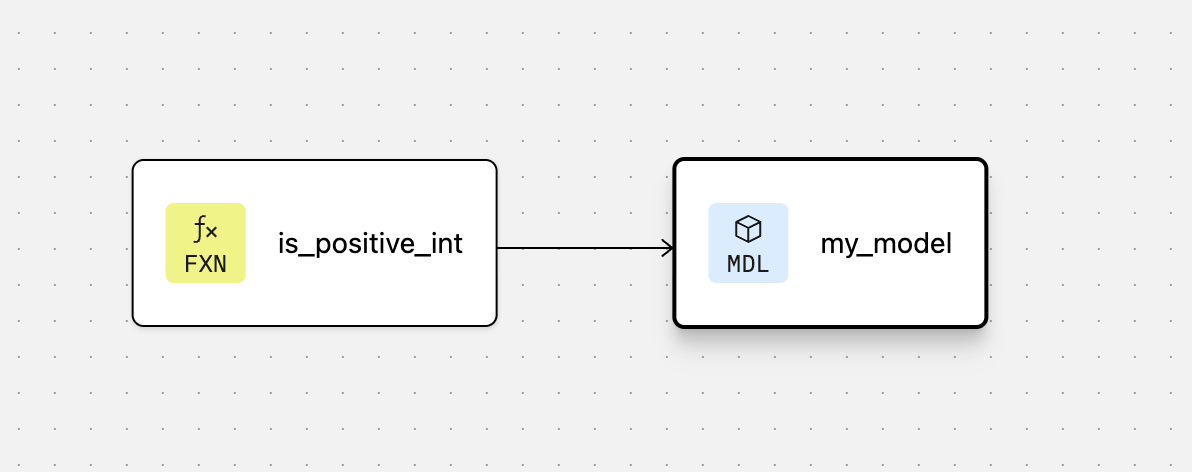](#)The DAG for the UDF node
After defining a UDF, your changes are applied to the UDF in the warehouse the next time you run `dbt build` when you update any of the following:
* The SQL, Python, or JavaScript file that contains its function body (`is_positive_int.sql`, `is_positive_int.py`, or `is_positive_int.js` in these examples)
* Its configurations
* Its properties defined in the `.yml` file (such as `arguments` or `returns`)
dbt detects all of these changes when using [`state:modified`](../../reference/node-selection/methods.md#state).
### Defining overloaded UDFs
Use the [`overloads`](../../reference/resource-properties/overloads.md) property (available in dbt Core v1.12+) to define multiple argument signatures for the same function. This lets you call the same function name with different input types, without creating separate UDFs for each variant. `overloads` is supported for SQL UDFs in Snowflake and Postgres, and Python and JavaScript UDFs in Snowflake.
To define overloaded UDFs:
1. Add an `overloads` list to the function definition in your properties YAML file. Each entry uses `defined_in` to reference a separate file, with optional `arguments` and `returns`:
functions/is\_positive\_int.yml
```yml
functions:
- name: is_positive_int
arguments:
- name: a_string
data_type: string
returns:
data_type: integer
overloads:
- defined_in: is_positive_int_numeric # references functions/is_positive_int_numeric.sql
arguments:
- name: a_num
data_type: numeric
returns: # optional, inherits from root function if omitted
data_type: integer
```
2. Create a separate file for each overload body.
For example, the body for the root function, which accepts a `string` argument:
functions/is\_positive\_int.sql
```sql
# Snowflake syntax
REGEXP_INSTR(a_string, '^[0-9]+$')
```
And the body for the overload, which accepts a `numeric` argument:
functions/is\_positive\_int\_numeric.sql
```sql
# Snowflake syntax
CASE WHEN a_num > 0 THEN 1 ELSE 0 END
```
All overloads are grouped into one DAG node (the root function), so they're built and selected together. On retry, dbt skips overloads that succeeded and reruns only those that failed. When dbt builds the function, it renders a separate `CREATE FUNCTION` statement for each overload using the same function name but different argument types.
For more information, refer to [`overloads`](../../reference/resource-properties/overloads.md).
## Using UDFs in unit tests
You can use [unit tests](./unit-tests.md) to validate models that reference UDFs. Before running unit tests, make sure the function exists in your warehouse. To ensure that the function exists for a unit test, run:
```bash
dbt build --select "+my_model_to_test" --empty
```
Following the example in [Defining UDFs in dbt](#defining-udfs-in-dbt), here's an example of a unit test that validates a model that calls a UDF:
tests/test\_is\_positive\_int.yml
```yml
unit_tests:
- name: test_is_positive_int
description: "Check my is_positive_int logic captures edge cases"
model: my_model
given:
- input: ref('a_model_i_like')
rows:
- { maybe_positive_int_column: 10 }
- { maybe_positive_int_column: -4 }
- { maybe_positive_int_column: +8 }
- { maybe_positive_int_column: 1.0 }
expect:
rows:
- { maybe_positive_int_column: 10, is_positive: true }
- { maybe_positive_int_column: -4, is_positive: false }
- { maybe_positive_int_column: +8, is_positive: true }
- { maybe_positive_int_column: 1.0, is_positive: true }
```
## Listing and building UDFs
Use the [`list` command](../../reference/commands/list.md#listing-functions) to list UDFs in your project: `dbt list --select "resource_type:function"` or `dbt list --resource-type function`.
Use the [`build` command](../../reference/commands/build.md#functions) to select UDFs when building a project: `dbt build --select "resource_type:function"`.
For more information about selecting UDFs, see the examples in [Node selector methods](../../reference/node-selection/methods.md#file).
## Limitations
* UDFs in other languages (for example, Java or Scala) are not yet supported.
* JavaScript UDFs are supported in Snowflake and BigQuery only. Using JavaScript UDFs on an unsupported adapter raises a parsing error.
* Python UDFs are supported in Snowflake, BigQuery, and Databricks only (when using dbt Core or Fusion). Other warehouses aren't yet supported for Python UDFs.
* Only scalar and aggregate functions are currently supported. For more information, see [Supported function types](../../reference/resource-configs/type.md#supported-function-types).
* The `overloads` property is supported for SQL UDFs in Snowflake and Postgres, and Python and JavaScript UDFs in Snowflake.
## Related FAQs
When should I use a UDF instead of a macro?
Both user-defined functions (UDFs) and macros let you reuse logic across your dbt project, but they work in fundamentally different ways. Here's when to use each:
#### Use UDFs when:
You need logic accessible outside dbt
UDFs are created in your warehouse and can be used by BI tools, data science notebooks, SQL clients, or any other tool that connects to your warehouse. Macros only work within dbt.
You want to standardize warehouse-native functions
UDFs let you create reusable warehouse functions for data validation, custom formatting, or business-specific calculations that need to be consistent across all your data tools. Once created, they become part of your warehouse's function catalog.
You want dbt to manage the function lifecycle
dbt manages UDFs as part of your DAG execution, ensuring they're created before models that reference them. You can version control UDF definitions alongside your models, test changes in development environments, and deploy them together through CI/CD pipelines.
Jinja compiles at creation time, not on each function call
You can use Jinja (loops, conditionals, macros, `ref`, `source`, `var`) inside a UDF configuration. dbt resolves that Jinja **when the UDF is created**, and the resulting SQL body is what gets stored in your warehouse.
Jinja influences the function when it’s created, whereas arguments influence it when it runs in the warehouse:
* ✅ **Allowed:** Jinja that depends on project or build-time state — for example, `var(“can_do_things”)`, static `ref(‘orders’)`, or environment-specific logic. These are all evaluated once at creation time.
* ❌ **Not allowed:** Jinja that depends on **function arguments** passed at runtime. The compiler can’t see those, so dynamic `ref(ref_name)` or conditional Jinja based on argument values won’t work.
You need Python logic that runs in your warehouse
A Python UDF creates a Python function directly within your data warehouse, which you can invoke using SQL.
This makes it easier to apply complex transformations, calculations, or logic that would be difficult or verbose to express in SQL.
Python UDFs support conditionals and looping within the function logic itself (using Python syntax), and execute at runtime, not at compile time like macros. Python UDFs are currently supported in Snowflake and BigQuery.
#### Use macros when:
You need to generate SQL at compile time
Macros generate SQL dynamically **before** it's sent to the warehouse (at compile time). This is essential for:
* Building different SQL for different warehouses
* Generating repetitive SQL patterns (like creating dozens of similar columns)
* Creating entire model definitions or DDL statements
* Dynamically referencing models based on project structure
UDFs execute **at query runtime** in the warehouse. While they can use Jinja templating in their definitions, they don't generate new SQL queries—they're pre-defined functions that get called by your SQL.
Expanding UDFs
Currently, SQL and Python UDFs are supported. Java and Scala UDFs are planned for future releases.
You want to generate DDL or DML statements
Currently, SQL and Python UDFs are supported. Java and Scala UDFs are planned for future releases.
You need to adapt SQL across different warehouses
Macros can use Jinja conditional logic to generate warehouse-specific SQL (see [cross-database macros](../../reference/dbt-jinja-functions/cross-database-macros.md)), making your dbt project portable across platforms.
UDFs are warehouse-specific objects. Even though UDFs can include Jinja templating in their definitions, each warehouse has different syntax for creating functions, different supported data types, and different SQL dialects. You would need to define separate UDF files for each warehouse you support.
Your logic needs access to dbt context
Both macros and UDFs can use Jinja, which means they can access dbt context variables like `{{ ref() }},` `{{ source() }}`, environment variables, and project configurations. You can even call a macro from within a UDF (and vice versa) to combine dynamic SQL generation with runtime execution.
However, the difference between the two is *when* the logic runs:
* Macros run at compile time, generating SQL before it’s sent to the warehouse.
* UDFs run inside the warehouse at query time.
You want to avoid creating warehouse objects
Macros don't create anything in your warehouse; they just generate SQL at compile time. UDFs create actual function objects in your warehouse that need to be managed.
#### Can I use both together?
Yes! You can use a macro to call a UDF or call a macro from within a UDF, combining the benefits of both. So the following example shows how to use a macro to define default values for arguments alongside your logic, for your UDF
```sql
{% macro cents_to_dollars(column_name, scale=2) %}
{{ function('cents_to_dollars') }}({{ column_name }}, {{scale}})
{% endmacro %}
```
#### Related documentation
* [User-defined functions](./udfs.md)
* [Jinja macros](./jinja-macros.md)
## Was this page helpful?
YesNo
[Privacy policy](https://www.getdbt.com/cloud/privacy-policy)[Create a GitHub issue](https://github.com/dbt-labs/docs.getdbt.com/issues)
This site is protected by reCAPTCHA and the Google [Privacy Policy](https://policies.google.com/privacy) and [Terms of Service](https://policies.google.com/terms) apply.