# About microbatch incremental models
Use microbatch incremental models to process large time-series datasets efficiently.
info
Available for [dbt **Latest**](../dbt-versions/dbt-release-tracks.md) and dbt Core v1.9 or higher.
If you use a custom microbatch macro, set a [distinct behavior flag](../../reference/global-configs/behavior-flags/require_batched_execution_for_custom_microbatch_strategy.md) in your `dbt_project.yml` to enable batched execution. If you don't have a custom microbatch macro, you don't need to set this flag as dbt will handle microbatching automatically for any model using the [microbatch strategy](#how-microbatch-compares-to-other-incremental-strategies).
Read and participate in the discussion: [dbt Core#10672](https://github.com/dbt-labs/dbt-core/discussions/10672). Refer to [Supported incremental strategies by adapter](./incremental-strategy.md#supported-incremental-strategies-by-adapter) for a list of supported adapters.
## What is "microbatch" in dbt?
Incremental models in dbt are a [materialization](./materializations.md) designed to efficiently update your data warehouse tables by only transforming and loading *new or changed data* since the last run. Instead of reprocessing an entire dataset every time, incremental models process a smaller number of rows, and then append, update, or replace those rows in the existing table. This can significantly reduce the time and resources required for your data transformations.
Microbatch is an incremental strategy designed for large time-series datasets:
* It relies solely on a time column ([`event_time`](../../reference/resource-configs/event-time.md)) to define time-based ranges for filtering.
* Set the `event_time` column for your microbatch model and its direct parents (upstream models). Note that this differs from `partition_by`, which groups rows into partitions.
Required
For incremental microbatch models, if your upstream models don't have `event_time` configured, dbt *cannot* automatically filter them during batch processing and will perform full table scans on every batch run.
To avoid this, configure `event_time` on every upstream model that should be filtered. Learn how to exclude a model from auto-filtering by [opting out of auto-filtering](./incremental-microbatch.md#opting-out-of-auto-filtering).
* It complements, rather than replaces, existing incremental strategies by focusing on efficiency and simplicity in batch processing.
* Unlike traditional incremental strategies, microbatch enables you to [reprocess failed batches](./incremental-microbatch.md#retry), auto-detect [parallel batch execution](./parallel-batch-execution.md), and eliminate the need to implement complex conditional logic for [backfilling](#backfills).
* Note that microbatch might not be the best [strategy](./incremental-strategy.md) for all use cases. Consider other strategies for use cases such as not having a reliable `event_time` column or if you want more control over the incremental logic. Read more in [How `microbatch` compares to other incremental strategies](#how-microbatch-compares-to-other-incremental-strategies).
## How microbatch works
When dbt runs a microbatch model — whether for the first time, during incremental runs, or in specified backfills — it will split the processing into multiple queries (or "batches"), based on the `event_time` and `batch_size` you configure.
Each "batch" corresponds to a single bounded time period (by default, a single day of data). Where other incremental strategies operate only on "old" and "new" data, microbatch models treat every batch as an atomic unit that can be built or replaced on its own. Each batch is independent and idempotent.
This is a powerful abstraction that makes it possible for dbt to run batches [separately](#backfills), concurrently, and [retry](#retry) them independently.
### Adapter-specific behavior
dbt's microbatch strategy uses the most efficient mechanism available for "full batch" replacement on each adapter. This can vary depending on the adapter:
* `dbt-postgres`: Uses the `merge` strategy, which performs "update" or "insert" operations.
* `dbt-redshift`: Uses the `delete+insert` strategy, which "inserts" or "replaces."
* `dbt-snowflake`: Uses the `delete+insert` strategy, which "inserts" or "replaces."
* `dbt-bigquery`: Uses the `insert_overwrite` strategy, which "inserts" or "replaces."
* `dbt-spark`: Uses the `insert_overwrite` strategy, which "inserts" or "replaces."
* `dbt-databricks`: Uses the `replace_where` strategy, which "inserts" or "replaces."
Check out the [supported incremental strategies by adapter](./incremental-strategy.md#supported-incremental-strategies-by-adapter) for more info.
## Example
A `sessions` model aggregates and enriches data that comes from two other models:
* `page_views` is a large, time-series table. It contains many rows, new records almost always arrive after existing ones, and existing records rarely update. It uses the `page_view_start` column as its `event_time`.
* `customers` is a relatively small dimensional table. Customer attributes update often, and not in a time-based manner — that is, older customers are just as likely to change column values as newer customers. The customers model doesn't configure an `event_time` column.
As a result:
* Each batch of `sessions` will filter `page_views` to the equivalent time-bounded batch.
* The `customers` table isn't filtered, resulting in a full scan for every batch.
tip
In addition to configuring `event_time` for the target table, you should also specify it for any upstream models that you want to filter, even if they have different time columns.
models/staging/page\_views.yml
```yaml
models:
- name: page_views
config:
event_time: page_view_start
```
We run the `sessions` model for October 1, 2024, and then again for October 2. It produces the following queries:
### Model definition
The [`event_time`](../../reference/resource-configs/event-time.md) for the `sessions` model is set to `session_start`, which marks the beginning of a user’s session on the website. This setting allows dbt to combine multiple page views (each tracked by their own `page_view_start` timestamps) into a single session. This way, `session_start` differentiates the timing of individual page views from the broader timeframe of the entire user session.
models/sessions.sql
```sql
{{ config(
materialized='incremental',
incremental_strategy='microbatch',
event_time='session_start',
begin='2020-01-01',
batch_size='day'
) }}
with page_views as (
-- this ref will be auto-filtered
select * from {{ ref('page_views') }}
),
customers as (
-- this ref won't
select * from {{ ref('customers') }}
)
select
page_views.id as session_id,
page_views.page_view_start as session_start,
customers.*
from page_views
left join customers
on page_views.customer_id = customers.id
```
### Compiled (Oct 1, 2024)
target/compiled/sessions.sql
```sql
with page_views as (
select * from (
-- filtered on configured event_time
select * from "analytics"."page_views"
where page_view_start >= '2024-10-01 00:00:00' -- Oct 1
and page_view_start < '2024-10-02 00:00:00'
)
),
customers as (
select * from "analytics"."customers"
),
...
```
### Compiled (Oct 2, 2024)
target/compiled/sessions.sql
```sql
with page_views as (
select * from (
-- filtered on configured event_time
select * from "analytics"."page_views"
where page_view_start >= '2024-10-02 00:00:00' -- Oct 2
and page_view_start < '2024-10-03 00:00:00'
)
),
customers as (
select * from "analytics"."customers"
),
...
```
dbt will instruct the data platform to take the result of each batch query and [insert, update, or replace](#adapter-specific-behavior) the contents of the `analytics.sessions` table for the same day of data. To perform this operation, dbt will use the most efficient atomic mechanism for "full batch" replacement that is available on each data platform. For details, see [How microbatch works](#how-microbatch-works).
It does not matter whether the table already contains data for that day. Given the same input data, the resulting table is the same no matter how many times a batch is reprocessed.
[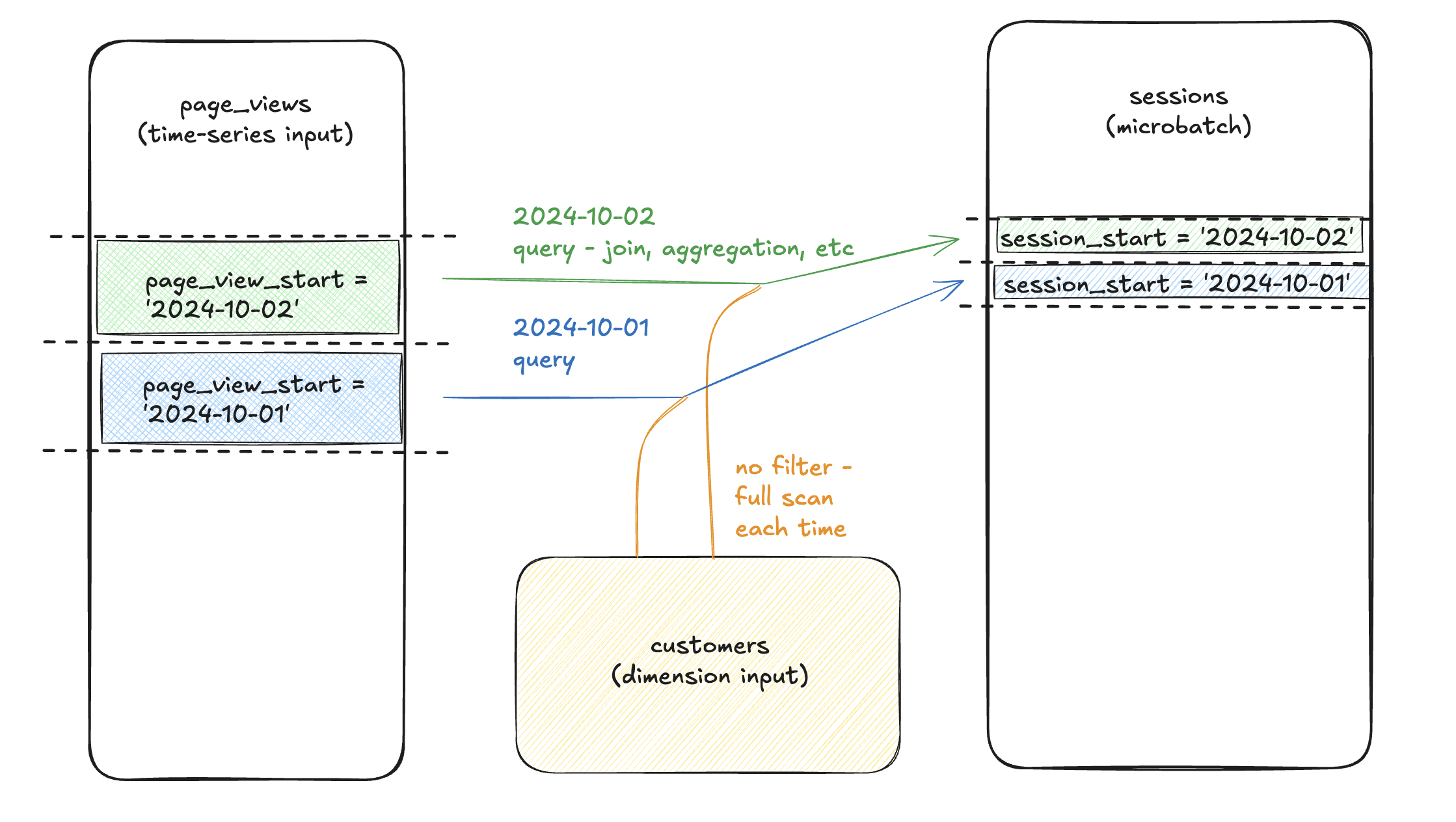](#)Each batch of sessions filters page\_views to the matching time-bound batch, but doesn't filter sessions, performing a full scan for each batch.
## Relevant configs
Several configurations are relevant to microbatch models, and some are required:
| Config | Description | Default | Type | Required |
| --------------------------------------------------------------------------------------------------- | ------------------------------------------------------------------------------------------------------------------------------------------------------------------------------------------------------------------------------------------------------------------------------------------------------------------------------------------------------------------- | ------- | ------- | -------- |
| [`event_time`](../../reference/resource-configs/event-time.md) | The column indicating "at what time did the row occur." Required for your microbatch model and any direct parents that should be filtered. | N/A | Column | Required |
| [`begin`](../../reference/resource-configs/begin.md) | The "beginning of time" for the microbatch model. This is the starting point for any initial or full-refresh builds. For example, a daily-grain microbatch model run on `2024-10-01` with `begin = '2023-10-01` will process 366 batches (it's a leap year!) plus the batch for "today." | N/A | Date | Required |
| [`batch_size`](../../reference/resource-configs/batch-size.md) | The granularity of your batches. Supported values are `hour`, `day`, `month`, and `year` | N/A | String | Required |
| [`lookback`](../../reference/resource-configs/lookback.md) | Process X batches prior to the latest bookmark to capture late-arriving records. | `1` | Integer | Optional |
| [`concurrent_batches`](../../reference/resource-properties/concurrent_batches.md) | Overrides dbt's auto detect for running batches concurrently (at the same time). Read more about [configuring concurrent batches](./parallel-batch-execution.md#configure-concurrent_batches). Setting to
\* `true` runs batches concurrently (in parallel).
\* `false` runs batches sequentially (one after the other). | `None` | Boolean | Optional |
[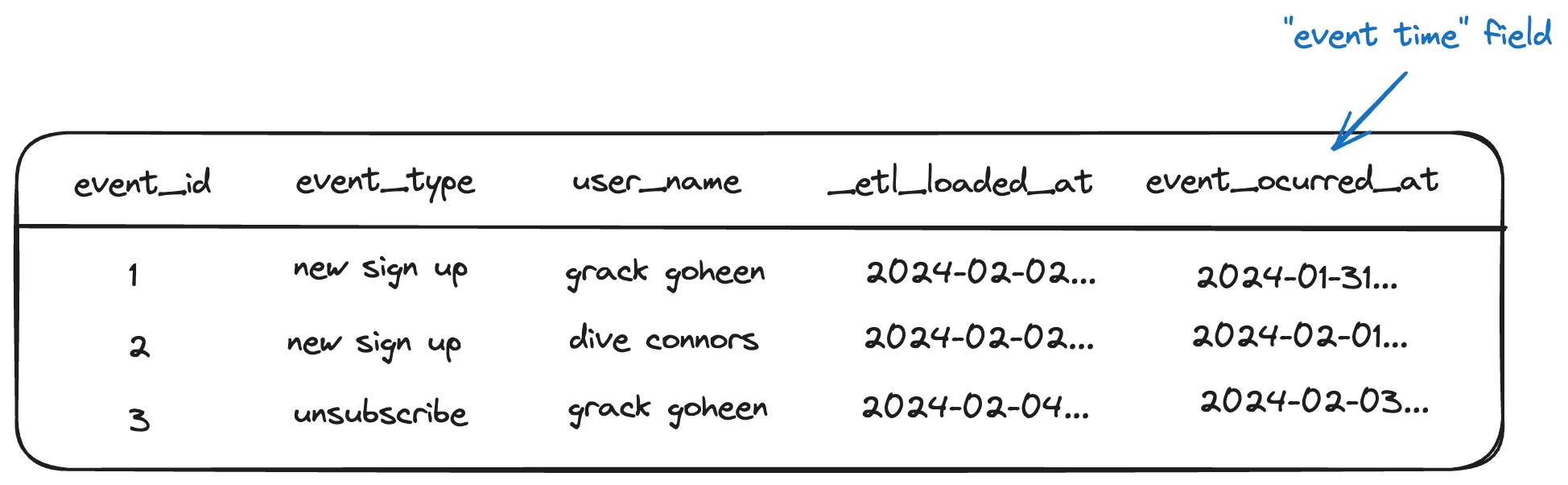](#)The event\_time column configures the real-world time of this record
### Required configs for specific adapters
Some adapters require additional configurations for the microbatch strategy. This is because each adapter implements the microbatch strategy differently.
The following table lists the required configurations for the specific adapters, in addition to the standard microbatch configs:
| Adapter | `unique_key` config | `partition_by` config |
| ------------------------------------------------------------------------------------------------------------------------------- | ------------------- | --------------------- |
| [`dbt-postgres`](../../reference/resource-configs/postgres-configs.md#incremental-materialization-strategies) | ✅ Required | N/A |
| [`dbt-spark`](../../reference/resource-configs/spark-configs.md#incremental-models) | N/A | ✅ Required |
| [`dbt-bigquery`](../../reference/resource-configs/bigquery-configs.md#merge-behavior-incremental-models) | N/A | ✅ Required |
For example, if you're using `dbt-postgres`, configure `unique_key` as follows:
models/sessions.sql
```sql
{{ config(
materialized='incremental',
incremental_strategy='microbatch',
unique_key='sales_id', ## required for dbt-postgres
event_time='transaction_date',
begin='2023-01-01',
batch_size='day'
) }}
select
sales_id,
transaction_date,
customer_id,
product_id,
total_amount
from {{ source('sales', 'transactions') }}
```
In this example, `unique_key` is required because `dbt-postgres` microbatch uses the `merge` strategy, which needs a `unique_key` to identify which rows dbt should merge in the data warehouse. Without a `unique_key`, dbt can't match rows between the incoming batch and the existing table.
### Full refresh
As a best practice, we recommend [configuring `full_refresh: false`](../../reference/resource-configs/full_refresh.md) on microbatch models so that they ignore invocations with the `--full-refresh` flag.
Note that running `dbt run --full-refresh` on a microbatch model by itself won't reset or reload data unless you have a `begin` datetime config for the model.
If you need to reprocess historical data, we recommend using a targeted backfill with `--event-time-start` and `--event-time-end`. You must configure both for the full refresh to successfully run.
```bash
dbt run --full-refresh --event-time-start "2024-01-01" --event-time-end "2024-02-01"
```
## Usage
**You must write your model query to process (read and return) exactly one "batch" of data**. This is a simplifying assumption and a powerful one:
* You don’t need to think about `is_incremental` filtering
* You don't need to pick among DML strategies (upserting/merging/replacing)
* You can preview your model, and see the exact records for a given batch that will appear when that batch is processed and written to the table
When you run a microbatch model, dbt will evaluate which batches need to be loaded, break them up into a SQL query per batch, and load each one independently.
dbt will automatically filter upstream inputs (`source` or `ref`) that define `event_time`, based on the `lookback` and `batch_size` configs for this model. Note that dbt doesn't know the minimum `event_time` in your data — it only uses the configs you provide (like `begin`, `lookback`) to decide which batches to run.
If you want to process data from the actual start of your dataset, you *must* explicitly define it using the `begin` config or the `--event-time-start` flag.
During standard incremental runs, dbt will process batches according to the current timestamp and the configured `lookback`, with one query per batch.
[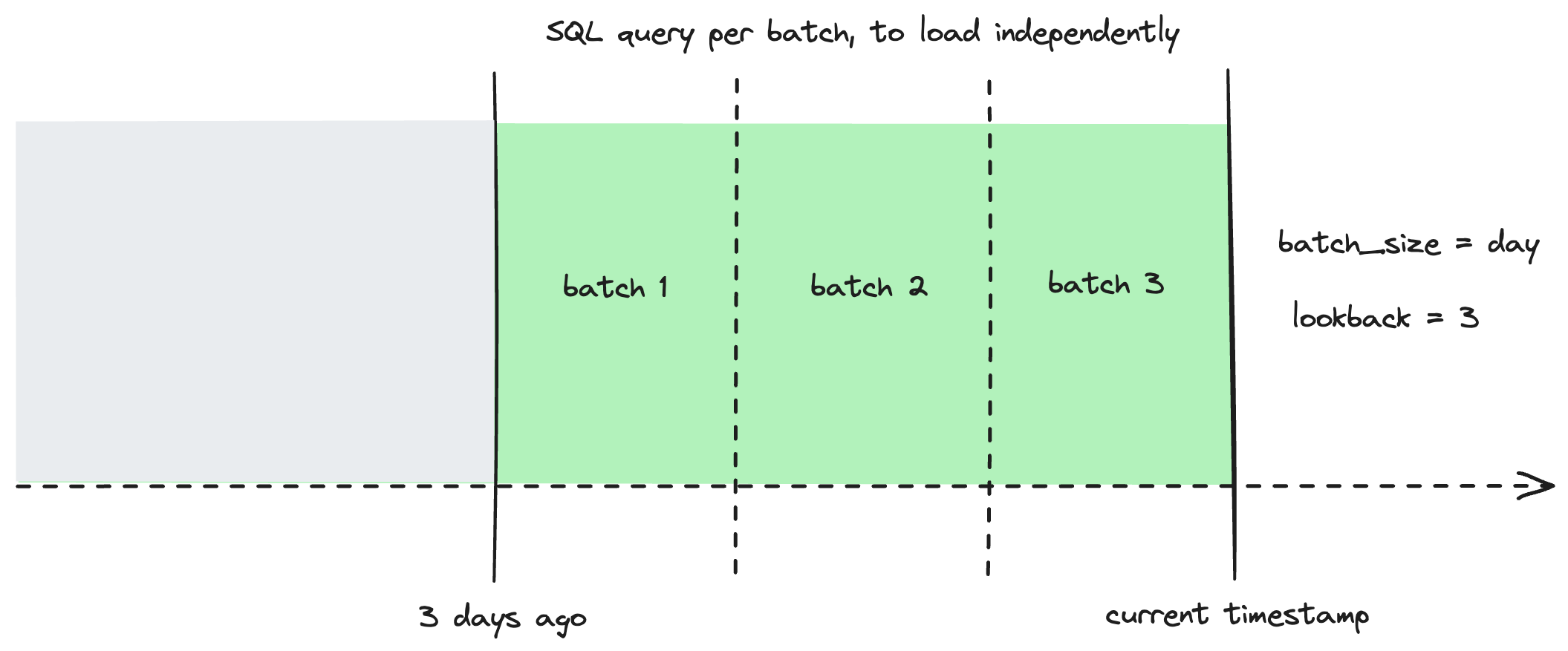](#)Configure a lookback to reprocess additional batches during standard incremental runs
#### Opting out of auto-filtering
If there's an upstream model that configures `event_time`, but you *don't* want the reference to it to be filtered, you can specify `ref('upstream_model').render()` to opt out of auto-filtering. This isn't generally recommended — most models that configure `event_time` are fairly large, and if you don't filter the reference, each batch performs a full scan of this input table.
## Backfills
Whether to fix erroneous source data or retroactively apply a change in business logic, you may need to reprocess a large amount of historical data.
Backfilling a microbatch model is as simple as selecting it to run or build, and specifying a "start" and "end" for `event_time`. Note that `--event-time-start` and `--event-time-end` are mutually necessary, meaning that if you specify one, you must specify the other.
As always, dbt will process the batches between the start and end as independent queries.
```bash
dbt run --event-time-start "2024-09-01" --event-time-end "2024-09-04"
```
[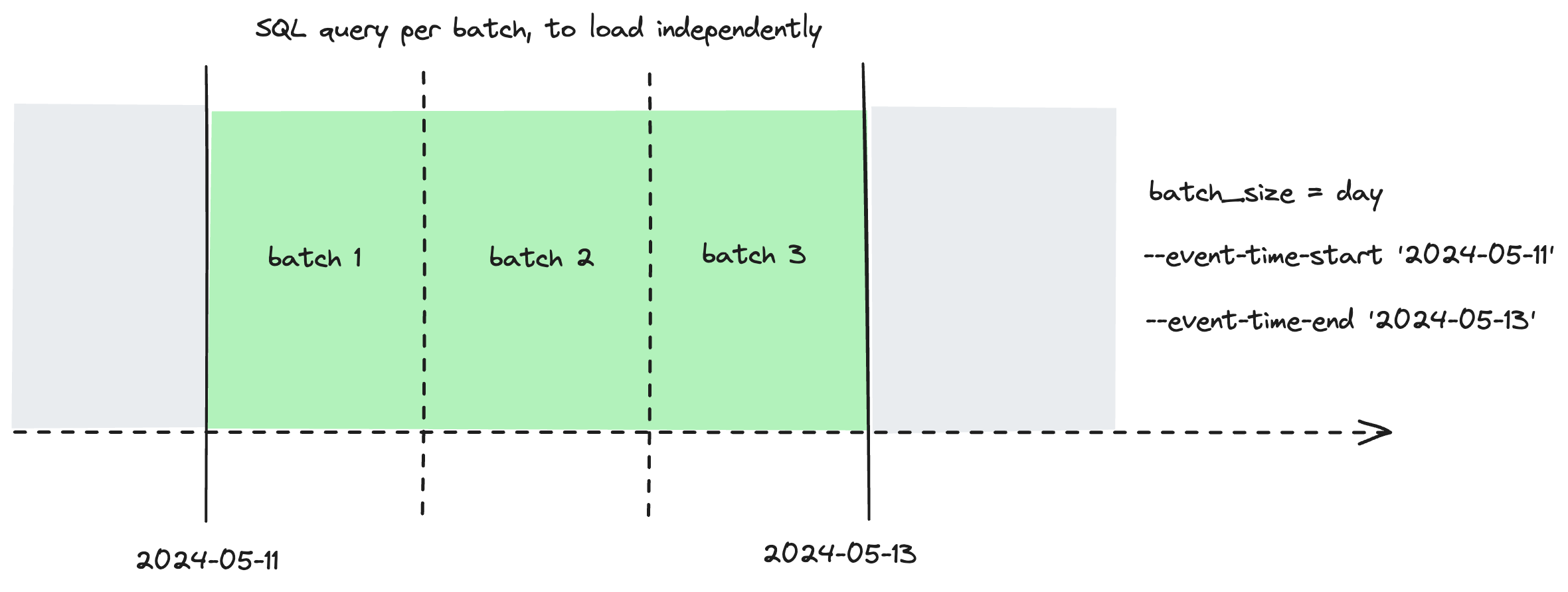](#)Configure a lookback to reprocess additional batches during standard incremental runs
## Retry
If one or more of your batches fail, you can use `dbt retry` to reprocess *only* the failed batches.

## Timezones
For now, dbt assumes that all values supplied are in UTC:
* `event_time`
* `begin`
* `--event-time-start`
* `--event-time-end`
While we may consider adding support for custom time zones in the future, we also believe that defining these values in UTC makes everyone's lives easier.
## How microbatch compares to other incremental strategies
As data warehouses roll out new operations for concurrently replacing/upserting data partitions, we may find that the new operation for the data warehouse is more efficient than what the adapter uses for microbatch. In such instances, we reserve the right the update the default operation for microbatch, so long as it works as intended/documented for models that fit the microbatch paradigm.
Most incremental models rely on the end user (you) to explicitly tell dbt what "new" means, in the context of each model, by writing a filter in an `{% if is_incremental() %}` conditional block. You are responsible for crafting this SQL in a way that queries [`{{ this }}`](../../reference/dbt-jinja-functions/this.md) to check when the most recent record was last loaded, with an optional look-back window for late-arriving records.
Other incremental strategies will control *how* the data is being added into the table — whether append-only `insert`, `delete` + `insert`, `merge`, `insert overwrite`, etc — but they all have this in common.
As an example:
```sql
{{
config(
materialized='incremental',
incremental_strategy='delete+insert',
unique_key='date_day'
)
}}
select * from {{ ref('stg_events') }}
{% if is_incremental() %}
-- this filter will only be applied on an incremental run
-- add a lookback window of 3 days to account for late-arriving records
where date_day >= (select {{ dbt.dateadd("day", -3, "max(date_day)") }} from {{ this }})
{% endif %}
```
For this incremental model:
* "New" records are those with a `date_day` greater than the maximum `date_day` that has previously been loaded
* The lookback window is 3 days
* When there are new records for a given `date_day`, the existing data for `date_day` is deleted and the new data is inserted
Let’s take our same example from before, and instead use the new `microbatch` incremental strategy:
models/staging/stg\_events.sql
```sql
{{
config(
materialized='incremental',
incremental_strategy='microbatch',
event_time='event_occurred_at',
batch_size='day',
lookback=3,
begin='2020-01-01',
full_refresh=false
)
}}
select * from {{ ref('stg_events') }} -- this ref will be auto-filtered
```
Where you’ve also set an `event_time` for the model’s direct parents - in this case, `stg_events`:
models/staging/stg\_events.yml
```yaml
models:
- name: stg_events
config:
event_time: my_time_field
```
And that’s it!
When you run the model, each batch templates a separate query. For example, if you were running the model on October 1, dbt would template separate queries for each day between September 28 and October 1, inclusive — four batches in total.
The query for `2024-10-01` would look like:
target/compiled/staging/stg\_events.sql
```sql
select * from (
select * from "analytics"."stg_events"
where my_time_field >= '2024-10-01 00:00:00'
and my_time_field < '2024-10-02 00:00:00'
)
```
Based on your data platform, dbt will choose the most efficient atomic mechanism to insert, update, or replace these four batches (`2024-09-28`, `2024-09-29`, `2024-09-30`, and `2024-10-01`) in the existing table.
## Was this page helpful?
YesNo
[Privacy policy](https://www.getdbt.com/cloud/privacy-policy)[Create a GitHub issue](https://github.com/dbt-labs/docs.getdbt.com/issues)
This site is protected by reCAPTCHA and the Google [Privacy Policy](https://policies.google.com/privacy) and [Terms of Service](https://policies.google.com/terms) apply.